Where’s my new website?

So you’ve built a brand new website, made it pretty, and filled it full of great content and information about your business. Then, you go and type it into Google to see it live. And… Nothing. You can’t find it. Your site couldn’t hide better if it was the child of Where’s Wally and Carmen Sandiego. Don’t worry–you aren’t alone! In this article we’ll cover some reasons why you might not be able to find your new website.

How-Long-Does-Seo-Take-To-See-Results

A new website takes time to index

Indexing is the process of adding a website to Google’s database. If Google doesn’t know the site exists, they can’t show it to people. This process takes time, so you might not be able to find your website from a Google search for a little while. Google also ranks new sites lower than existing sites, so it could be that your site isn’t high enough in the results yet. The rankings will naturally improve over time as long as you follow SEO best practices.

You can still find your site directly

Thankfully, if you’re having trouble finding your new site through a Google search, you can still access it by typing in the full URL directly. Often, you’re also able to type that URL into Google and get your site to show up that way, although that isn’t much use to someone who’s looking for it. In the meantime, you can wait–or invest into Google ads to at least show up as an ad in the search results.

Why is there even a wait at all?

One reason why your brand new site won’t show up instantly is because of the sheer number of websites and pages that exist. There is an estimated 1.5 billion websites that currently exist and over 1 quadrillion individual pages. That’s more than 10 times the amount of all the money that exists in the world! A million isn’t even a drop in the bucket when you’re dealing with quadrillions, though a million dollars would still be nice to have!

Search engines like Google process this sheer volume of sites through crawling and indexing. “Crawling” is when a web “spider” goes through websites searching for new information–like the existence of your new site. Once Google’s itsy bitsy spider finds your site, the site is indexed, or read over to make sure that the site has quality content and the information the crawler is looking for. If you’ve registered your site in Google Webmaster, you can request it to be indexed manually, but it will still take some time to appear in the results, especially when it’s brand new.

Isn’t there a way to speed up the process somehow?

While you can’t really do anything to speed up the indexing process, there is something you can do to make your site appear sometimes in the search results while you wait. Get an AdWords account and run some ads on Google. AdWords is still a good idea when your site is indexed as it has shown to be an effective tool for increasing revenue when done well, but it can be a huge boost to those first few weeks when you aren’t showing up in searches.

However, the ads can drain your budget quickly if you’re unfamiliar with the platform and don’t know how to use it’s many tools. Google offers free training you can go through to learn the basics, or you can always get the help of our knowledgeable team to manage the accounts on your behalf! We also have a certified Google Ads team here at Back9. Find out more on our article 9 Key Reasons to use Google Ads, or get in touch today!


5 Ways to Help Reduce Your Website’s Page Loading Speed

The old adage “patience is a virtue” doesn’t really apply online.

When it comes to website loading speed, even a one-second delay can dramatically reduce pageviews, customer satisfaction, and drop conversions.

The speed of your website even affects your website’s performance and subsequently your organic search rankings for SEO. Since 2010, Google has been accounting for a site speed in its algorithm.

So what’s the biggest factor contributing to your page speed?

Size does matter.

It takes browsers time to download the code that makes up your page. It has to download your HTML, your stylesheets, your scripts and your images. All this means it can take a while to download all that data.

As web users expect more engaging website, or UX UI design, the size of a site’s resource files will continue to grow. Each new feature requires a new script or stylesheet that weighs down your site just a little more.

How do you make sure your site is up to speed?

There are some great resources for analysing your site’s speed. Google’s PageSpeed Insights, and GTMetrix are the most popular. Both services will analyse your site and tell you where you’re falling behind.

A little warning: the results can be a bit daunting sometimes, but most fixes are relatively quick and easy. You might not fix everything the speed service recommends, but you should fix enough to make the site experience better for your visitors.

Let’s learn how to speed things up!

Out-of-the-box template solutions like WordPress and Joomla for example are great but do require the know how a little manual labour to get up to speed – It can all be quite daunting, so we are here to help – Obviously expert help comes at a price, but sometimes an investment in the right help can save you time and money in the long run…

Read about the benefits of a custom designed website here… 

Now let’s look at some essential speed solutions that every webmaster should consider.

1. Optimize Images

Images are one of the most common bandwidth hogs on the web.

The first way to optimize your images is to scale them appropriately.

Many webmasters use huge images and then scale them down with CSS. What they don’t realize is that your browser still loads them at the full image size.

For example, if you have an image that is 1000 x 1000 pixels, but you have scaled it down to 100 x 100 pixels, your browser must load ten times more than necessary.

Scale your images before you upload them to your site, so you don’t ask for more from your visitors than you should.

Take a look at the size difference when we scaled down one of our images:

Speed-01-Scaling

The second way to optimize your images is to compress them.

There are several free online tools for image compression, such astinypng.com, that can reduce your image sizes dramatically without losing quality. You can see size reductions anywhere from 25% to 80%!

2. Browser Caching

Why make visitors download the same things every time they load a page?

Enabling browser caching lets you temporarily store some data on a visitors’ computer, so they don’t have to wait for it to load every time they visit your page.

How long you store the data depends on their browser configuration and your server-side cache settings.

To set up browser caching on your server, check out the resources below or contact your hosting company:

3. Compression

Enabling compression is like putting your website into a zip file.

Compression can dramatically reduce your page’s size and thereby increase its speed. According to Digital.gov, The smaller the better, when it comes to page resources.

Compression can knock off 50 – 70% from your HTML and CSS files! That’s a ton of data your visitor won’t have to download.

Compression is a server setting, so how you implement it will depend on your webserver and its settings. Below are some resources for the most common webservers. If you don’t see yours, contact your hosting company to see what they can do.

4. Optimize Your CSS

Your CSS loads before people see your site. The longer it takes for them to download your CSS, the longer they wait. And the slower your website loading speed.

Optimized CSS means your files will download faster, giving your visitors quicker access to your pages.

Start by asking yourself, “do I use all of my CSS?” If not, get rid of the superfluous code in your files. Every little bit of wasted data can add up until your website’s snail-pace speed scares away your visitors.

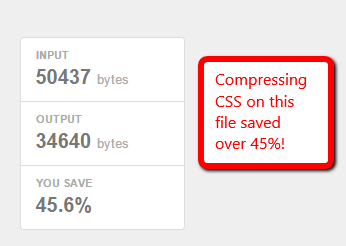
Next, you should minimize your CSS files. Extra spaces in your stylesheets increase file size. CSS minimization removes those extra spaces from your code to ensure your file is at its smallest size.

So how do you minimize your CSS files?

First, see if your CMS already minimizes your CSS or if there’s an option for it. HubSpot, for example, already minimizes your CSS by default whereas WordPress or Joomla do not.

If your CMS does not have a minimize CSS option, you can use a free online service like CSS Minifier to minimize your files. Simply paste in your CSS and hit “Compress” to see your newly minimized stylesheet.

Minimizing your resource files is a great way to knock some size off your files. Trust me—those little spaces add up quickly.

Speed-02-Minification

5. Keep Your Scripts Below the Fold to improve website loading speed

Javascript files can load after the rest of your page, but if you put them all before your content—as many sites do—they will load before your content does.

This affects your website loading speed and means your visitors must wait until your Javascript files load before they see your page, and we know how much they like waiting.

The simplest solution is to place your external Javascript files at the bottom of your page, just before the close of your body tag. Now more of your site can load before your scripts.

Another method that allows even more control is to use the defer or async attributes when placing external .js files on your site.

Both defer and async are very useful, but make sure you understand the difference before you use them:

  • Async tags load the scripts while the rest of the page loads, but this means scripts can be loaded out of order. Basically, lighter files load first. This might be fine for some scripts, but can be disastrous for others.
  • The defer attribute loads your scripts after your content has finished loading. It also runs the scripts in order. Just make sure your scripts run so late without breaking your site.

All you need to do is add a simple word in your <script> tags.

For example, you can take your original script

<script type=”text/javascript” src=”/path/filename.js”></script>

And add the little code to ensure it loads when you want it.

<script type=”text/javascript” src=”/path/filename.js” defer></script>
<script type=”text/javascript” src=”/path/filename.js” async></script>

The importance of your scripts will determine if they get an attribute and which attribute you tack on. More essential scripts should probably have the async attribute so they can load ASAP without holding up the rest of your content. The nonessential ones, however, should wait until the end to ensure visitors see your page faster.

But for the best website loading speed, always make sure you test each script to ensure the attribute doesn’t break your site!

Conclusion

As online users demand a richer online experience, the size of our pages will continue to grow. There will be flashier Javascript, more CSS tricks and more third-party analytics to weigh down our sites,  but we can’t let this bog us down.

A little attention will go a long way—remember, just a one-second delay is all it takes to lose a lead, so you need to also think about what those lost leads may cost and  whether you are using an out-of-the-box template or a custom design.

Get-Free-Website-Audit-Button