Digital Trust Explained: The New Competitive Advantage for New Zealand Organisations

For years, organisations have invested heavily in websites, software, cloud platforms and digital transformation initiatives.

Establishing strong Trust [in general] is essential for modern organisations to thrive in any business landscape.

But Digital [or online] Trust is essential in our interconnected world.

Trust enhances collaboration and innovation.

Yet many have overlooked one of the most valuable assets those investments create.

Trust.

Establishing this type of Trust is not only critical for ongoing customer relationships and ensuring businesses remain competitive, but also when attarcting new business and geerating leads.

In this day and age, Digital Trust is what underpins lead generation, but in turn, customer loyalty and engagement.

Without this Trust, organisations risk losing valuable customers, and prospects.

Today, prospects, leads, customers, employees, suppliers, and stakeholders interact with organisations through digital channels based on 2 key things:

  1. Trust, and;
  2. Authority

In today’s world, fostering genuine Trust online is key to long-term business success.

Every one of those interactions requires trust.

As outlined in our GainLine™ framework Digital Trust is built on a foundation of security and transparency.

The organisations that succeed over the next decade will not simply be those with the most advanced technology.

What Is Digital Trust?

Digital (online) trust is the confidence people have in your organisation’s digital systems, services and experiences.

It is the belief that:

  • Information is protected
  • Systems are secure
  • Services are reliable
  • Privacy is respected
  • Data is handled responsibly
  • Digital experiences work as expected

When people trust your digital environment, they are more likely to engage with your organisation, purchase your products, share information and remain loyal customers.

When trust is lost, the consequences can be immediate and significant.

Why Digital Trust Matters

Trust influences almost every digital interaction.

Consider the questions customers ask themselves when interacting with your organisation:

The concept of Digital Trust influences customer perceptions significantly.

  • Is this website legitimate?
  • Can I safely enter my personal information?
  • Will my payment details be secure?
  • Can I rely on this business?
  • Will they protect my data?

Customers may never consciously think about these questions, but they make trust-based decisions every day.

A lack of trust can result in:

  • Lower enquiry rates
  • Reduced online sales
  • Poor customer retention
  • Reputation damage
  • Increased business risk

Trust has always been something of a core value in New Zealand and particularly in the more remote parts; and not just in business. But in todays digital world in business, a website is more than a brochure; it is a trust engine! It’s a 24/7 employee, representing your business every hour of every day, (potentially) all over the world!

The Four Pillars of Digital Trust

Many organisations think digital trust is simply about cyber security.

Security is important, but trust is built long before someone enters their credit card details or submits an enquiry form.

Trust is earned through every interaction a customer has with your organisation.

At Back9, we believe digital trust is built on four core pillars.

1. Tackle the Tough Stuff: Front-Foot Truth

Most organisations avoid the difficult conversations.

They hide pricing, gloss over limitations, avoid comparisons and focus only on the positives.

The problem is that buyers are already asking these questions.

Trust begins when you answer them.

This means openly addressing:

  • Costs and pricing
  • Common problems
  • Risks and limitations
  • Competitor comparisons
  • Real-world proof and outcomes

When organisations provide honest answers to difficult questions, they remove uncertainty and help buyers make informed decisions.

Trust is built when people feel they are getting the whole story, not just the sales pitch.

2. Open Up the Engine Room: Be open and transparent

People trust what they can see.

Many businesses showcase the finished result but hide the process that created it.

Digital trust grows when organisations become more transparent about how they operate, solve problems and deliver value.

This could include:

  • Behind-the-scenes content
  • Team introductions
  • Project case studies
  • Process documentation
  • Lessons learned
  • Customer success stories

Showing the work builds confidence because it demonstrates competence, accountability and authenticity.

People want proof, not promises.

3. Gain the Tactical Advantage

The most trusted organisations help buyers make informed decisions before speaking with sales.

Rather than forcing prospects into conversations they are not ready for, they provide tools, resources and guidance that help people move forward with confidence.

Examples include:

  • Cost calculators
  • Assessment tools
  • Readiness checklists
  • Interactive guides
  • Educational content
  • Self-service resources

When buyers can self-educate and self-qualify, they arrive at conversations better informed and more confident.

Trust increases because the organisation is clearly focused on helping rather than selling.

4. Play for the Jersey – human-led connection

Trust ultimately comes down to people.

Technology should help people do their work better, not get in the way.

The most trusted organisations communicate clearly, act with integrity and focus on solving real problems rather than promoting jargon, frameworks or technology for its own sake.

This means:

  • Speaking in plain English
  • Being transparent when challenges arise
  • Putting people before platforms
  • Acting as a long-term partner
  • Focusing on outcomes rather than outputs

Customers are not looking for another supplier.

They are looking for a team they can trust.

Three Stone Pillars Labelled Clarity, Proof, And Confidence On A Rugby Field, Representing The Drivers Of Digital Trust In The Gain Line Model

How Digital Trust and Cyber Security Work Together

Cyber security remains a critical part of digital trust.

Without secure systems, trust can be lost quickly.

However, cyber security is only one component.

An organisation may have excellent security controls and still struggle to build trust if:

  • Pricing lacks transparency
  • Customer experiences create friction
  • Information is difficult to find
  • Communication feels impersonal
  • Buyers cannot find proof of capability

Digital trust exists where transparency, security, education and human connection meet.

The organisations that build trust most effectively are often the organisations that grow most consistently.

The Hidden Cost of Lost Trust

Many organisations focus on the cost of security incidents.

The larger cost is often lost confidence.

A security breach, website outage or privacy failure can result in:

  • Customer churn
  • Negative publicity
  • Reduced referrals
  • Lost revenue
  • Increased scrutiny

Trust can take years to build and only moments to lose.

Regulatory compliance enhances Digital Trust and customer confidence.

This is why proactive management is becoming increasingly important.

Why Cyber Security Alone Is Not Enough

Cyber security remains essential.

However, a secure organisation is not automatically a trusted organisation.

For example:

A website may be secure but difficult to use.

A business may comply with regulations but fail to communicate transparently.

A software platform may function well but lack accessibility.

Every interaction reinforces or diminishes Trust in your brand.

Digital trust exists where security, compliance, accessibility and customer experience intersect.

Organisations that focus exclusively on one area often create gaps elsewhere.

Measuring Digital Trust

Historically, trust has been difficult to measure.

Most organisations track:

  • Website traffic
  • Leads
  • Revenue
  • Customer satisfaction

Few measure trust directly.

However, trust can be assessed through indicators such as:

  • Security posture
  • Compliance readiness
  • Accessibility standards
  • Uptime and reliability
  • Customer feedback
  • Reputation signals
  • Risk exposure

As digital ecosystems become more complex, organisations will increasingly require visibility into these areas.

What gets measured gets improved.

The Future of Business Trust

Trust is rapidly becoming a competitive advantage.

Building Trust will require ongoing effort and commitment.

Customers have more choice than ever before.

They are becoming increasingly aware of:

  • Cyber security risks
  • Privacy concerns
  • Data breaches
  • Ethical business practices

Organisations that can demonstrate trustworthiness will stand apart from competitors who simply claim to be secure.

The future belongs to businesses that continuously monitor, improve and validate the quality of their digital experiences.

How Back9 Views Digital Trust

Digital Trust is not just a concept; it is a critical business strategy.

At Back9, we believe Trust extends far beyond website design or software development.

A great digital experience should be:

  • Secure
  • Accessible
  • Reliable
  • Compliant
  • Continuously improving

Building trust is not a one-time project.

It is an ongoing commitment to improving the digital experiences people rely on every day.

As technology continues to evolve, organisations need greater visibility into the health, risk and trustworthiness of their digital assets.

Those that embrace this mindset will be better positioned to grow, adapt and earn confidence in an increasingly digital world.

Final Thoughts

Trust is quickly becoming the key to building one of the most valuable assets an organisation can build. Your Digital Presence! And that is not just your website; it is all-encompassing. It means the experience your prospects/potential customers, as well as existing one’s, get online mirrors the experience they would get in person if you had/have a bricks and mortar store.

It influences customer confidence, business reputation, operational resilience and long-term growth.

Cyber security, compliance, accessibility and reliability all contribute to trust, but trust itself is the outcome.

Organisations that actively invest in trust will create stronger relationships, reduce risk and build more sustainable businesses.

In the years ahead, trust may become the defining factor that separates industry leaders from everyone else.

Ultimately, Trust is a crucial driver of business success.

Christchurch Website Design Services: What Should Be Included in a Website That Actually Works?

Christchurch Website Design Services For-Strategy-Ux-Seo-And-Development-By-Back9-Digital

A good website is not just a collection of pages.

For many Christchurch businesses, the website is one of the most important digital assets they own. It helps people find you, understand what you offer, trust your business, and take the next step.

That might be an enquiry, booking, quote request, phone call, application, download, purchase or meeting.

But for that to happen, your website needs more than good design. It needs the right strategy, structure, content, user experience, search foundations and ongoing improvement.

In this article, we break down the key website design services Christchurch businesses should consider when planning a new website or redesigning an existing one.

Why Website Design Services Need to Go Beyond Design

When people think about website design, they often think about how the website looks.

That matters. Your website should look professional, modern and aligned with your brand.

But looks alone will not make your website perform.

A strong website needs to answer the right questions for the right people, in the right order. It needs to load quickly, work well on mobile, be easy to navigate, support search visibility and guide users towards action.

If your website is hard to use, unclear or poorly structured, people will leave. Even if the design looks good.

That is why the best Christchurch website design services should include much more than visual design.

They should bring together:

  • Strategy
  • User experience
  • Website structure
  • Content planning
  • Visual design
  • Website development
  • SEO foundations
  • Conversion planning
  • Analytics and tracking
  • Ongoing improvement

Each part plays a role in helping your website work harder for your business.

1. Website Strategy and Planning

Before any design work starts, there needs to be a clear strategy.

This is where many website projects go wrong. Businesses jump straight into design without first defining what the website needs to achieve.

A website strategy should clarify:

  • Who the website is for
  • What users need to understand
  • What action you want people to take
  • What services or products need the most focus
  • How the website supports your sales process
  • What search terms matter
  • What content is needed
  • What problems the current website has
  • How success will be measured

For a Christchurch business, this might include generating more local leads, improving credibility, supporting recruitment, explaining complex services, improving online bookings or making it easier for customers to get information.

The strategy stage gives the website direction. It helps avoid guesswork and makes sure the project is built around business outcomes, not personal preference.

2. Website Structure and Sitemap Planning

Once the strategy is clear, the next step is planning the structure of the website.

This includes the sitemap, main navigation, page hierarchy and how different sections connect.

A good website structure helps both users and search engines.

Users need to find the right information quickly. Search engines need to understand what each page is about and how important pages relate to each other.

For example, a Christchurch website design project might include pages such as:

  • Home
  • About
  • Services
  • Individual service pages
  • Industries
  • Case studies
  • Blog or insights
  • Contact
  • Location pages
  • Frequently asked questions

The exact structure depends on the business. A simple brochure website might only need a handful of pages. A growth-focused website may need a deeper structure with service pages, article clusters, landing pages and conversion-focused content.

This is where SEO and UX need to work together.

A website should not be structured only for Google. It also needs to make sense to real people.

3. UX Design and User Journey Planning

UX stands for user experience.

In simple terms, it means making the website easier and more useful for the people using it.

UX design looks at how someone moves through the website, what they need at each stage, and what might stop them from taking action.

Good UX planning considers questions like:

  • Can people quickly understand what the business does?
  • Is the navigation clear?
  • Are the calls to action obvious?
  • Is the content in the right order?
  • Are forms simple enough?
  • Does the mobile experience work well?
  • Are important pages easy to find?
  • Is the website accessible and easy to read?

For Christchurch businesses, this matters because people are often comparing you with other local or national providers. If your website creates friction, confusion or doubt, they may move on before making contact.

A better user experience can help improve enquiries, conversions and trust.

4. Website Copy and Content Planning

Design and content need to work together.

A website can look great, but if the words are vague, generic or confusing, it will not perform as well as it should.

Good website content should clearly explain:

  • Who you help
  • What you offer
  • Why it matters
  • What makes you different
  • What problems you solve
  • What proof you have
  • What the user should do next

For service-based businesses, the content needs to do a lot of heavy lifting. It needs to educate, build trust and reduce uncertainty.

That means avoiding empty phrases like “quality service” or “trusted experts” unless they are backed up with clear detail.

Instead, your content should be specific. It should explain your process, your experience, your approach and the outcomes your clients are looking for.

Content planning should also consider SEO. If your website needs to rank for service and location-based searches, each important service should usually have its own well-structured page.

5. Custom Website Design

Once the strategy, structure and content direction are in place, the visual design can begin.

Custom website design is about creating a digital experience that fits your brand, your audience and your goals.

This includes:

  • Page layouts
  • Visual hierarchy
  • Typography
  • Colour use
  • Image direction
  • Buttons and calls to action
  • Mobile layouts
  • Design consistency
  • Trust signals
  • Conversion-focused sections

A good design should make the website feel professional, clear and easy to use.

It should also support the content. Design is not just decoration. It helps guide attention, create flow and make key information easier to understand.

For Christchurch businesses that want to stand out, custom design can also help create a stronger sense of credibility and difference.

6. Website Development

Website development is where the approved design becomes a working website.

This is the technical build. It needs to be done properly, because poor development can affect speed, security, usability, SEO and future flexibility.

A strong website development process should consider:

  • Clean code
  • Mobile responsiveness
  • Page speed
  • Browser compatibility
  • CMS setup
  • Security
  • Forms
  • Integrations
  • Accessibility
  • SEO structure
  • Future scalability

At Back9 Digital, we generally prefer custom WordPress development for business websites because it gives flexibility, control and room to grow.

That does not mean every website needs to be complicated. It means the website should be built in a way that supports the business, rather than boxing it into a restrictive template or setup that becomes hard to improve later.

7. SEO Foundations

Search engine optimisation should not be added at the end of a website project.

It should be considered from the start.

SEO foundations can include:

  • Keyword research
  • Page title planning
  • Meta descriptions
  • Heading structure
  • Internal linking
  • URL structure
  • Image alt text
  • Page speed
  • Mobile usability
  • Schema markup
  • Google Search Console setup
  • Technical crawlability
  • Content structure

For a Christchurch business, local SEO can also be important. This may include location-based pages, Google Business Profile alignment, local service terms and content that reflects the areas you serve.

The goal is not to stuff keywords everywhere. The goal is to build a website that is clear, useful and easy for search engines to understand.

8. Conversion Planning

Traffic is useful, but traffic alone does not grow your business.

Your website also needs to convert the right visitors into leads, enquiries or customers.

Conversion planning looks at what action someone should take and how easy that action is.

This can include:

  • Clear calls to action
  • Strong enquiry forms
  • Click-to-call buttons
  • Quote request forms
  • Booking links
  • Downloadable resources
  • Lead magnets
  • Trust signals
  • Testimonials
  • Case studies
  • Proof points
  • Service-specific CTAs

A common mistake is using the same generic call to action across the whole website.

Different users may be at different stages. Some are ready to talk. Others need more information first.

A good website should support both.

9. Analytics and Tracking

If you want your website to improve, you need to know what is happening.

Analytics and tracking help you understand how people are finding and using your website.

This may include:

  • GA4 setup
  • Google Tag Manager
  • Conversion tracking
  • Form tracking
  • Phone click tracking
  • Search Console
  • Heatmaps
  • Scroll tracking
  • Landing page performance
  • Traffic source reporting

Without tracking, decisions are often based on opinion.

With tracking, you can see which pages are working, where people drop off, what content attracts traffic and which calls to action are generating results.

This is especially important if your website is part of a wider marketing strategy.

10. Hosting, Maintenance and Website Support

A website needs to be looked after once it is live.

Hosting and maintenance are often overlooked, but they play an important role in performance, security and reliability.

Website support may include:

  • Website hosting
  • Backups
  • Security monitoring
  • Plugin and software updates
  • Uptime monitoring
  • Bug fixes
  • Content updates
  • Technical support
  • Performance reviews

A website that is not maintained can become slow, insecure or outdated.

For businesses that rely on their website for leads, sales or customer trust, ongoing support is not just a technical extra. It is part of protecting the asset.

11. Growth-Driven Design and Ongoing Improvement

The best websites are not finished at launch.

They improve over time.

Growth-Driven Design is an approach that treats your website as an evolving digital asset. Instead of launching a site and leaving it untouched for years, you continue to review, measure and improve it.

This might include:

  • Improving service pages
  • Adding new content
  • Testing calls to action
  • Updating landing pages
  • Reviewing analytics
  • Improving site speed
  • Adding case studies
  • Expanding SEO topic clusters
  • Refining the user journey
  • Improving conversion rates

This approach is a strong fit for growth-minded Christchurch businesses that want their website to keep supporting business goals after launch.

Cta-For-Growth-Driven-Design-Reading-Designed-To-Evolve-Built-To-Win-Learn-More-Button

What Website Design Services Does Your Business Actually Need?

Not every business needs every service at once.

The right mix depends on where your business is now.

A new business may need a simple but professional foundation.

An established business may need a full redesign, stronger service pages, better SEO and clearer conversion pathways.

A growing business may need a website that connects with CRM, automation, reporting, landing pages and ongoing optimisation.

Before choosing a website design partner, ask what your website needs to achieve.

Then make sure the services match that goal.

Choosing the Right Website Design Services in Christchurch

When comparing website design services in Christchurch, it is easy to focus on price.

Price matters, but it should not be the only factor.

A cheaper website may cost less upfront, but it can become expensive if it does not generate leads, support your sales process, rank in search, or make your business look credible.

When choosing a website design company, ask:

  • Do they start with strategy?
  • Do they understand your business goals?
  • Do they consider SEO before the build?
  • Do they plan the user journey?
  • Do they help with content structure?
  • Do they build for long-term flexibility?
  • Do they provide support after launch?
  • Can they measure and improve performance?

The right partner should help you make better decisions, not just build what you ask for.

Back9 Digital’s Approach to Christchurch Website Design Services

At Back9 Digital, we help businesses create websites that are built around strategy, user experience and growth.

Our website design services can include strategy, UX, design, development, SEO, analytics, hosting, support and ongoing Growth-Driven Design.

We are not interested in building websites that simply sit online and look nice.

We want your website to become a stronger digital asset. One that helps people understand your business, trust what you do and take action.

If your current website is outdated, unclear or underperforming, it might be time to take a more strategic approach.

Ready to Improve Your Website?

If you are looking for Christchurch website design services that go beyond a basic website build, Back9 Digital can help.

We can work with you to plan, design, build and improve a website that supports your business goals.

Whether you need a new website, a redesign, stronger SEO foundations, better user experience or ongoing improvement, we can help you create a website that works harder for your business.

Book a website strategy call with Back9 Digital.

FAQs About Christchurch Website Design Services

What website design services should a business website include?

A strong business website should usually include strategy, UX planning, content structure, custom design, development, SEO foundations, analytics and conversion planning. Some businesses may also need integrations, landing pages, hosting, support and ongoing optimisation.

Why is strategy important in website design?

Strategy helps define what the website needs to achieve before design begins. It makes sure the website is built around business goals, customer needs and clear actions rather than assumptions or personal preference.

Do Christchurch businesses need local SEO?

Many Christchurch businesses can benefit from local SEO, especially if they serve customers in Christchurch, Canterbury or the wider South Island. Local SEO helps search engines understand where you operate and what services you provide.

Is WordPress a good option for business websites?

WordPress can be a strong option for business websites when it is designed and developed properly. It offers flexibility, content management and scalability, which makes it suitable for many service-based and growth-focused businesses.

How often should a website be improved after launch?

A website should be reviewed regularly. Analytics, user behaviour, search performance and business goals can all highlight opportunities for improvement. Growth-minded businesses should treat their website as an evolving asset, not a one-off project.

12 Tips to Improve Search Engine Optimisation in NZ

Search engine optimisation in NZ is about helping the right people find your business when they are actively searching for what you offer.

It is not just about ranking higher in Google. It is about improving your website, attracting better quality traffic, building trust and turning your digital presence into a stronger business asset.

For New Zealand businesses, SEO can be a powerful long term strategy. Whether you are targeting customers locally, regionally or across the country, the right approach can help your website become easier to find and more effective once people land on it.

Here are 12 practical tips to improve search engine optimisation in NZ.

1. Start With the Right SEO Keywords

Keyword research is the foundation of any good SEO strategy.

Before you optimise your website, you need to understand what your customers are actually searching for. This means looking beyond broad keywords and finding the search terms that match your services, locations and customer intent.

For example, a business like us at Back9 Digital, may want to rank for “search engine optimisation nz”, but there may also be value in targeting related terms such as:

The goal is not to chase every keyword. The goal is to find the terms that are relevant to your business and likely to attract the right visitors.

A strong keyword strategy should include a mix of broad keywords, local keywords and long tail keywords. Long tail keywords are usually more specific, but they often attract people who are closer to making a decision.

2. Understand Search Intent

Search intent is the reason behind a search.

Someone searching “what is SEO” is probably looking for information. Someone searching “SEO services NZ” may be closer to choosing a provider. Someone searching “SEO agency Christchurch” is likely looking for a local option.

Understanding intent helps you create the right type of content for each search.

There are usually four main types of search intent:

  • Informational: the person wants to learn something
  • Commercial: the person is comparing options
  • Transactional: the person is ready to take action
  • Local: the person wants a provider in a specific area

If your page does not match the intent behind the search, it will struggle to perform.

For example, if someone wants practical SEO tips, a hard sales page may not be the best answer. An informative article is more useful. If someone is searching for an SEO provider, a clear service page may be more appropriate.

Good search engine optimisation in NZ starts with understanding what your audience needs at each stage of their journey.

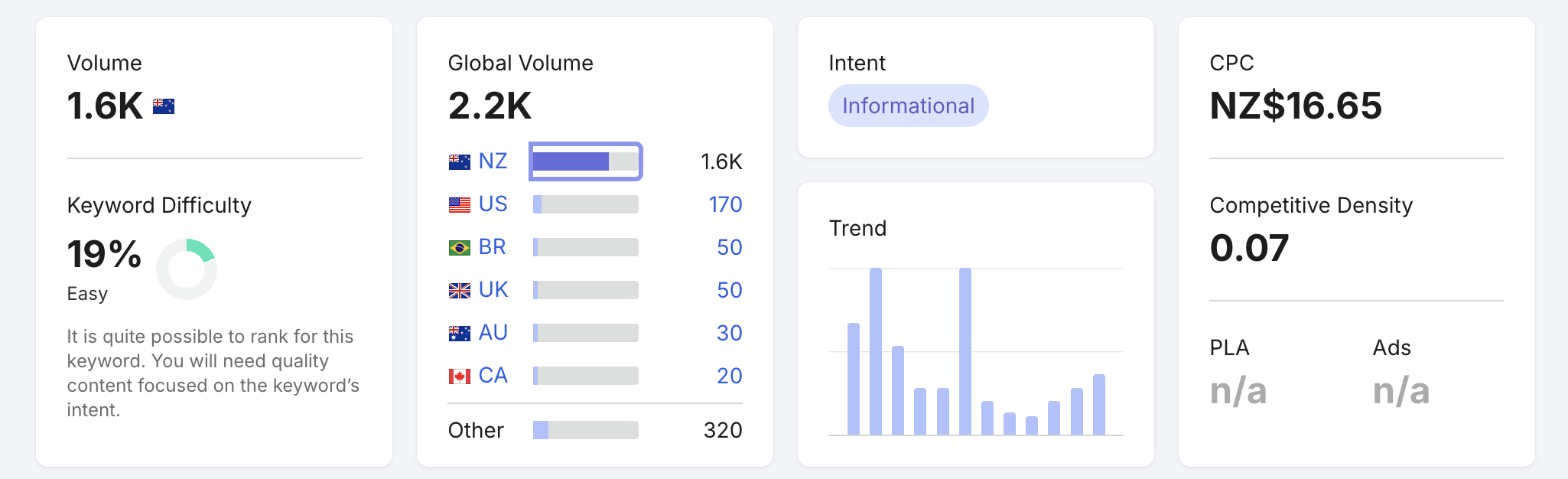
Search Engine Optimisation Nz Keyword Research Showing Search Volume, Keyword Difficulty, Search Intent, Cpc And Trend Data.

3. Optimise Your Page Titles and Meta Descriptions

Your page title and meta description are often the first things people see in Google.

They help search engines understand your page, but they also influence whether someone clicks through to your website.

A good SEO title should be clear, relevant and include your focus keyword naturally. For example:

“12 Tips to Improve Search Engine Optimisation NZ”

A good meta description should explain what the page is about and give people a reason to click. For example:

“Improve your search engine optimisation in NZ with these practical SEO tips for New Zealand businesses. Learn how to improve visibility, traffic and website performance.”

For best results, every important page on your website should have a unique title and meta description.

Avoid writing titles that are vague, duplicated or stuffed with keywords. Google is looking for relevance, but users are looking for clarity.

4. Use a Clear Heading Structure

Headings help both users and search engines understand the structure of your content.

Your page should usually have one main H1 heading, followed by H2 headings for main sections and H3 headings for supporting points.

For example:

H1: 12 Tips to Improve Search Engine Optimisation in NZ
H2: Start With the Right SEO Keywords
H2: Understand Search Intent
H2: Improve Your Website Speed

This structure makes your content easier to scan and easier for Google to interpret.

It also improves the user experience. Most people do not read every word on a page. They scan first, then decide whether the content is worth their time.

Clear headings help them find what they need quickly.

5. Create Content That Actually Helps

Good SEO content should not feel like filler.

It should answer real questions, explain things clearly and help your audience make better decisions.

For New Zealand businesses, this could include:

  • Service pages
  • Location pages
  • Blog articles
  • Case studies
  • FAQs
  • Guides
  • Comparison articles
  • How to content
  • Industry specific advice

The best SEO content is written for people first, then optimised for search.

That means your content needs to be useful, specific and easy to understand. It should also sound like your business, not like generic AI generated copy or recycled marketing text.

At Back9 Digital, we see content as part of your wider digital asset. It should help build trust, support your sales process and keep working for you over time.

6. Improve Your Local SEO

Local SEO is especially important if your business serves a specific city, region or community.

If someone searches for a product or service near them, Google wants to show relevant local results. To appear in those results, your website and online profiles need to make your location clear.

Ways to improve local SEO in NZ include:

  • Optimising your Google Business Profile
  • Creating location specific landing pages
  • Keeping your name, address and phone number consistent online
  • Building local citations
  • Getting genuine customer reviews
  • Adding local context to your website content
  • Linking to relevant local organisations, projects or case studies

For example, if you want to rank in Christchurch, Auckland, Wellington or Invercargill, you need content that supports that local relevance.

A generic service page may not be enough. Google needs clear signals about where you operate and who you serve.

7. Optimise Your Google Business Profile

Your Google Business Profile can have a major impact on local visibility.

It helps your business appear in Google Maps and local search results. It also gives potential customers quick access to your contact details, reviews, photos, services and opening hours.

To improve your Google Business Profile:

  • Make sure your business name is correct
  • Add the right categories
  • Keep your contact details up to date
  • Add your services
  • Upload quality photos
  • Ask happy customers for reviews
  • Respond to reviews professionally
  • Add updates when relevant
  • Link to the most relevant page on your website

For many local businesses, your Google Business Profile may be seen before your website. It needs to be treated as an important part of your SEO strategy, not an afterthought.

8. Make Sure Your Website Loads Quickly

Website speed matters.

If your website is slow, users are more likely to leave before they even see what you offer. Google also considers page experience as part of how it evaluates websites.

Common things that slow websites down include:

  • Oversized images
  • Poor hosting
  • Too many plugins
  • Bloated themes
  • Unused scripts
  • Poorly built pages
  • Lack of caching

Improving website speed can support both SEO and conversions. A faster website gives people a better experience and helps search engines crawl your site more efficiently.

This is one of the reasons we believe SEO and website quality should not be separated. A technically weak website will usually limit your SEO performance.

9. Make Your Website Mobile Friendly

A large amount of search traffic now happens on mobile devices.

That means your website needs to work well on smaller screens. It should be easy to read, easy to navigate and easy to take action from a mobile phone.

A mobile friendly website should have:

  • Responsive design
  • Readable text
  • Clear buttons
  • Simple navigation
  • Fast loading pages
  • Forms that are easy to complete
  • No awkward horizontal scrolling
  • Content that adapts properly to screen size

If your website is frustrating on mobile, people will leave. That can reduce enquiries, lower engagement and weaken your overall SEO performance.

Search engine optimisation in NZ is not just about what Google sees. It is also about what real people experience when they visit your site.

Internal links are links between pages on your own website.

They help users move through your content and help search engines understand how your pages are connected.

For example, an article about search engine optimisation in NZ could link to related pages such as:

  • SEO services
  • Website design
  • Growth Driven Design
  • Google Ads
  • Analytics and reporting
  • Conversion rate optimisation

Internal linking helps spread authority through your website and can support important service pages.

It also keeps users engaged by guiding them to the next useful page.

A simple rule is this: if another page on your website would genuinely help the reader, link to it.

Backlinks are links from other websites to your website.

Google can use backlinks as a signal of trust and authority. But not all backlinks are equal. Quality matters more than quantity.

For New Zealand businesses, useful backlink opportunities may include:

  • Local business directories
  • Industry associations
  • Supplier websites
  • Partner websites
  • Sponsorship pages
  • Community organisations
  • Guest articles
  • PR mentions
  • Case studies
  • Local media

Avoid cheap link building schemes or low quality backlinks. These can look unnatural and may do more harm than good.

The best backlinks usually come from genuine relationships, useful content and credible business activity.

12. Track Results and Keep Improving

SEO is not a one time job.

Search engines change. Competitors change. Your business changes. Your website needs to keep improving as well.

Important SEO metrics to track include:

  • Organic traffic
  • Keyword rankings
  • Enquiries
  • Conversion rate
  • Click through rate
  • Bounce rate
  • Engagement rate
  • Indexed pages
  • Google Business Profile actions
  • Landing page performance

Tracking results helps you understand what is working and where the opportunities are.

The goal is not just to get more traffic. The goal is to attract the right traffic and turn more of that traffic into enquiries, sales or meaningful business outcomes.

At Back9 Digital, we see SEO as part of a wider growth strategy. Your website should not just exist. It should keep evolving into a stronger digital asset.

Final Thoughts on Search Engine Optimisation NZ

Search engine optimisation in NZ is about visibility, trust and long term growth.

The businesses that do well with SEO are usually the ones that commit to improving over time. They understand their audience, create useful content, build strong websites and measure what matters.

You do not need to do everything at once. Start with the foundations. Make sure your website is technically sound, your content is useful, your local presence is clear and your key pages are properly optimised.

From there, keep improving.

That is how SEO becomes more than a marketing task. It becomes part of building a stronger, more valuable digital asset for your business.

Want to know more. Get in touch

Posted in SEO

What Is a Cyber Security Audit and Why Does Your Organisation Need One?

Many organisations assume they are secure because their website is online, their antivirus software is active, and nobody has reported a problem.

Unfortunately, cyber/website/software security does not work that way.

The majority of security incidents are discovered only after an organisation has already been exposed to risk. In some cases, vulnerabilities may exist for months or even years before they are identified.

A cyber security audit provides an independent assessment of your organisation’s digital assets, helping uncover weaknesses before they become costly incidents.

Cyber-Security-Audit-Banner-Image

What Is a Cyber Security Audit?

A cyber security audit is a structured review of your organisation’s security controls, systems, policies and infrastructure.

The purpose is to identify vulnerabilities, assess risk and determine whether your current website security measures are adequate for protecting your business and data.

Rather than focusing on a single system, an audit takes a broader view of your organisation’s security posture.

This may include:

  • Websites
  • Software applications
  • Email systems
  • Cloud services
  • User access controls
  • Password policies
  • Backup procedures
  • Security configurations
  • Third-party integrations
  • Data protection processes

The goal is not to find fault. The goal is to identify opportunities for improvement.

Why Cyber Security Audits Matter

Cyber threats continue to evolve.

New vulnerabilities are discovered every day, software changes frequently, and businesses become increasingly dependent on digital systems.

A cyber security audit helps answer important questions such as:

  • Are our systems secure?
  • What risks currently exist?
  • Are we meeting our obligations?
  • Could customer data be exposed?
  • Are our backups sufficient?
  • How would we respond to a security incident?

Without regular assessment, organisations often operate with unknown risks that can have significant consequences.

Common Risks a Cyber Security Audit Can Identify

Many vulnerabilities are not obvious during day-to-day operations.

Examples include:

Outdated Software

Content management systems, plugins, applications and integrations may contain known vulnerabilities if updates have not been applied.

Weak Authentication Controls

Poor password policies or a lack of multi-factor authentication can significantly increase risk.

Email Security Gaps

Missing SPF, DKIM or DMARC records can make organisations more vulnerable to phishing and email impersonation attacks.

Misconfigured Security Settings

Incorrect permissions, exposed services or weak configurations can create opportunities for attackers.

Backup and Recovery Weaknesses

Many organisations assume backups are working correctly without regularly testing them.

Third-Party Risk

External software and integrations can introduce vulnerabilities beyond your direct control.

What Happens During a Cyber Security Audit?

While every organisation is different, most audits follow a similar process.

1. Discovery

An inventory of digital assets is created, including websites, applications, cloud services and supporting systems.

2. Assessment

Systems are reviewed against recognised security best practices.

This may include:

  • Vulnerability scanning
  • Configuration reviews
  • Security control assessments
  • Access reviews
  • Documentation reviews

3. Risk Identification

Issues are categorised according to their likelihood and potential impact.

Not every vulnerability presents the same level of risk.

Prioritisation is essential.

4. Reporting

Findings are documented in a clear and structured format.

Reports should explain:

  • The issue
  • The potential impact
  • The associated risk
  • Recommended actions

5. Remediation Planning

The most important outcome is a practical roadmap for improvement.

A good audit does not simply identify problems. It provides guidance on how to address them.

A series of assessments help organisations identify vulnerabilities before they become serious problems.

There is no single answer that applies to every organisation.

Factors such as industry, regulatory requirements, customer expectations and system complexity all influence audit frequency.

As a general guideline:

Annually

Most organisations should complete a cyber security audit at least once per year.

After Major Changes

Audits should also be considered following:

  • Website rebuilds
  • Software launches
  • Infrastructure migrations
  • Significant business growth
  • Security incidents

Continuous Monitoring

Increasingly, organisations are moving beyond annual audits and adopting continuous monitoring to identify risks as they emerge.

Cyber Security Is About More Than Technology

One of the biggest misconceptions is that cyber security is purely a technical issue.

In reality, people, processes and governance play an equally important role.

A comprehensive cyber security audit may also assess:

  • Security policies
  • Staff awareness
  • Incident response planning
  • Data handling procedures
  • Privacy obligations
  • Vendor management

Strong security requires a combination of technology and organisational discipline.

Customers trust organisations with sensitive information every day.

That trust can be difficult to earn and easy to lose.

A cyber security audit is not simply about compliance or technical controls.

It is about demonstrating a commitment to protecting customers and stakeholders.

Organisations that take security seriously are often better positioned to build confidence, strengthen reputation and reduce business risk.

Final Thoughts

Cyber security audits help organisations identify weaknesses before they escalate.

Whether you operate a small business or a complex enterprise environment, regular assessment provides valuable insight into your current risk.

The most effective approach is proactive rather than reactive.

By understanding your security posture today, you can make informed decisions that improve resilience, protect sensitive information and strengthen trust over time.

Frequently Asked Questions About Cyber Security Audits

What is a cyber security audit?

A cyber security audit is a structured review of your organisation’s digital systems, controls, policies and processes. It helps identify vulnerabilities, assess risks and provide recommendations for improving security.

Cyber Security and Digital Trust: Why New Zealand Organisations Need More Than Just a Secure Website

For many organisations, cyber security is still viewed as an IT problem.

Install antivirus software. Enable multi-factor authentication. Keep software updated.

While these are important steps, they only address part of the challenge.

The reality is that trust has become one of the most valuable assets an organisation can build. Customers, employees, partners and stakeholders expect digital systems to be secure, reliable, accessible and compliant. A single failure can damage reputation, reduce customer confidence and create significant financial risk.

As organisations become increasingly dependent on websites, software, cloud platforms and digital processes, the conversation is shifting from cyber security alone to something much broader: digital trust.

Cyber Security Banner Showing A Digital Shield, Secure Lock And Protected Network Connections Across A Modern Data Landscape.

What Is Digital Trust?

Digital trust is the confidence people have in your organisation’s digital systems.

When someone visits your website, submits personal information, completes an online transaction or accesses a customer portal, they are trusting that:

  • Their information is secure
  • Your systems are reliable
  • Your organisation protects privacy
  • Your website functions correctly
  • Your digital experience is accessible and usable

Trust is not created through a single security measure. It is built through a combination of technology, processes and ongoing improvement.

Why Cyber Security Matters More Than Ever

Cyber threats continue to evolve at a rapid pace.

Modern attacks are no longer limited to large companies. Small and medium-sized organisations are increasingly targeted because they often have fewer resources dedicated to security. This includes AI software security risks; risks that you need to take seriously

Common cyber security risks include:

  • Phishing attacks
  • Ransomware
  • Weak passwords
  • Vulnerable plugins and software
  • Data breaches
  • Business email compromise
  • Third-party software vulnerabilities

A successful attack can result in:

  • Financial loss
  • Operational disruption
  • Reputational damage
  • Regulatory consequences
  • Loss of customer confidence

Cyber security is no longer optional. It is a fundamental business requirement.

Security Alone Is Not Enough

Many organisations focus on cyber security while overlooking other critical trust factors.

For example:

A website may be secure but inaccessible to users with disabilities.

A system may be reliable but fail privacy obligations.

A business may have strong technical controls but no documented processes or incident response plans.

True digital trust requires organisations to consider several interconnected areas.

Security

Protecting systems, networks and information from unauthorised access.

Privacy

Ensuring personal information is collected, stored and managed responsibly.

Compliance

Meeting legal, regulatory and industry obligations.

Accessibility

Use best practise UX/UI design principles, to create digital experiences that everyone can use.

Reliability

Maintaining uptime, resilience and business continuity.

Performance

Providing fast, responsive digital experiences.

Together, these elements contribute to customer confidence and organisational trust.

The Growing Importance of Cyber Security Audits

One of the most effective ways to improve trust is through regular assessment.

A cyber security audit helps organisations identify weaknesses before they become serious problems.

A typical audit may assess:

  • Website vulnerabilities
  • Security configurations
  • Email protection
  • User access controls
  • Software updates
  • Backup processes
  • Compliance requirements

Rather than waiting for an incident, organisations can take a proactive approach to reducing risk.

Building a Culture of Security Awareness

Technology alone cannot prevent every security incident.

Many breaches begin with human error.

This is why cyber security awareness training and employee education are becoming increasingly important.

Staff should understand:

  • How to identify phishing emails
  • Password security best practices
  • Data handling responsibilities
  • Social engineering risks
  • Incident reporting procedures

When employees become active participants in security, organisational risk decreases significantly.

The Future of Digital Trust

The organisations that succeed over the next decade will be those that earn and maintain trust.

Customers are becoming more aware of privacy, security and transparency. Regulators are increasing expectations. Technology is becoming more complex.

As a result, organisations need greater visibility into the health of their digital assets.

The future is not simply about protecting systems.

It is about continuously measuring, monitoring and improving trust.

Final Thoughts

Cyber security is no longer just an IT concern.

It is a business issue, a customer experience issue and ultimately a trust issue.

Organisations that invest in security, compliance, accessibility and reliability are better positioned to protect their reputation, improve customer confidence and create sustainable growth.

Trust is not something that can be implemented once and forgotten.

It must be built, maintained and continuously improved over time.

Frequently Asked Questions About Cyber Security and Digital Trust

What is cyber security?

Cyber security is the practice of protecting websites, systems, networks, software and data from unauthorised access, attacks and disruption. It includes measures such as secure passwords, multi-factor authentication, software updates, backups, monitoring and staff awareness training.

Why is cyber security important for New Zealand organisations?

Cyber security is important because New Zealand organisations rely heavily on websites, cloud platforms, email, customer portals and online systems. A cyber attack can cause financial loss, operational disruption, privacy breaches, reputational damage and a loss of customer trust.

What is digital trust?

Digital trust is the confidence people have in an organisation’s digital systems. It means customers, staff and stakeholders believe that your website, software and online processes are secure, reliable, private, accessible and well managed.

What is the difference between cyber security and digital trust?

Cyber security focuses on protecting systems and data from threats. Digital trust is broader. It includes cyber security, but also covers privacy, compliance, accessibility, reliability, performance and the overall confidence people have when interacting with your organisation online.

Does my business need a cyber security audit?

A cyber security audit is useful for any organisation that depends on a website, online system, cloud platform or customer data. An audit can help identify weaknesses in areas such as website security, software updates, access controls, email protection, backups and compliance.

What are common cyber security risks for small businesses?

Common cyber security risks for small businesses include phishing emails, weak passwords, outdated website plugins, insecure hosting, ransomware, poor backup processes, business email compromise and staff members being unsure how to recognise threats.

Is a secure website enough to protect my organisation?

A secure website is important, but it is not enough on its own. Organisations also need secure processes, privacy controls, reliable hosting, regular updates, staff training, accessibility standards, backup systems and clear incident response procedures.

How often should cyber security be reviewed?

Cyber security should be reviewed regularly, not just after something goes wrong. Websites, software, plugins, hosting environments, staff access and compliance requirements change over time, so ongoing monitoring and scheduled reviews are important.

Why does cyber security awareness training matter?

Cyber security awareness training helps employees understand how to identify phishing emails, use strong passwords, handle data responsibly and report suspicious activity. Since many incidents begin with human error, staff education is a key part of reducing risk.

How can organisations build digital trust?

Organisations can build digital trust by investing in security, privacy, compliance, accessibility, performance and reliability. This includes keeping systems updated, protecting customer data, reviewing risks, improving website usability and continuously monitoring digital assets over time.

Is This App Safe? How to Spot AI-Built Software Before You Hand Over Your Data

A new app appears. The landing page is clean, the branding looks sharp, the signup flow is smooth. You enter your email, your name, maybe your phone number, maybe your card details. You get a welcome email. Everything feels normal.

Underneath, that app design and build might have been generated by AI in a weekend, deployed without a security review, and storing your data in a database that anyone on the internet can query.

This isn’t hypothetical. In 2025, around 13,000 people had their personal information exposed through apps built on a single AI app-building platform; most of them had no idea the services they trusted were AI-generated, let alone insecure. The exposed data included names, emails, addresses, payment records, and in some cases other API keys that opened the door to further compromise.

The uncomfortable reality is that the burden of figuring out whether an app is safe has quietly shifted onto end users. There’s no badge, no disclosure rule, no required security baseline before a service can start collecting your data.

So here’s a practical guide to spotting the warning signs and protecting yourself.

Why End Users Are Now in the Firing Line

How to Determine if an App is Safe

Before AI tools made app and software development accessible to anyone, the path from “idea” to “app collecting your personal data” went through professional engineers, code reviews, and at least some baseline security thinking. That wall is mostly gone.

Today, anyone with a prompt and a credit card can:

  • generate a fully working web app in an afternoon
  • connect it to a database
  • collect signups
  • charge for a subscription
  • start storing real user data

None of those steps require the person to understand authentication, access control, encryption, or how to keep API keys out of public code. And the resulting app can look indistinguishable from one built by a serious team.

The hard part for users is that the surface gives almost nothing away.

Signals That an App Might Be AI-Built and Under-Secured

No single signal is proof. But when several stack up, it’s worth slowing down before signing up.

The Domain and Hosting

  • Hosted on a builder subdomain. URLs ending in .lovable.app, .vercel.app, .netlify.app, .replit.app, .bolt.new, or similar suggest the app may be early-stage or AI-built. Not automatically insecure — plenty of legitimate apps run on these platforms — but worth treating with extra caution before handing over real data.
  • Very new domain. A WHOIS lookup (free at sites like who.is) shows when the domain was registered. A site asking for payment details on a domain registered three weeks ago deserves more scrutiny than one with a five-year history.
  • No clear company behind the product. No registered business name, no physical address, no team page, no LinkedIn presence for the founders. Real software usually has a paper trail.

The Branding and Copy

  • Generic AI-flavoured naming. Names like “[Adjective][Noun].ai” or “[Verb]ly” combined with stock-feeling marketing copy. Not damning on its own, but a pattern.
  • Hero images that look AI-generated. Slightly off hands, oddly perfect lighting, faces with the smooth uncanny look of generated portraits.
  • Feature lists that read like a ChatGPT response. Three-bullet sections, identical sentence structures, every feature described in the same upbeat tone. Real product copy usually has more variation.

The Auth and Account Flow

  • No two-factor authentication option. Any serious app handling personal data, payments, or business information should offer 2FA. Its absence is meaningful.
  • Broken or weird login flows. Forgot-password emails that never arrive, confirmation emails from random Gmail addresses, signup forms that accept obviously invalid input. These often indicate broken auth design underneath.
  • Asks for far more information than the product needs. A note-taking app asking for your date of birth and phone number on signup is a flag. The data is being collected because it can be, not because it has to be.

The Trust Signals That Should Be There

  • No published privacy policy, or a clearly templated one. Look for specifics: what systems store your data, where they’re located, how long it’s kept, who it’s shared with. Generic templates with placeholder text suggest nobody thought hard about this.
  • No security or trust page. Established apps usually have something — even a basic page covering encryption, data handling, and how breaches are reported.
  • No working customer support channel. A support email that doesn’t reply, no live chat, no ticket system. If something goes wrong with your account, who do you contact?

The Practical Defence: Don’t Trust Apps With More Than They Need

Even with the best signal-spotting, you can’t always tell. So the realistic strategy is to assume any app might leak your data, and limit the damage if it does.

1. Use a Unique Password Every Time

This is the single highest-leverage habit a normal person can adopt. A password manager — Bitwarden, 1Password, Apple’s built-in Keychain, or your browser’s manager — generates a unique password per site and remembers it for you.

When (not if) one app gets breached, the leaked password is useless anywhere else.

2. Use Email Aliases

Services like Apple’s Hide My Email, Firefox Relay, SimpleLogin, or DuckDuckGo Email Protection let you create a different email address for every signup. They forward to your real inbox.

The benefit:

  • If one alias starts getting spam or phishing, you know exactly which app leaked your address.
  • You can shut off any alias instantly without affecting anything else.
  • Attackers who buy leaked email lists can’t link your accounts together.

3. Use Virtual Card Numbers for Payments

If you’re entering payment details into something you don’t fully trust, virtual cards are your friend.

  • Revolut, Wise, and most major banks now offer disposable or single-merchant card numbers.
  • In the US, Privacy.com is popular for this.
  • Apple Pay and Google Pay also tokenise your real card so the merchant never sees the actual number.

You can cap the spending limit, lock the card to one merchant, or kill it instantly if something looks off.

4. Be Selective About What You Upload

AI-built apps often store uploaded files in cloud storage buckets that are misconfigured to be publicly accessible. If you wouldn’t be comfortable with a document being viewable by anyone with a guessable URL, don’t upload it to a service you don’t trust.

This applies especially to:

  • ID documents (passports, driver’s licences)
  • Financial records
  • Medical information
  • Anything containing other people’s personal details

5. Watch for Targeted Phishing After Signup

The clearest sign you’ve signed up for a leaky app is a phishing email that’s too well-informed. If you start getting messages that reference:

  • a real order number
  • the actual amount you spent
  • a specific feature of the service
  • your real name combined with details only that service knew

…assume the service has been breached. Change your password there, rotate any payment card you used, and treat any “urgent action required” emails from that service as suspect for the next few months.

6. Check Have I Been Pwned Periodically

haveibeenpwned.com is a free service run by security researcher Troy Hunt. It tells you which known data breaches have included your email address. You can also subscribe to be notified if your address appears in a future breach.

It’s the closest thing to a smoke alarm for your digital life.

7. For Anything Financial or Health-Related, Prefer Boring Established Services

This advice sounds dull, but it’s statistically right. A ten-year-old company with an ugly website is almost always safer than a beautifully-designed app that launched last month — because the older company has had more time, more incidents, and more reasons to take security seriously.

For banking, insurance, healthcare, tax, or anything where a breach would seriously harm you, “exciting and new” is a feature you don’t actually want.

A Reasonable Mental Test Before You Sign Up

When you’re about to hand over your details to a service you don’t know well, run this quick check:

  1. Could I find anyone responsible? Is there a real company behind it, with a name and an address?
  2. Have I heard of this from a trustworthy source, or just an ad?
  3. Does it offer 2FA?
  4. Is it asking for more information than it actually needs?
  5. If this app leaked everything I’m about to give it tomorrow, what’s my exposure?
  6. Is the software or app built by a reputable company? Check the footer (right at the bottom) and see if it states who build it… See image below
Screenshot Of Footer Showing Software Built By Back9 Digital

If you can’t answer those comfortably, you don’t need to refuse, you just need to limit what you give. Use an email alias, a unique password, a virtual card, and the minimum information required.

What Should Change

End users shouldn’t have to be amateur security researchers to safely sign up for a service. The current state of things — where an AI-built app with no security review can collect your name, email, address, and payment details, and the only signal you get is a slightly-too-polished landing page — isn’t sustainable.

Eventually, this will likely shift through some combination of:

  • regulation requiring disclosure of AI-generated software handling personal data
  • platform-level security defaults that make basic mistakes harder to ship
  • consumer trust marks for services that meet a security baseline
  • insurance and liability pressure on businesses that deploy unreviewed AI-generated code

Until any of that arrives, the practical answer is the same as it’s always been with new technology: trust slowly, give up the minimum, and assume that what gets collected will eventually leak.

The good news is that the basic defences, unique passwords, email aliases, virtual cards, and a healthy scepticism — protect you against most of the damage even when an app does turn out to be insecure.

The bad news is that nobody else is going to do this for you.

Frequently Asked Questions

How can I tell if an app was built using AI?

There’s no definitive way, but signals include: hosting on AI builder subdomains (.lovable.app, .vercel.app, etc.), very new domains, generic AI-flavoured branding, AI-generated hero images, and feature lists that read like ChatGPT output. Most importantly: lack of a real company behind the product, no team or contact details, and no published security or privacy practices.

Is it dangerous to sign up for AI-built apps?

Not automatically; many AI-built apps are perfectly safe. The risk is that AI tools make it possible to launch software without the security review that used to happen by default. That means a higher proportion of AI-built apps ship with vulnerabilities like exposed databases, missing access controls, or leaked API keys. The damage usually shows up as data breaches and targeted phishing.

What information is most risky to give to an unknown app?

Anything that’s hard to change or rotate: government ID numbers, full date of birth, home address, real card details (use virtual cards instead), and unique passwords. Email and phone are also valuable to attackers but easier to mitigate using aliases.

How do I know if my data has already been leaked?

Check haveibeenpwned.com — it lists known breaches your email has appeared in. Also watch for unusually well-informed phishing emails referencing specific accounts or transactions. That’s often the first real-world sign that a service you used has been compromised.

What should I do if I think an app I signed up for has leaked my data?

Change the password on that service immediately. Change it on any other service where you reused that password (and switch to a password manager so you never reuse again). If you used a payment card, rotate it or use a virtual card going forward. Watch for phishing emails for several months. If serious data was exposed (ID, financial details), consider a credit monitoring service.