

You wouldn’t design a new kitchen without drawing up a plan first, would you? Similarly, you’d never want to design a website without creating a Google sitemap.
A sitemap is a file of code that lives on your web server and lists all of the relevant URLs that are in the structure of your website. It helps search engine web crawlers determine the structure of the site so they can crawl it more intelligently.
Here’s an example of what a sitemap file might look like:
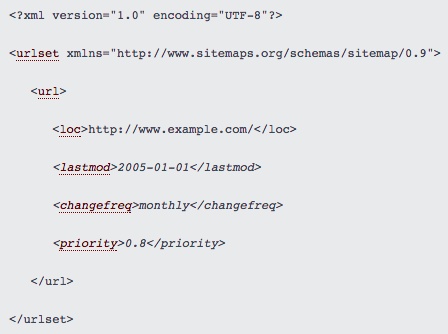
Image Credit: Sitemaps.org
We create sitemaps when we first design your website, add pages to it, and/or redesign it. It’s kind of like a “floor plan” for the site, which especially comes in handy whenever the site gets changed. Along with boosting SEO, sitemaps can also help define a site’s navigation scheme so you avoid internal linking issues.
You might be thinking to yourself, “But I thought sitemaps were more visual, like a web”. That’s a visual sitemap, as opposed to an XML sitemap — the latter is what we’ve been talking about so far.
4 Steps to Building a Sitemap
1) Research & Plan
When we first begin planning your sitemap, we think about questions like: What are your website/ UX UI design goals? Who’s your target audience, and what do they want to see?
It’s also important to keep in mind each search engine’s requirements. The last thing we want to do is break the path of a visitor getting from a search engine to your website. Google’s, Bing’s, Yahoo!’s, and others’ requirements are fairly similar, but you’ll want to make sure you’re not breaking any specific requirements for any of them. This is especially true if you see a lot of your traffic is coming from a specific search engine.
Note: We generally only submit sitemaps to Google, but can submit to Bing and Yahoo if you choose.
For the requirements and rules for sitemaps, check out:
- Read more about Google’s sitemap requirements.
- Discover more about Bing and Yahoo!’s sitemap requirements.
2) Define the Top-Level Navigation Structure
What do you want your homepage to link to? This will provide the foundation for your site’s structure, and will allow your site to grow.

The structure of your website plays a huge role in your site’s SEO, so it’s important to plan top-level navigation structure carefully. Specific attention should be given to the website’s depth. The further away a page is from the original homepage URL of your site, the worse it is for that page’s Search engine optimisation.
In other words, a shallow website (one that requires three or fewer clicks to reach each page) is much better for SEO than a deep website, according to Search Engine Journal.
Unfortunately, it’s difficult to give general advice here as best practices can vary significantly by industry, company type, and so on. This high;ights the importance of understanding your industry and the marketing landscape in which you operate – If you want to discuss this further with us, please feel free to book a free 45min consultation.
3) Define the Second- & Third-Level Content
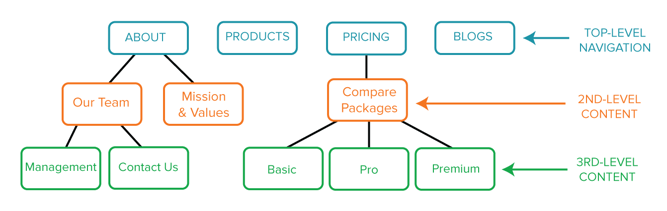
This is where creating visual sitemaps can come in handy. Once your homepage’s navigation structure is set, we brainstorm and map out the pages that are two or three levels deeper into your website. This might be your “About Us” page, your team page, your hiring page and your blog etc.
Depending on the complexity of your website, you may only need two levels, or you may need up to four. And as you think out the deeper parts of your website, you may find you need to tweak the top-level navigation — and that’s okay.
4. Write the XML Sitemap & Submit it to Search Engines
Once your website’s planned out, designed and coded, it’s time for our web development team to also create the XML sitemap to put on your web server, and submit it to the search engine.
When we first publish your website and each time you go through a significant site redesign, the sitemap will need to be resubmitted, so that search engines will be able to tell your homepage from your “About Us” page from your team page and so on.
Unless you’re using a platform that automatically updates your sitemap, you’ll need to update the sitemap yourself (or have us do it for you) and resubmit any time you make significant changes to your website, because if your website sucks, it won’t convert.
But remember, you’ll still either have to rely on search engines to pick up new pages organically. That means if you’ve made a really significant change to your site’s structure, we might need to manually submit it.)
Below are step-by-step instructions for submitting a sitemap to Google, and then to Bing and Yahoo!.
How to submit a sitemap to Google:
- Sign in to Google Webmaster Tools.
- Click “Add a Site.”
- Enter the URL for your company (e.g. http://www.yourdomain.com). Click “Continue.”
- Click “Crawl” on the left-hand side of the page, and choose “Sitemaps.”
- Click “Add/Test Sitemap.”
- Enter sitemap.xml after “http://www.yourdomain.com/”.
- Click “Submit Sitemap.”
(For more details, click here.)
How to submit a sitemap to Bing or Yahoo!:
- Sign in to Bing Webmaster Tools.
- On the My Sites page, enter the URL for your company (e.g. http://www.yourdomain.com). Click “Add.”
- In the “Add a sitemap” field, enter http://www.yourdomain.com/sitemap.xml. (Replace “yourdomain” with your company’s URL.)
- Complete the rest of the required fields on the page, and click “Save.”
(For more details, click here.)
What If I Want to Add Webpages Later?
Once you define and submit your sitemap the first time, chances are you’ll want to tweak and add pages to your website every so often — and that’s completely fine. But keep in mind that if your website isn’t built on a platform that automatically generates a new sitemap and updates it on your web server when new pages are added, then every time you add a page — any page — to your website, that page will be missing from the sitemap that search engines see.
Remember, Google and other search engines will pick up the sitemap organically as long as you’ve updated the sitemap.xml file on your web server. But if you want to try to index your content the fastest way possible, you could resubmit your sitemap after publishing a new page — and it’s possible that Google would pick it up more quickly.
Once you’ve created and submitted your XML sitemap to search engines, you can start working on other fun stuff like your website’s design.
This is of course just one step in the process and it helps if you’re a little bit tech savvy. If you need some help with a sitemap on a pre-existing website – please be aware there are some variables, (such as the platform you are using or if we can access the raw code via the cPanel on you site) and there may be no guarantee that we can help. but like anything in life, if you don’t ask, you don’t get so please feel free to get in touch, otherwise… Happy site-mapping!
