
AI Software Security Risks: Why You Should Be Careful With Vibe Coding

AI has changed software development at a pace very few people predicted.

You can now generate websites, apps, automations, and entire software platforms in hours instead of months. At Back9 Digital we use AI ourselves; it’s a genuinely powerful tool when applied with care.

But there’s a growing pattern we’re concerned about: businesses (seemingly) trusting AI-generated software without properly considering what’s running underneath. And in the last twelve months, that concern has stopped being theoretical.

The Real Risk Isn’t That AI-Built Software “Looks AI-Built”

A lot of commentary on AI-generated software focuses on whether products feel generic or visually polished but operationally weak. Those are real observations — but they’re not the issue that should be keeping business owners awake at night.

The real issue is security.

Modern software is deeply connected into the systems businesses depend on every day:

  • customer information
  • payment systems
  • CRMs
  • email platforms
  • operational tools
  • automations
  • business databases

When vulnerabilities exist inside any of those systems, the consequences move from “annoying bug” to “genuine business risk” very quickly.

AI Generates Vulnerabilities Just as Quickly as It Generates Code

AI is excellent at producing software that works.

But working is not the same as secure, and that distinction is where most of the danger sits.

AI-generated code routinely introduces issues such as:

  • exposed API keys
  • insecure or missing authentication
  • weak permissions handling
  • exposed database endpoints
  • missing or misconfigured access control rules
  • poor input validation
  • vulnerable third-party dependencies
  • insecure server configurations
  • cross-site scripting (XSS) vulnerabilities
  • SQL injection vulnerabilities

The dangerous part is that none of this is visible to the average business owner. The app loads, the dashboard works, the forms submit. Underneath, the gaps may already be wide open.

Recent Incidents That Show Why This Matters

If you want to understand why this issue is urgent, three real incidents from the last year tell the story clearly.

1. Lovable + Supabase: AI-Generated Apps Exposed Real User Data (CVE-2025-48757)

This is the case study every business considering vibe coding should know about.

Lovable is a popular AI app-building platform that generates apps backed by Supabase databases. In 2025, security researchers found that a large share of Lovable-generated apps had broken or missing Row Level Security, the rule layer that controls who can read what data in the database.

The result: attackers didn’t need credentials. The public API key already embedded in the app’s frontend code was enough to query the database directly and pull out full user lists, payment records, and even other API keys.

Around 170 apps were affected, exposing data belonging to roughly 13,000 users — about 10% of all Lovable applications scanned.

This wasn’t a Supabase failure. Supabase’s security model works correctly when configured properly. The failure was in the AI-generated code, which produced apps that looked finished but didn’t lock down the database access controls underneath.

It’s a near-perfect example of the risk: software that ships fast, looks polished, and quietly leaks user data.

2. Vercel (April 2026): When Connected AI Tools Become an Attack Path

In April 2026, Vercel, one of the largest hosting platforms for modern web apps; disclosed a breach that began with a compromised third-party AI tool (Context.ai) used by one of its employees.

From there, attackers were able to pivot into Vercel’s internal environment and read environment variables across affected customer accounts that were not flagged as “sensitive”, meaning they were not encrypted at rest. Stolen data was later listed for sale on a hacker forum for $2 million.

The lesson here isn’t that Vercel built insecure software. It’s that environment variables, he same place AI-generated apps tend to dump API keys, database credentials, and third-party tokens, are a high-value target, and a single weak link in the AI tool chain can cascade into hundreds of downstream environments.

3. The Pattern Across Both Incidents

The common thread: AI accelerated the build, but the security thinking didn’t keep up.

In Lovable’s case, the AI generated code that skipped a critical access control layer. In Vercel’s case, the supply chain wrapped around AI tooling created an attack path nobody had stress-tested.

Neither would have been caught by “does the app work?” The damage in both cases was invisible from the surface.

What Exposed API Keys Actually Allow Attackers To Do

When people hear “API key leak”, it can sound abstract. In practice, it usually leads to one or more of the following:

  • Direct database access. Attackers can query, modify, or dump entire tables.
  • Impersonation. Acting as a trusted system to call internal APIs.
  • Infrastructure abuse. Spinning up resources or sending requests on the business’s bill.
  • Lateral movement. Using the leaked key to reach connected systems (email, payments, analytics).
  • Targeted phishing campaigns. Once attackers have customer names, emails, order history, or transaction patterns, they can craft phishing messages that look uncannily legitimate — referencing real orders, real account numbers, real product names. These campaigns convert at far higher rates than generic spam, which is why exposed customer data is so valuable on the criminal market.

That last point is exactly the chain you described, and it’s accurate. A leaked API key can lead to user data exposure, which can lead to highly targeted phishing — and from there to account takeover, fraud, or further compromise.

Why Most Businesses Don’t See the Danger

This deserves its own section, because it’s the heart of the problem.

Most business owners using AI to build or commission software:

  • can’t read the code being generated
  • don’t know what an environment variable is, let alone whether it’s encrypted at rest
  • assume that “the AI wouldn’t generate something insecure”
  • judge the product by what they can see — the UI, the dashboard, the working forms
  • have no internal benchmark for what “secure” even looks like

That’s not a criticism. Software security is a specialised discipline, and historically it sat behind a wall of expert review before anything went live.

AI vibe coding has removed that wall, but it hasn’t replaced what the wall was doing.

AI Doesn’t Understand Consequences

This is the part many businesses overlook.

AI predicts likely code patterns. It does not truly understand:

  • operational security
  • compliance obligations (GDPR, PCI-DSS, HIPAA, NZ Privacy Act)
  • breach recovery planning
  • data privacy implications
  • business continuity
  • infrastructure hardening
  • legal exposure if a breach occurs

It can generate functional code at remarkable speed. It cannot take responsibility for what happens when something goes wrong — and in a breach, the responsibility falls on the business that deployed it.

Speed Is Creating False Confidence

One of the biggest risks with AI development is how quickly businesses can move from idea → prototype → live product.

That speed creates a false sense of confidence. Launching software fast is not the same as launching software safely. Security reviews, dependency audits, permissions checks, environment hardening, and proper architecture still matter, arguably more, because the cost of skipping them is now lower in the short term and higher in the long term.

How To Use AI Safely In Software Development

We’re not anti-AI. Far from it. Used well, AI is one of the most useful tools to enter the industry in years. Used carelessly, it’s a liability waiting to surface.

The practical baseline we recommend:

  • Never deploy AI-generated code without human review — particularly anything touching authentication, database access, payments, or user data.
  • Treat every AI-generated environment variable as if it could leak. Use platforms’ “sensitive” or encrypted-at-rest options. Rotate keys regularly.
  • Verify access control at the database layer, not just in the app code. For Supabase-style setups, that means actually testing Row Level Security policies, not just enabling them.
  • Run dependency and secret scanning in CI/CD. Tools like GitGuardian, Snyk, and GitHub’s built-in scanners catch a lot of low-hanging fruit.
  • Test from an attacker’s perspective. A simple curl against your public API endpoints will tell you more than most automated reports.
  • Engage proper engineering oversight for anything connected to real user data, payments, or critical workflows.

Final Thoughts

AI is going to play a huge role in the future of software development. That’s not in question.

What is in question is whether businesses will treat AI-generated code with the same scrutiny they’d apply to anything else running their operations. The pattern of recent incidents; Lovable, Vercel, and the broader rise in AI-related supply chain attacks, suggests many won’t, until something forces them to.

Software that looks good on the surface can still leak customer data, expose credentials, and become the launch pad for targeted phishing campaigns against the very people who trusted the business with their information.

In an environment where anyone can generate working software in an afternoon, the real differentiators become security, stability, and trust.

That’s the bar worth building to.

Frequently Asked Questions

Is AI-generated software secure?

AI-generated software can be secure — but only when it is properly reviewed, tested, and engineered. Left unchecked, AI routinely produces code with exposed API keys, weak access controls, and vulnerable dependencies.

What are the biggest AI software security risks?

The most common risks include:
exposed API keys and environment variables
insecure or missing authentication
missing database access controls (e.g. Row Level Security)
vulnerable third-party packages
weak permissions handling
targeted phishing campaigns built from leaked customer data

Can exposed API keys lead to phishing attacks?

Yes. If attackers gain access to customer information through exposed keys or misconfigured APIs, that data is often used to build highly targeted phishing campaigns that reference real orders, accounts, or transactions — making them far more convincing than generic spam.

Is AI bad for software development?

No. AI is an incredibly powerful development tool. The risk comes from skipping the security review and engineering oversight that used to be built into the development process by default.

Why should businesses be concerned about AI-generated code?

Because most business owners can’t see the security gaps that AI-generated software often contains. The product looks finished, the dashboard works, customers can sign up — and yet the database might be queryable by anyone with the public API key. Recent incidents like CVE-2025-48757 (which exposed user data across 170+ Lovable-built apps) show this isn’t theoretical. Without proper review, the first sign of a problem is often a breach notification.

Best CRM NZ: Top CRM Platforms for Kiwi Businesses in 2025

If you’re searching for the Best CRM in NZ, you’ve likely noticed there’s no shortage of options. But not all CRMs are created equal, and many tools that claim to be CRMs (like Monday.com or Asana) fall short of what true customer relationship management software should offer.

This guide breaks down five of the top CRM platforms used by Kiwi businesses today—what they do well, who they’re best for, and what to watch out for—so you can make an informed decision.

What Makes a CRM the “Best”?

A genuine CRM system is built to:

  • Centralise all customer data
  • Track communications, interactions, and tasks
  • Automate marketing, sales, and service workflows
  • Help teams close more deals and retain customers

Many tools market themselves as CRMs, but unless they support lead pipelines, customer lifecycle management, and robust automation—they’re just glorified task boards.

Best CRM NZ: Our Top Picks for 2025

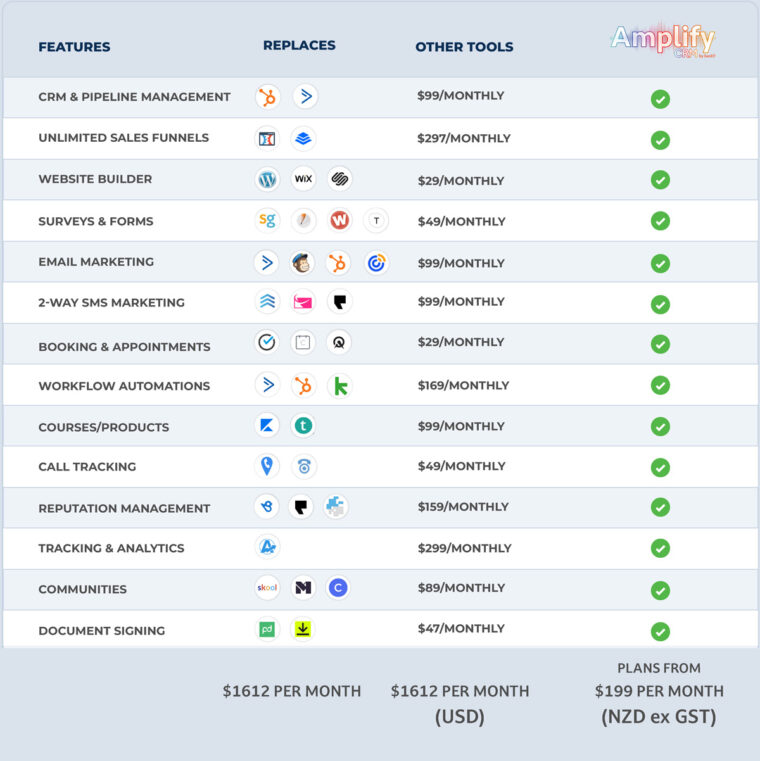
1. Amplify CRM (by Back9) – Best All-in-One CRM for NZ-Based Businesses

Strengths:

  • Full CRM suite with sales, marketing, customer service, and automation
  • Includes AI-powered tools like the “AI Employee” for instant customer handling
  • Built-in reputation management, review requests, email, SMS, funnels, live chat
  • NZ-based support, local hosting, and fast onboarding

Best for:
Small to medium-sized NZ businesses wanting to turn their digital marketing efforts into an ever-evolving digital asset, with the added bonus of a local partner and real support.

Why it’s a top choice in NZ:
Amplify offers everything most Kiwi businesses need, without the bloat or cost of enterprise tools. You get a powerful platform and a real team behind it, helping you grow month by month. It’s ideal for teams who want fast results, less tech stress, and scalable automation from day one.

Amplify HQ offers a great deal of flexibility from running individual modules to preset packages starting at just $79 NZD (excluding GST) per month.

2. SharpSpring (by Constant Contact) – Best Mid-Range CRM for Growing Teams

Strengths:

  • Affordable pricing for marketing automation, sales, and lead tracking
  • Solid feature set including email workflows, lead scoring, and form tracking
  • Designed for agencies and growing service businesses

What to consider:
The user interface in SharpSpring can feel dated, and setup requires more manual configuration than other platforms. Once it’s built out, though, it performs reliably.

Best for:
Marketing agencies or B2B companies needing a cost-effective HubSpot alternative.

Here’s an Honest comparison between SharpSpring and Salesforce

3. HubSpot CRM – Best for Larger or Marketing-Led Teams

Strengths:

  • Slick interface, detailed analytics, and a full suite of marketing tools
  • Wide adoption across NZ with lots of certified local partners
  • Free plan available to get started

Limitations:
While HubSpot’s free tier is a great entry point, it lacks key automation and reporting features. As your team grows, pricing quickly scales up—making it better suited for larger businesses with dedicated marketing and sales departments.

Best for:
Mid-to-large businesses that want marketing-first CRM tools and have a budget for scaling. For decent feature you should expect to spend around 2000 AUD per month

4. Zoho CRM – Best Budget CRM with Flexible Features

Strengths:

  • Cost-effective and scalable
  • Good feature range for the price, including automation and integrations
  • Integrates with the wider Zoho business app suite

Best for:
Tradies, consultants, and small businesses looking for an affordable CRM without the frills.

Considerations:
Zoho is powerful but can be overwhelming at first. It’s best for businesses willing to invest time in learning the platform and doing some DIY setup.

5. Salesforce – Best Enterprise CRM for Complex Needs

Strengths:

  • Endless customisation and advanced reporting
  • Ideal for managing multiple teams, locations, and services
  • Built to integrate with large-scale operations

Best for:
Enterprise organisations or corporates with big budgets and in-house IT support.

Why it’s in the top 5:
Salesforce is a global leader for a reason. But for most small businesses, it’s simply overkill—unless you need highly customised workflows or deal with large data volumes.

What’s Not a CRM?

Many tools claim to be CRMs but don’t include core functionality like pipeline tracking, automation, or customer communication history.

These aren’t true CRMs (without heavy customisation):

  • Monday.com
  • ClickUp
  • Notion
  • Trello
  • Airtable
  • Tradify

These are great for project or task management, but they won’t help you manage leads, automate follow-ups, or track customer lifetime value.

Choosing the Best CRM for Your NZ Business

Ask yourself:

  • What’s your biggest bottleneck; lead generation, follow-up, or service delivery?
  • Do you need automation, or just better contact management?
  • Do you want local support, or are you happy self-managing?
  • What’s your monthly budget?

Your answers will guide which CRM fits best. Here’s a quick cheat sheet:

CRMBest ForPrice Range
AmplifyNZ-based businesses wanting support$
SharpSpringMarketing automation on a budget$$
HubSpotMarketing-led, mid to large teams$$$
ZohoSmall businesses on a tight budget$
SalesforceLarge, enterprise-level setups$$$$

Final Thoughts: What’s the Best CRM in NZ?

There’s no one-size-fits-all answer. But if you’re after the Best CRM NZ businesses can actually use, the key is choosing something that fits your workflow, team size, and growth goals.

  • Go with Amplify if you want local help from us at Back9 and an all-in-one platform that works out of the box.
  • Use SharpSpring if you want powerful automation and are comfortable with setup.
  • Choose HubSpot if you’ve got a solid budget and a marketing-focused team.
  • Try Zoho if cost is key and you’re happy customising.
  • Pick Salesforce if you need advanced solutions at an enterprise scale

Amplify Crm Comparison - Best Crm For  Manynz Businesses

Developing a Successful Mobile App: A Growth-Focused Guide

A well-built app can boost engagement, drive loyalty, and open up new revenue streams. But how do you make sure it’s built right for a successful mobile app?

That’s where Growth-Driven Design (GDD) comes in. GDD is not about getting the first iteration (MVP) perfect! The reality is that no software, app or website is ever perfect! GDD is all about starting smart, learning fast, and improving constantly. There’s no “set and forget” builds here—just ongoing improvement and growth, backed by real data.

Know Your Audience. Build for Them.

You can’t build something great if you don’t know who it’s for. Understanding your users—and what they want—is the foundation. From there, it’s about making sure every tap, swipe, and screen feels effortless.

Great performance isn’t just nice. It’s essential. People drop apps that don’t deliver. Fast.

So, your app needs to work hard for your business and even harder for your users.

Back9-Website-Banner-Cta-Image-For-How-Much-Does-A-Mobile-App-Cost

Why Mobile Apps Matter More Than Ever

In a fast-paced digital world, mobile apps are your direct link to customers. They’re personal, always-on, and can build serious brand loyalty.

Done well, apps:

  • Improve customer experience
  • Boost visibility
  • Unlock new ways to earn

Plus, the data can you collect? That’s Gold… Priceless Gold! That’s not in a creepy way either. You need to collect the data ethically and use it wisely. Data helps you continually evolve and build on your user experience (UX). It helps you tailor offers, fine-tune the experience, and make smarter decisions.

Growth-Driven Design: Build, Learn, Grow

The traditional design process for websites, apps and software is broken! Forget the old-school way of building apps. Growth-Driven Design (GDD) is where it’s at. Nothing is ever going to launch perfectly, at the pace the digital world moves. Taking 3-6 (or more) months to launch is costly, because so much will change over that time. It’s a bloody competitive landscape so launch fast and improve based on real live user data, instead of building based on assumptions!

Here’s why it works:

  • You start with what matters most.
  • You improve constantly, based on real user feedback.
  • You reduce risk—no big upfront bets.

Don’t get me wrong, you still need to launch a solid product – there are no shortcuts – with apps and software, there are also (often) no second chances. Therefore, a delicate balance of UX/UI Design and understanding your user’s needs at a base level is crucial.

If you can find this balance, it’s user-focused, data-backed, and flexible. You’re not guessing what people want—you’re building what they actually need.

Connect Your Business Goals to App Features

If your app doesn’t serve your goals, why bother?

Start by asking: What do we want to achieve? More sales? Better support? Higher retention?

Then make sure every feature supports that. Keep it focused. Keep it aligned.

User Experience Isn’t Optional—It’s Everything when creating a successful mobile app

As mentioned before, the app still needs to work for people. If your app is hard to use, it’s not going to last long on anyone’s phone.

The design should guide users, not confuse them. It should look great, but more importantly, work great.

Make it intuitive. Make it responsive. And always—always—test it on different devices.

And remember, the work doesn’t stop after launch. Keep improving.

Native, Hybrid, or Web? What’s Right for You?

You’ve got options. Each with pros and cons.

  • Native Apps: Best performance, best experience—but they’ll cost you more to build and maintain.
  • Hybrid Apps: Faster to market, more cost-effective, and you can hit multiple platforms at once.
  • Web Apps: Budget-friendly and easy to update, but they won’t have that same “native feel.”

It comes down to your goals, your budget, and how quickly you want to move.

Know the Market. Know the Competition.

Before you dive in, do the homework.

What do your users want? What are your competitors offering?

Find the gaps. Then make sure your app stands out.

Watch the trends too—staying relevant means staying informed.

The App Development Journey: From Idea to Reality

It all starts with an IDEA. Literally.

We use our I.D.E.A. framework—Imagine, Design, Execute, Amplify—to guide the entire app development process. It’s about starting smart, building efficiently, and setting things up for continuous growth.

1. I = IMAGINE

This is where it all begins.

  • What’s the big idea?
    What problem are you solving? What opportunity are you tapping into? Get crystal clear on the app’s purpose and the value it delivers to your users.
  • What’s the plan to bring it to life?
    We map out the strategy. This includes understanding your target audience, defining your business goals, and setting clear objectives for the app.
  • What’s your Minimum Viable Product (MVP)?
    You don’t need to build everything all at once. Start with the essentials—the core features that get you to market quickly and deliver real value from day one. We focus on launching fast, learning fast, and growing smarter.

2. D = DESIGN

Now we bring it to life visually.

  • User Experience (UX)
    We craft the journey your users will take. Every screen, every interaction—it all needs to feel intuitive and seamless. Great UX keeps people coming back.
  • User Interface (UI)
    It’s got to look good too. The design should reflect your brand and resonate with your users. Clean, modern, and engaging.
  • Prototyping & Feedback
    Before we build, we test the design with real users. What works? What doesn’t? This step saves time and money down the track.

3. E = EXECUTE

Here’s where the real building happens.

  • Development
    We turn the designs into a working app. Whether it’s native, hybrid, or web—we choose the right tech to suit your goals.
  • Testing
    No one likes buggy apps. We rigorously test for performance, usability, and security to make sure everything runs smoothly.
  • Launch
    Ready to go? We help you roll out your app to the world—with a plan to maximise visibility and adoption from day one.

4. A = AMPLIFY

This is where most stop—but not us.

  • Analytics & Reporting
    What gets measured gets improved. We track key metrics—downloads, engagement, retention—so you always know how your app is performing.
  • Continuous Improvement
    The launch is just the start. We monitor, learn, and adapt. Using real user data and feedback, we fine-tune features, fix what’s not working, and double down on what is.
  • Add New Features
    As your users grow, so do their needs. We plan for future updates that keep your app relevant, competitive, and useful.
  • Marketing & User Engagement
    Amplify also means getting your app in front of the right people. From ASO (App Store Optimisation) to targeted marketing campaigns—we help you grow your user base.

    Plan smart. Work with a good team. And have a solid launch strategy.

    Agile and Iterative: Move Fast. Learn Faster.

    Agile isn’t just a buzzword—it’s a sound development method. And, it’s how you build successful mobile apps.

    Small releases. Quick feedback. Constant tweaks.

    It’s flexible. It’s collaborative. And it keeps you moving in the right direction.

    Earlier in the article, we spoke about data and the importance of collecting and using it ethically. Your users trust you with their data. Don’t let them down.

    Use strong security. Encrypt everything. And make sure your app complies with the law—privacy policies, terms, all of it.

    If you need to, get expert advice around the privacy act in NZ. It’s worth it.

    Get Your Mobile App Seen: Marketing That Works

    You’ve built it. Now let people know.

    • Nail your value proposition.
    • Use social to create hype.
    • Work with influencers to spread the word.
    • Optimise your app store listing (ASO).

    Marketing isn’t an afterthought—it’s part of the plan. You should cover this off in the IMAGINE piece of our IDEA framework

    After Launch: Keep Improving

    Launch day isn’t the finish line, as mentioned above. It’s just the start. This is where you begin to Amplify your MVP, and start to turn it into a successful mobile app!

    Track your metrics. Listen to your users. Update regularly.

    • What’s working?
    • What’s not?
    • What’s next?

    Keep asking these. Keep growing.

    Data + Feedback = Better Apps

    Data tells you what’s happening. Feedback tells you why.

    Together, they show you where to go next.

    Use them. Don’t guess.

    Updates Show You Care

    Regular updates keep your app fresh. They show users you’re paying attention.

    New features. Bug fixes. Security patches. It all matters.

    Stay responsive. Stay relevant.

    Find the Right Team. Build Something Great.

    When developing a Successful Mobile App, the right app development partner makes all the difference.

    You want a team that gets your vision, brings the skills, and is with you for the long haul.

    Collaboration is key. Communication is everything.

    With the right crew, and the right methodology (Growth-Driven that is 😉) your app won’t just launch—it’ll thrive.

    AI in Software Development: Product Innovation

    In today’s rapidly evolving tech landscape, artificial intelligence (AI) is revolutionising the way we approach software development. As software developers, Back9 has witnessed firsthand how AI-driven strategies can dramatically improve outcomes, boost ROI, and create unparalleled user experiences.

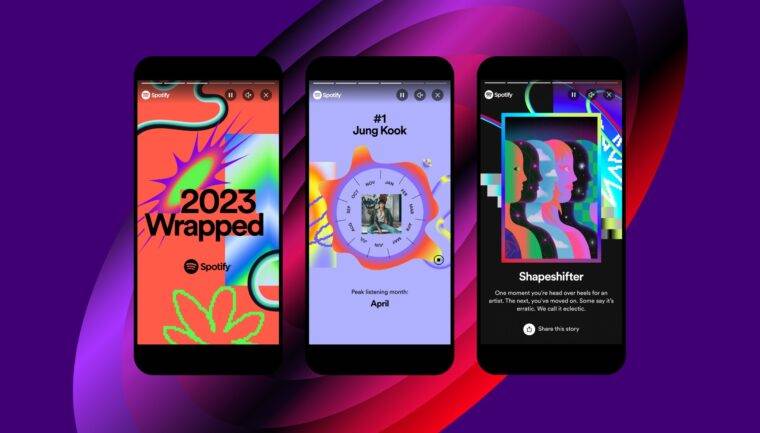
    AI in software is all around us. Spotify uses AI and machine learning to create a personalised playlist, recommend a song or compile the popular end of year Wrapped feature. Grammarly suggests real-time grammar corrections, style improvements, tone adjustments, and even rewrites sentences for clarity and conciseness. Google Workspace uses ‘smart compose’ to suggest entire phrases while composing emails or documents, improving typing speed and reducing errors. These are only a couple of examples!


    Let’s dive into the data-backed benefits of AI in software development and explore how your business can leverage this evolving technology.

    Ftr Experience Header Scaled 1
    Spotify Wrapped. Image source: Spotify

    The Numbers Don’t Lie: AI’s Impact on Software Development

    Recent studies paint a compelling picture:

    • Companies implementing AI in their software development process see a 25% reduction in time-to-market (McKinsey, 2023).
    • AI-driven testing can identify up to 90% of software bugs before launch (TechValidate, 2024).
    • Businesses using AI for market analysis in software development report a 30% increase in successful product launches (Gartner, 2023).

    These statistics underscore the transformative potential of AI in software innovation. But how can you harness this power for your projects?

    Strategies for AI-Driven Software Development Success

    1. Predictive Market Analysis: Utilise machine learning algorithms to analyse vast amounts of market data, identifying emerging trends and untapped niches before your competitors.
    2. AI-Powered Code Generation: Implement AI tools to assist in writing and optimising code, significantly reducing development time and improving code quality.
    3. Personalised User Experiences: Leverage AI to analyse user behaviour and preferences, creating dynamically adaptive interfaces that resonate with individual users.
    4. Automated Quality Assurance: Employ AI-driven testing tools to identify bugs and usability issues early in the development process, ensuring a polished final product.
    5. Intelligent Resource Allocation: Use AI to optimise your development team’s workflow, assigning tasks based on individual strengths and project requirements.
    6. Growth-Driven Software Development: With AI and the digital landscape changing so rapidly, adopting the Agile process of Growth-Driven Software Development is key. This will help your software continually improve and keep up with the ever-evolving digital world.

    Case Study: AcmeSoft’s AI Transformation in Software Development

    AcmeSoft, a mid-sized software company, implemented AI-driven development strategies in 2023. The results were staggering:

    • 40% reduction in overall development time
    • 35% increase in user satisfaction scores
    • 50% decrease in post-launch bug reports
    • 28% boost in first-year revenue for new software products

    By embracing AI throughout their software development lifecycle, AcmeSoft not only improved their bottom line but also positioned themselves as industry innovators.

    Case Study: Farm 4 Life and Back9’s AI-Powered Smart Farm Plan

    Farm 4 Life, an innovative education platform in New Zealand that teaches farming to students, approached Back9 with a unique challenge. Tangaroa Walker, the Hub Founder of Farm 4 Life, needed a mobile app to allow their students to access courses and educational resources more easily.

    As the project evolved, an opportunity was identified to provide a comprehensive one-page business strategy plan to those in the farming space. Leveraging AI integration, Back9 created a software platform where farmers can create a detailed and actionable business plan in a matter of hours – tailored specifically to the farming industry.

    Farm 4 Life'S Smart Farm Plan Has Used Ai In Software Development.
    Farm 4 Life’s Smart Farm Plan

    The result? The Farm 4 Life Smart Farm Plan – an AI-powered solution that enables farmers with limited time to create comprehensive business plans quickly and efficiently.

    This case study demonstrates several key strategies for AI-driven software development success:

    1. AI-Powered Personalisation: The Smart Farm Plan uses AI to tailor business plans to the specific needs of individual farmers.
    2. Automated Content Generation: AI algorithms help generate detailed business plans based on user inputs and industry-specific data.
    3. Intelligent Data Analysis: The system likely uses AI to analyse market trends and best practices in the farming industry to inform the business plans.
    4. User-Centric Design: The mobile app and Smart Farm Plan were developed with the end-users (students and farmers) in mind. That means addressing their specific needs and constraints.
    5. Innovative Problem-Solving: Back9’s approach shows how AI can be used to identify and solve problems beyond the initial project scope.

    Looking Ahead: The Future of AI in Software Development

    As AI technology continues to advance, we anticipate even more exciting developments:

    • Autonomous Code Refactoring: AI systems that can automatically improve and optimise existing codebases.
    • Emotional Intelligence in UX Design: AI-powered interfaces that can read and respond to users’ emotional states in real-time.
    • Predictive Maintenance: AI algorithms that can forecast potential software issues and automatically implement fixes before problems arise.

    Overcoming The Challenges

    While the benefits are clear, implementing AI in software development comes with its challenges:

    1. Data Privacy and Security: Ensuring that AI systems handle sensitive code and user data securely and in compliance with regulations.
    2. Skill Gap: Many organisations lack in-house expertise in AI. Investing in training or partnering with AI specialists can bridge this gap.
    3. Integration with Existing Workflows: Adapting current development processes to incorporate AI tools seamlessly.

    Embracing the AI Revolution in Software Development

    The integration of AI into software development isn’t just a trend – it’s a fundamental shift in how we approach innovation. By embracing these technologies, you’re not just keeping pace with the industry – you’re positioning your business at the forefront of the next wave of software evolution.

    Are you ready to revolutionise your software development process with AI? Let’s explore how Back9 can bring your software ideas to life. Together we’ll leverage cutting-edge AI technologies to create products that truly resonate with your target market.

    Contact us today to start your AI-driven innovation journey in software development.