Google Display Ads – Why You Should Use Them

There are many reasons to use paid advertising. Here are 9 reasons to use Google Ads in general. Google Display Ads are a type of advertising that falls under the Google Ads umbrella. They allow businesses to show ads on websites across the internet. Display Ads are a great way to reach new customers, and they can be very effective in driving brand awareness and website traffic.

There are several reasons why you should use Google Display Ads for your business.

Effective at reaching new customers.

Google Display Ads are very effective at reaching new customers. When someone visits a website that is part of the Google Display Network, your ad has the opportunity to be seen by that person. This gives you the chance to reach people who might not be familiar with your brand or your product.

Flexibility to fit your specific marketing goals.

Google Display Ads are very flexible. You can customize your ads to fit your specific marketing goals. For example, if you want to increase brand awareness, you can create an ad that is designed to generate interest and awareness for your brand. If you want to increase website traffic, you can create an ad that is designed to drive traffic to your website. And if you want to increase sales, you can create an ad that is designed to generate leads or sales for your product or service.

Affordability

Finally, Google Display Ads are very affordable. You can set a daily budget for your campaign, and you only pay when someone clicks on your ad. This makes Display Ads a great way to stretch your marketing budget and get the most bang for your buck.

How to use Google display ads

Google Display Ads come in all shapes and sizes. The key to making them work for you is to create ads that are relevant to your target audience and that stand out from the rest. Here are some tips for creating effective Display Ads:

1. Define your target audience.

The first step in creating effective Google Display Ads is to define your target audience. Who are you trying to reach with your ads? What are their interests? What are their demographics? Once you know who you’re targeting, you can create ads that are relevant to them.

2. Write compelling ad copy.

Your ad copy is what will make or break your ad campaign. Your copywriting for your ads needs to be attention-grabbing and that offer value to your target audience. Don’t try to sell them on your product or service; instead, focus on how your product or service can solve their problem.

3. Use eye-catching visuals.

Your visuals need to be eye-catching and relevant to your ad copy. If you’re selling a product, use high-quality images of the product. If you’re selling a service, use visuals that depict the benefits of the service. And make sure your visuals are optimized for all devices—you want your ads to look good on both desktop and mobile devices.

4. Test, test, test!

The only way to know if your Google Display ads are effective is to test them. Try different versions of your ads and see which ones perform the best. Then, continue to refine your ads until you’re getting the results you want.

Reach New Customers and Drive Sales with Google Display Ads

Display Ads can be a great way to reach your target audience and grow your business. If they’re done right. Display Ads are a great way to reach new customers and drive brand awareness and website traffic. If you’re looking for a flexible, affordable way to market your business, then you should definitely consider using Google Display Ads. In saying that like any tactic in marketing using them in isolation is not always the best option and may not give you the best ROI. Consider using a Google Certified expert and incorporating Display ads into your overarching marketing strategy.

It is important to also understand the role your website plays in your paid advertising strategy – which falls under Search Engine Marketing or SEM. You can send as many people as you can to your website, but if your website sucks it won’t convert.

Get-Free-Website-Audit-Button

SEO and SEM meaning?

It’s not uncommon for people to misunderstand SEO and SEM’s meaning. And you can be forgiven if you want to compare SEO and SEM in a showdown

Search Engine Optimization (SEO) and Search Engine Marketing (SEM) are two terms that are often used interchangeably, but they actually refer to two different things.

SEO – or searching optimation – is the process of optimising a website for Google’s search engine algorithms. This is associated with the goal of earning higher web traffic (visitor) levels and improving the visibility of the site on SERPs (Search Engine Results Pages). SEM, on the other hand, is a form of internet marketing that involves the use of paid advertising to earn higher web traffic levels and improve the visibility of a site.

Should SEO and SEM be employed separately?

While SEO and SEM meaning can be often lumped together as the same thing. Often because they both aim to improve the same thing. A website’s ranking in search engine results pages (SERPs). However they are in fact two distinct strategies. In saying that they should be used together in order to achieve the best results.

SEO should be used to optimize a website’s on-page elements, such as the title tag, meta description, and header tags, as well as the site’s content. SEM can be used to improve a website’s ranking in SERPs by bidding on relevant keywords and phrases.

When SEO and SEM are used together, they can create a powerful marketing strategy that can help businesses succeed online. SEO can help to attract organic traffic to a site, while SEM can help to drive traffic through paid advertising. By using both SEO and SEM, businesses can have a better chance of two things: 1. Earning higher web traffic and 2. improving their visibility in SERPs.

Where to Start with SEO and SEM

Understand SEO and SEM meaning is really just the start. If you’re still scratching your head about SEO and SEM, don’t worry. We can help! In addition to this blog post, we have a wealth of information about both topics. Plus, we offer free website audits so that you can get an idea of where your site stands and what improvements could be made. Simply fill out the form below and we’ll grade your website right here and right now!

Can I Manage Google Ads Myself?

Can I Manage Google Ads Myself?

The quick answer is, Yes, you can. You can create a google ads account and set up an advert that’ll be up and running fairly quickly. But ask yourself, how well can you manage Google Ads? Do you understand the intricacies of:

  • Identifying key reports that will give you the most insight into your campaigns?
  • Are you comfortable interpreting the data in your account and knowing what actions to take to optimise your campaigns?
  • Can you explain key Google Ads data such as Ad Rank, Search Impression Share, Quality Score, or Interaction Rate?

If you do, then you probably don’t need to read on, and I’ll bid you a good day. However, if those things seem a little foreign to you then perhaps you should consider outsourcing an expert to Manage google ads for you.
Can, would, or do you service your own vehicle? Or if you employ people do you do your own employment contracts? And do you do all of your accounting with the aid of an expert in their field?
Again if this is something to consider. Having an Expert manage google ads for you will ultimately give you the best opportunity to see measurable, tangible results – and a positive ROI.
If you choose to manage Google Ads yourself, whilst it may seem easy to get started, it is virtually impossible for a novice user to know whether or not they are getting the best results possible, and there are a lot of parts to a successful campaign.

Managing Google Ads

Managing a Google Ad account is not simply looking at the reports once a month and making a couple of random tweaks. It’s about knowing exactly what’s happening in the account day to day. And then being able to dedicate time each week to check key reports. It’s also important to understand how to research ppc keywords, costs per click, and even the user’s search intent. Then there is the landing page each ad directs the user to. Is it optimised for user experience, is it even relevant?

Google is pretty smart – we all know this. But an expert in Google ads will make calculated adjustments and apply new opportunities to maximise traffic, conversion, and ultimately revenue.

In competitive industries, like law firms, travel, and tourism, or Finance and insurance to name a few – this requires daily check-ins and adjustments to bids strategies, for example, just to maintain the ad position and level of traffic to the website.

A lot can happen in the space of a month. Google Ads is definitely not a “set and forget” platform, so don’t be tempted to think that a profitable campaign will remain profitable without any intervention from you. It’s likely that it’s taken months, maybe years, to get it to a profitable state, and it will continue to require work and time to keep it profitable.

You Can Lead a Horse to Water…

You may have heard the saying ‘you can lead a horse to water, but you can’t make it drink’. This also applies to Google Ads. And in particular your website. Imagine the information (or content) on your website is the water. Once you lead your prospects to said water, you need to ensure they find what they are looking for. Simply put, what do you want those visitors to do once they get there? And how easy is it for them to drink – or take that action – How will you make them stay longer? How will you convert them into contacts and then customers?

And if they do convert, what is your lead nurturing process or strategy?

These are all relevant questions to be thinking about and if possible answering before you even set up the Google Ad account.

A &Quot;Working Website&Quot; Picture Pasted On A Cardboard Box

Why you shouldn’t Manage Google Ads yourself

On more than one occasion I have heard from clients who tried to manage Google Ads on their own. And all too often, have made a complete mess of it. They end up spending thousands of dollars and have no idea if they got any ROI from it.
We’re all human, and with digital marketing being such a minefield, we understand the attraction to manage Google Ads yourself.

Google encourages you to have a go, with their ‘easy’ AdWords Express offer that pops up with every Google service you sign up to.
It seems by doing it yourself you will save on agency fees.
There are so many companies offering SEO and Google Ads services. They hail from who knows where around the world at seemingly cheap rates. (if you’re like me you get at least a few emails a week in your inbox)
All the Google Ads companies claim to be “experts”
Yellow Pages have sale reps selling Google Ads every time you want to talk about how expensive their adverts are.
It’s really hard to know who you can trust and at least if you manage your digital marketing yourself, you’re the one in control right?

If you have tried outsourcing to digital marketing companies before you may have had a bad experience. Unfortunately, as marketing companies, even the honest ones, often get tarred with the same brush, or worse we inherit the distrust or the baggage the client carries with them from the previous firm.

How Do You Choose The Right Marketing Agency?

There are still a number of reasons you’ll see better results using a certified expert to manage Google Ads and should avoid trying to do it yourself –

  1. Being found in ways you don’t want to be
  2. Showing the Search Results in the wrong locations
  3. Being found for the wrong keywords
  4. Appearing for negative searches
  5. It’s always Changing

Get a professional to Manage Google Ads for you

Like the references above in the first section, about vehicle servicing legal contracts and accounting practices, there are some tasks or jobs we don’t (or shouldn’t) do ourselves. Factors like not having the time, resources, or expertise to do them as well as they need to be done all contribute here..
Some people may ‘have a crack’ at certain tasks (probably) to save money, some may just enjoy learning or doing it themselves. When it comes to digital marketing and Google Ads, it all depends on how much time you have to learn and keep up-to-date with the ever-evolving changes.
It’s a well-known fact that time is our most valuable commodity – in fact, the one thing on earth we can literally never obtain or acquire is more time. Smart people understand that swapping money for (other people’s) time is an investment – after all, we can always get more money – but we can never get more time!

The Damaging Effects of upsetting Google

We see this so often. To save money, people sacrifice their time to create their own templated websites. Often they try to do their own SEO and manage Google Ads themselves too. Months down the track, they give up in frustration and ask for help. Or worse – they deduce that digital marketing doesn’t work! The trouble is that on the internet, some things last a long time. A website that has been penalised by Google or damaging SEO practices can take months (or more) to put right.
If you’ve tried to manage Google Ads yourself, we understand you’re probably just trying to lead your horse to water. But you may be just getting led down the garden path…
You could actually be doing or already have done some lasting damage that will take time to put right. If you’re spending a bunch of money on Google Ads but not getting results, or even worse, you have no idea if you’re getting results at all – the best advice we can give you is, STOP! Talk to someone who understands and get yourself back on track.

How is Website Health Score calculated?

What is Website Health

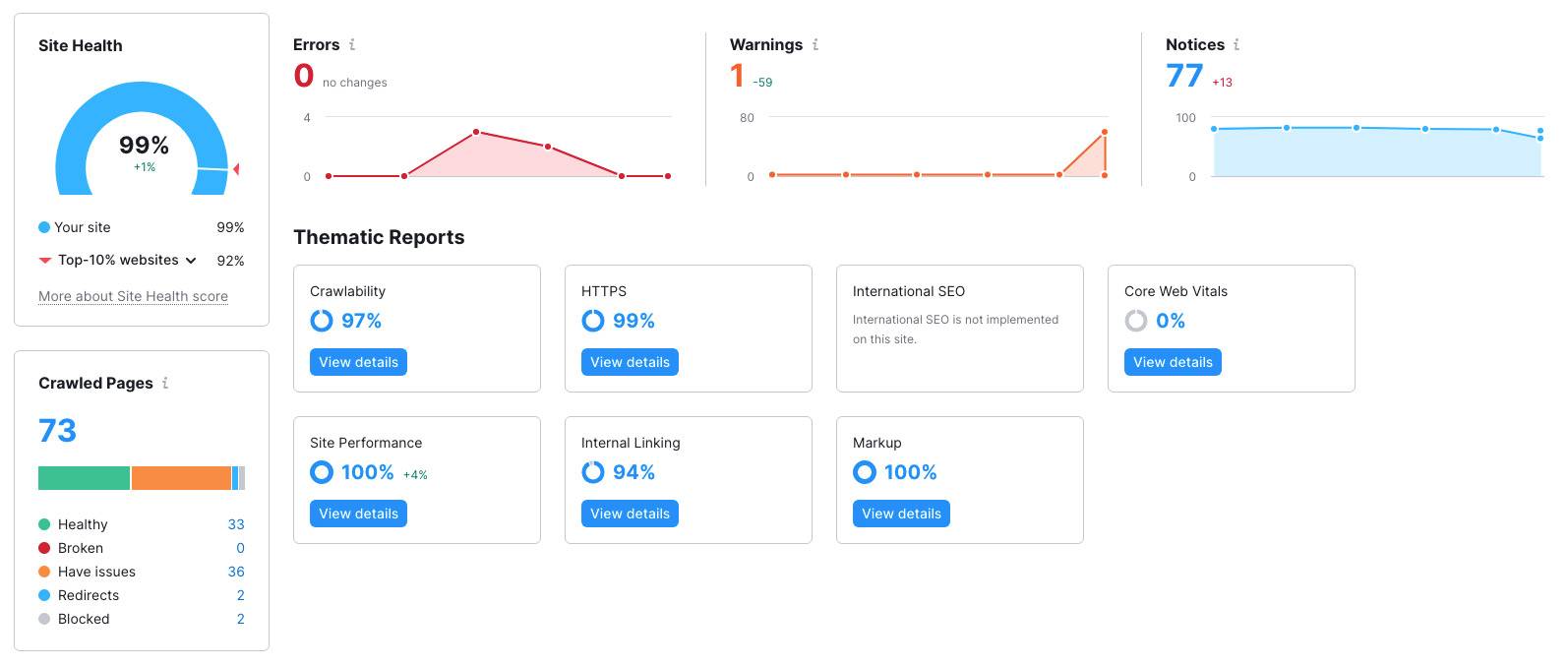
Website Health Score is a method we use to Audit a website. Your Website Health Score is a critical part of your website performance and is based on the number of your total errors and total warnings that were found on the pages crawled on your site. Errors have more impact on your Site Health Score than warnings, so it is recommended that you address errors first if you can.

Nexus-Website-Health-Score

Our website Audit has over 130 checks — types of issues the tool checks for. The type of check found on the site, the number of unique checks found on the site, and the number of issues fixed for one check matter. Fixing all issues related to the same check (for example, all Broken links fixed) will have an effect on the overall health of your site higher than fixing two errors from two different types of checks (for example, Duplicate content issues and Broken links).

Your Site Audit will also provide a list of notices.

As far as notices go, you will still want to fix these issues as they still impact your SEO, but remember:
errors will have more weight on your Site Health Score compared to warnings and notices. Make sure you are addressing any major issues your site may have (errors) so that you can ensure you are making the best efforts to help lower your overall score.

Excluded Checks

If you exclude any check from your audit, the problem will no longer appear in your report, and we will no longer check for these issues in future crawls. At the same time, the audit will no longer take into account any of the instances of excluded checks when calculating your Site Health in the future crawls.

You can track the total number of errors, warnings, notices, or specific issues that Site Audit finds on your site over time with the Compare Crawls and Progress reports in the tool.

What the Website Health score DOES NOT depend on

The Site Health Score doesn’t depend on the number of pages crawled on the site, since the frequency of each error’s occurrence is what accounts for the score. However, the larger the site, the more attention you should pay to issues relevant to large sites, such as internal linking and site structure.

Other factors on Site Health Score

Because of the way our bot navigates a website through hyperlinks from the main page, each crawl can find new issues on the same site. Therefore, we recommend that you crawl a website in its entirety (as long as you have the crawl budget). At the same time, you can also set your audit’s crawl source as Sitemap or a file of URLs.

There may be times when a crawl finds a new issue (pages with slow loading speed, for example) that has a strong overall effect on your score at the same time that you cleaned up some of the other less significant ones (such as fixing URLs that are too long). In such a case, your site’s total number of issues could go down but your score would also go down.

Google Business Profile Verification methods available in NZ

Having your business show up with your phone number, website, and map link makes it easy for customers to get in touch with you. The little sidebar with that information you see when searching for a business is a Google Business Profile (formally Google My Business). Any business with a verified profile can make changes to the listing, respond to reviews, and share images of the business. In the past, the verification process has sometimes unreliable. There are a few Google Business Profile verification methods available in NZ, so over time it’s become a whole lot easier!

Why get verified?

We’ve talked before about Google Business Profiles and how a verified account is probably the single best thing you can do for SEO. If you don’t have one at all and you need to create one you could make one quickly at the Google Business Profile portal. But if you aren’t verified, you have minimal control over the settings in your profile.

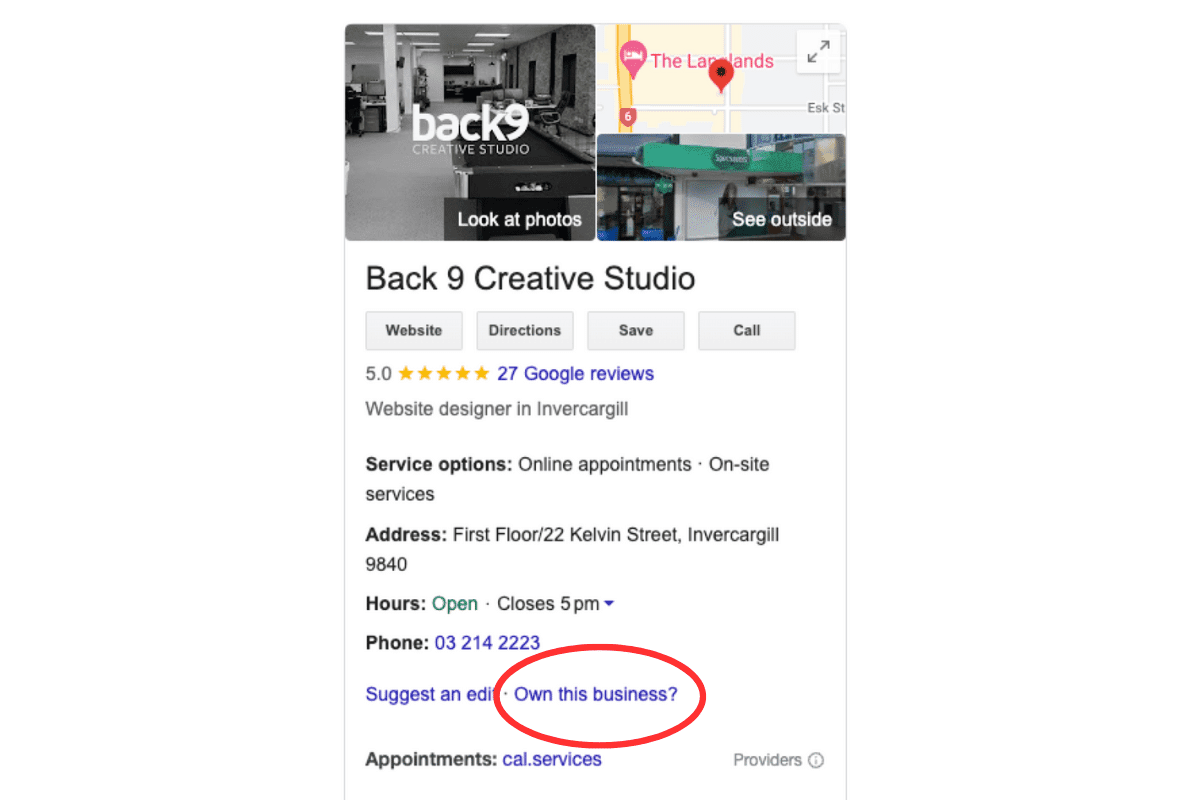
If you see one that you don’t remember making, Google may have made one for you. Instead of making a new one, you can claim the existing profile by clicking the “Own this business?” link in the profile sidebar. Then you’ll be taken through steps to prove that you own the business.

Google Business Profile For Back9 Creative Studio With A Red Circle Showing The &Quot;Own This Business&Quot; Link.

Google My Business Verification methods in NZ

Until recently, there was only one method of verification you could rely on to show up as an option. That was to have Google over in the US mail your business a physical postcard with a 5-digit code on it. The problem? The United States isn’t very close. Postcards could take several weeks to show up, and more often than not, never arrived. And if you requested a new one, the old code is instantly invalidated. This means you could wait 4 weeks, request a new one, and then have the postcard arrive the next day and it wouldn’t count, forcing you to wait again.

A lot of NZ businesses ran into a wall with this process, and thankfully Google has heard their feedback. Now, verification is much faster, easier, and more accessible than ever.

Older Methods

The old methods still work if they’re available. Phone verification (for a landline) used to be a good option if you have a business landline. For that, a robot will call and tell you a code that you can type in right away. This method was fast and easy, but a lot of businesses are moving away from landlines.

The postcard was far less reliable but available for any business. The wait is long and if you are lucky enough to get it, there’s a chance it would be expired by the time it arrived in NZ.

Thank goodness the verification methods have eventually moved into the digital age. We’ve compiled a current list below.

Current Standard Methods

  • Phone or Text Message: One new method is to get a text message or answer your workplace phone number. If they call and it goes to answer phone, Google will not leave a message with the code.
  • Email to the business account: Another is through the business email attached to your account. Like the text, this method is nearly instant and you can proceed with verification right away. If it doesn’t come through, make sure to check your Spam. Also ensure you can actually access the email address listed on the account.
  • Live video call: Since postcards weren’t very reliable, there’s the option to do video verification. With video verification, you do a live video call with someone from Google and show them your business signage and premises. While in theory this should work well, we’ve previously had trouble getting the calls to come through. Sometimes Google didn’t show up to their call and wouldn’t answer callbacks. And because of the amount of prep it takes to get ready, this led to a lot of lost time. Hopefully they are more reliable for your call. This method also doesn’t work for side hustles or running a business out of your house with no signage.
  • Recorded Video: You can record a video showing the required details of your business.
  • The classic snail mail: This method is still available but is a bit clunky. The code lasts 30 days and while you are awaiting your mail, you can’t request a new code or change the businesses name, address or category. Google states that most codes arrive after around 14 days.
  • Instant verification through Google Search Console: This method is only available for some businesses. When it works, you simply add a website property to Search Console and verify that you own it. Then sign into your profile and follow the steps to finish Google Business Profile verification. This method is more technical and requires knowledge of Search Console and possibly updating records for your domain.

Other Points to Consider

Get a business email with your domain

Instead of a standard Gmail, Yahoo, or Outlook account, try getting a business account. This is one with your business name at the end. For example, one that we have at back 9 is info@back9.co.nz . Some hosting providers give you the option for a business email. Or you can get a Google Workspace account with any hosting provider starting at $9NZ/month per user. The steps can be a bit complicated if you aren’t familiar with web hosting, so an agency like ours can help with setup if needed.

Make sure you have emails and phone numbers attached to your Google Business Profile

There are a lot of things that you can’t do until you’ve completed Google My Business verification. But you can add emails, phone numbers, and your website. If you want to get an email or text message, make sure that you add this information to your profile.

Enable 2-factor authorisation

Google is pushing for all accounts to have 2-factor authorisation to cut back on fake profiles. 2-factor authorisation is when you need to confirm sign-ins to your account on another device. So if you sign in to your account, you have to tap a notification on your mobile device before you gain access. This greatly increases security but also means you need your device by you at all times. There can also be issues if you lose the mobile device which can make regaining access extremely difficult. Google calls this “2-step verification” and you can find out more about it on the Google 2-step verification page.

Verification for your business now, and into the future

With these methods, it’s easier than ever to get your business verified. And since having a verified profile is the best way to improve your SEO, it’s something you should handle as soon as possible. The last thing you want is for someone to type in your business name and have a competitor show up – something we’ve seen surprisingly often when the business doesn’t have a Google Business profile.

However, Google My Business verification is only the first step for using your profile to drive visitors. After that, you need to optimise it by adding products, posts, videos, and images in the right place that are the correct size. An optimised profile can boost traffic to your website and in-store visitors, and we’ve seen optimised accounts bring in twice as many monthly visitors to the profile as unoptimised accounts. And this directly led to more people requesting directions or making calls to the business. For more popular industries, sometimes over 10,000 people see the profile in a single month! It is also an important factor in Local SEO. The GBP Insights page has detailed results about how many people profile and how many take additional actions like pressing the call button or requesting directions.

If you’d like help with setting up, verifying, or optimising your Google My Business profile, get in touch with us or hit the button below. Our team manages dozens of profiles and can help you reach more customers who are searching for you.

Updated 21 June 2024