Google’s May Algorithm update is a Game Changer!

Most normal people don’t even know what the Google Algorithm is. Let alone care what a Google Algorithm Update is. Or what it means to them… Are you one of those people? That’s okay. But even if you are, if you’re in business and you have a website, and you want it to be found, then you need to know about this next update!

This update is BIG. REALLY big. It WILL separate the website winners from the losers! If you don’t understand – or even care for the “nerdy Geek Speak” – that’s cool I get it, but before your eyes glaze over and you hit the back button, or give up and go watch videos of cats, I urge you to read on, or at the very least, contact your website provider to discuss what you need to do to get your website up to speed.


The 3 Key Aspects of Core Web Vitals

Google announced this Algorithm update last April. This means that they’ve let us know ahead of time that this major change was in the works. Only recently did they put a date to it, however. In May, their new measurement for SEO called Core Web Vitals will start taking effect. Specifically, they are introducing three metrics specific to page experience. These Core Web Vitals put simply, will address:

1. Site speed

The speed a website page loads once a link is clicked on from search results. Google has been pushing fast site speed for several years, because that’s what users want. Over half of users won’t wait more than 3 seconds for a page to load. Yet, stats on page load speed claim the average is anywhere from 15 seconds to nearly 30 seconds to load. Mobile sites are meant to load faster, but many take longer because the site wasn’t designed to work on mobile devices.

So what does that mean for you? If you are able to get your pages to load in under 3 seconds, you should see a boost in results. All content “Above the fold” (What someone sees without scrolling down) should load within that time. Most sites are going slow, and if you’re faster, you’re more likely to rank above them in Google.

2. Interactivity

How seamless user interactivity is – for example, with no delays in button-tapping and site response or desired action. We’ve all been to a website with broken buttons or a confusing structure. With Interactivity being measured soon, sites that are designed and built better will rise to the top. Google knows design and ease of use is important to people. So they’re going to start rewarding sites that do it well–and punishing ones that don’t.

3. Stability

The stability of a webpage content is the way it loads for a user on the screen. Have you ever been on a website and see something you want to click, but then it moves right before you click it shifts and you click something else? Those kinds of things will soon be measured as Stability. The layout of the pages should generally be consistent. Pages where text or images keep shifting around while other things load (Think ads loading while you’re reading) will start to see a decrease in rankings. Google has known this kind of site behaviour annoys people, so they’ve found a way to measure and analyse the most important factors that cause this.


What does this mean for your website?

This change could be good or bad news for your website. It’s good news is that if you already have a well-built site that loads fast and gives a good user experience. You might not have to do anything to get the benefits! You’ll probably see your rankings increase and it will be easier for you to be found in Google.

The bad news is that if your site needs improvement, this update could hurt. An old, basic, slow site won’t do well when things change. If you’ve been putting off updating your website, now is a good time to action it. The sooner you do it, the better.

Procrastination is easy!

When you have hundreds of things on the go – as most business owners do, it’s easy to let something like this sit in the “I’ll worry about that when it happens category”, If you’re familiar with the Eisenhower Matrix then this is the probably sitting in the Important, but not Urgent quadrant.

This is normal. We see it all the time with business owners and only when something becomes Urgent and Important, is it really on the radar? It’s human nature to put things off or procrastinate when we don’t understand the impact or cost of the action, or the cost of inaction for that matter.

If you value your website and you get a good amount of leads from organic traffic, then the cost of inaction here could be detrimental to your business.

On the other hand if you don’t know what your website is up to or what it is returning for you I recommended you talk to a good Marketing Company. Have a read of our article by clicking the button below to see how to find a marketing company who is a good fit for you.

How To Choose The Right Marketing Agency?


User Experience – It needs to be top shelf

User Experience is a bit of a buzzword these days in digital marketing. However, it also can’t be understated. The user, A.K.A. your leads, prospects, and customers have all of the power these days!

Your website needs to cater to their expectations. Whether that be expecting the site to load lightning fast, that they can navigate your site well, or simply find the answers to their questions about what you do and how much it costs.

If it doesn’t cater to these things, then the reality is you are likely to lose those visitors, never to return, especially if your competitor caters for their expectations better.


Google’s promise to all internet users

All online searchers want 2 things – relevant webpage results for their search query, and when they land on that page, a great experience from the websites. Google understands this and as such they want, no, NEED to deliver on that. And that is their core promise.

To deliver that promise, the Google Algorithm Update needs to be constantly evolving. And your website needs to keep up! Google added metrics around page loading speed, mobile-friendly need in 2018, then the BERT update in 2019 and in April 2020 they announced the focus on user experience. And May 2021 will see it come to fruition. To evaluate and measure page experience they will implement what they are referring to as Core Web Vitals.

Google has said for over a decade that they want users to have the best experience possible on websites and deliver those websites as their first results. A good website is an investment. It takes time, effort, and resources to do it right. At the end of the day, your website needs to have a good design with quality content. Some people have tried to take shortcuts, tricking the algorithm etc. but that was always a risk. Eventually, Google was going to find a way to find out what websites are doing it right and what ones took shortcuts. The next step for that starts in May. Are you ready?


What do you need to do now?

I mentioned the Eisenhower Matrix above and if you care about your search rankings, then now is the time to shift your focus. Your website maintenance, or design for user experience into the URGENT and IMPORTANT quadrant. I can tell you categorically as I write this, even our own website is well below average. Right now it needs some urgent attention! We’re working on improving it to make it better and easier to use.

So if you haven’t done much with your website in recent times – or worse – have done nothing, then please act… For your website users’ sake, please don’t procrastinate. Your website’s success quite literally depends on it.

See how your website is doing with a free website audit


Do Google Ads work?

The internet is rife with advertising. Ads appear before YouTube videos, in the middle of Facebook feeds, and on top of Google results. Google Ads–formerly Google AdWords–are the ads that appear before the normal results. They’re a quick way to get to spot one on Google quickly. But does advertising on Google Ads really work?

For many businesses, yes, it does. However, success depends on many factors, such as how much time you invest into creating the ads, the quality of the website itself, and of course, advertising budget. Even on a smaller budget, Google Ads can work–as long as they’re done right.

The different goals of advertising on Google Ads

Ask most businesses what their goal for Google Ads is, and they’ll answer with “Get more customers”. And Google Ads can help with that. But the final sale or new customer is only one stage of the Buyer’s Journey. There are several different types of goals in Google Ads with the main ones being getting website visits, getting leads, and making sales.

Get Free Audit On Your Google Ads Account

Getting website visits through Google Ads

Not all sites need or even want sales or customers. For some, the goal is to raise awareness. Think of non-profits like charities, who want people to be aware of a specific issue. They may not have anything to sell. They may not accept donations. For these types of sites, the goal is to educate customers, and you’ll pay Google Ads for each click on your ad that leads to your website, with the average across all industries being about $3.80 NZD per click.

One study showed that educated customers are over 130% more likely to do business with a company. And the more expensive the product or service, the more likely someone is to do thorough research before making a decision. Using the website traffic goal can help get people to your website–then it’s up to you to have the right information on the site to keep them interested. If your site is small and simple and you don’t add articles or updates regularly, the website traffic goal may not be right for you.

Since costs per click (CPC) are relatively low, they’re a fantastic option for a smaller budget. Sometimes, people simply don’t know that you’re an option. By showing up in Google for the right keywords, they can find you, learn about you, and maybe decide to do business with you.

Getting leads through Google Ads

When you can’t make sales directly through the website or are looking to get leads, advertising on Google Ads can help you get them. Google Ads can help by having you pay for each conversion. Standard options for conversions include calls made by clicking the call button on an ad or filling out a contact form. You can also set them for custom actions–like if someone visits a thank you page–but these require adding some code to your site manually or by using Google Tag Manager. Naturally, the cost for a conversion action is much higher than the cost per click, currently at around $70 NZD per conversion.

The benefit of using this kind of goal and bidding strategy is that you can see how many leads come directly from ads. If you sell a service that profits you $500 and ends up costing $50 to get a customer, then you’ve gotten yourself a pretty good deal… Especially if they become a regular!

Getting Sales through Google Ads

If you have the ability for people to buy products directly on your website, you can create Google Ads to target getting purchases. Using this goal is great because it’s easy to track if your ads are making you money. However, to work properly it requires extra setup and adding code to your website to track purchases. Technically, a sale is considered a conversion action by Google Ads. This means across all industries, the average is $70 NZD.

For smaller, less expensive products however, this amount can be much lower. The cost per action on apparel, for example, is around $15 NZD. On the opposite end, for high-tech industries, it’s over $180 NZD.

How do you get your cost per click or cost per action lower?

If those costs seem like they’re a bit on the high side, that’s because they are. Properly made and optimised ads can be much cheaper and deliver better results. But these require a bigger time investment both for the ads and for the website itself.

Google decides how much an ad costs to run based on Quality Score. This quality score is a scale of 1-10 and includes the relevance of the keywords, the design and writing on the ad itself, and the relevance of the page the ad leads to. Using the keyword “best” and with an ad that just says “We’re the best” and a page with only “Call us now” will be closer to a 1. Well-written ads leading to an optimised page clearly related to the search term can get you a 10. And the difference in cost for quality ads isn’t just a little bit either. A 10 ad can cost half as much of a 4 ad and several times less than a 1.

Real-world examples of successful Google Ads

At Back9 Creative, we have several clients who are consistently outperforming others in their industry with better results at a lower cost. Some of these include:

  • A retail store with a cost per click of 20 cents NZD–less than 1/10 of the average across all industries and less than 1/5 of the average for other e-commerce sites.
  • A property maintenance company with $34 NZD cost per action — less than half of the Consumer Services average of $84 NZD.
  • A speciality service B2B business with under $2 NZD cost per click and $60 NZD cost per action — with average B2B at $160 NZD per action and $4.67 NZD per click.

So how are these costs so much lower than average? First, we are certified in Google Ads, which involves taking courses created by Google and passing the certification exam. We also aim to maximise Quality Score through a combination of creating professional ads with excellent website experiences. Finally, we update ads, campaigns and keywords regularly to maximise effectiveness. If you’re looking to advertise on Google Ads successfully, get in touch with us today and see what Google Ads can do for your business.

Google Ads Packages

Why should you have a Google Business Listing?

Practically everyone connected to the internet uses Google regularly. As the most popular website in the world, the search engine gets over 60,000 searches per second. It also commands nearly 90% of search engine traffic worldwide, and close to 95% in New Zealand. With that much popularity, you absolutely want your business to be a part of it. There are a few good ways to get found by people looking for someone in your industry quickly such as by using Google Ads. But one of the most important- if not the most important – is having a Google Business Listing (formally Google My Business).

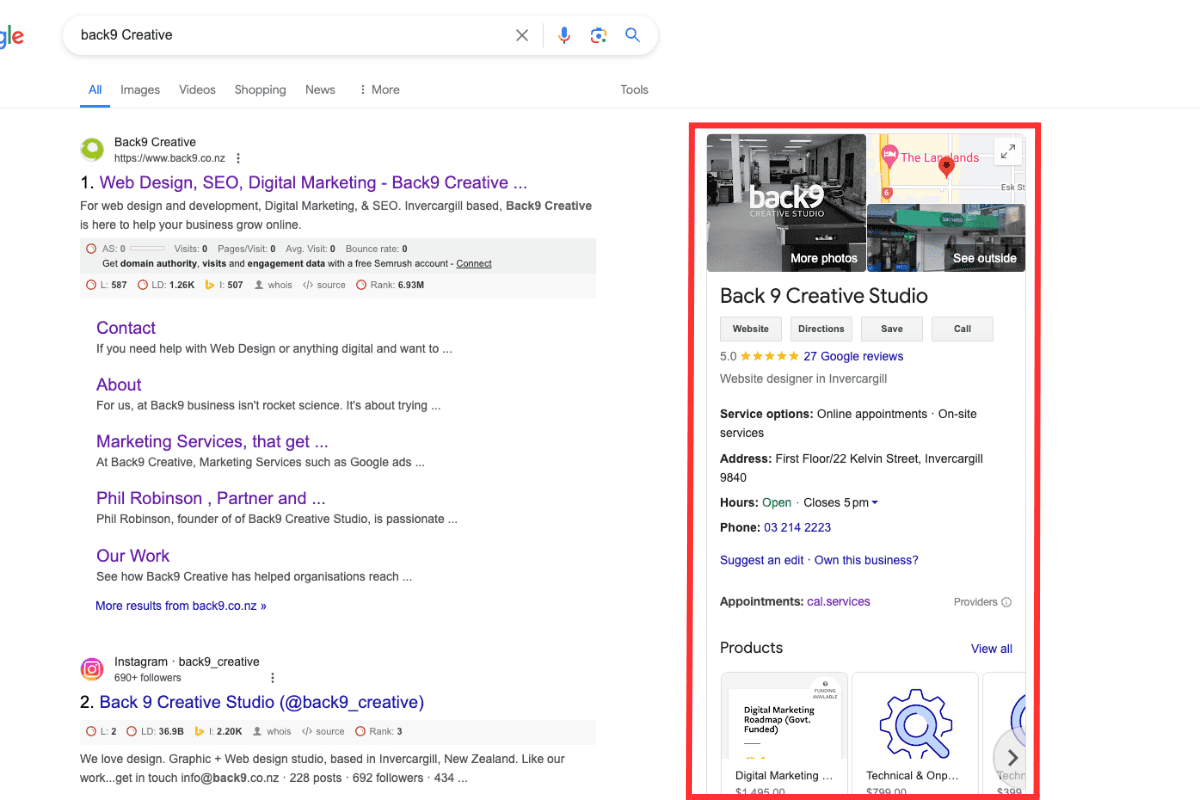
A Google Business Listing is the section that shows up when you do a search for a business. It’s most common to appear when you type in a business name directly. Take a look at the image below. The part in red is the Google Business Listing.

Untitled Design 45

There’s a ton of information about the business right there in one place. So what happens if you don’t have one? That spot of the page is blank or the details are scarce. We’ll go over the different parts of your Google Business Profile, why they’re important, and the shocking difference it can make if you have an optimised profile done instead of rushing through to get it done fast.

Image and Location

At the top of the profile is a cover photo and map location. Getting Your Business on Google Maps will help with Local SEO. The cover photo is a photo you upload to be your primary photo to represent your business. In ours, we have a photo of the Back9 studio in Kelvin Street, Invercargill. The map pin is also important because it gives people an idea of where your business is. You can even be extra precise where you put the pin and move it on the map if the address doesn’t put it quite right. Since this is the top of your profile and the first thing people see, it’s important to get it right!

Some profiles don’t have an image or driving directions. You can have a listing without it, but it’s not recommended. In 2020, Businesses with photos get 42% more direction requests and 35% more website visits. So don’t skip it!

Name and contact buttons

The name you choose for your profile is the one that Google sees as the official name, so it’s important to choose the right name. Choose the name you want to go by instead of the legal name. If you want to include LTD, LLC, Corp or any abbreviations, you can. But you don’t have to. What’s most important is that you use the name that people know your business by. So if your logo has the ltd in it and people know it by the name, include it. Otherwise, it’s probably better to leave it out.

The buttons below your name are the ways that people can contact you. In ours, we have Website, Directions, Save, and call.

  • Website goes directly to our website. If you don’t have a website, you can leave the button out, or have it link to your Facebook business page.
  • Directions opens up Google maps and gives directions to get to your business. This is one of the most common ways people get directions, so make sure the address is right if you plan on using this feature. If someone clicks the button, they’re almost certainly doing business with you!
  • Save lets you save the business to a list like Favourites, Want to Go, or Starred Places. This is useful for people who are researching and don’t want to forget a place they looked at.
  • Call immediately calls the business if you’re on a phone, or tries to connect to a calling app on desktop. The number that is called is based on the phone number you put in the listing.

Questions and Answers

The questions and answers bit is a “community” feature that pops up right below your name, address, and contact details. It lets anyone using Google ask questions about your business or answer them. Since you’re the expert, you should be answering every single question that gets asked.

Questions can get multiple answers, but the ones with the most “likes” will show as the top answer. Then users can click a link to read any other answers if they want more details.

Questions work the same way. If a question scores at least 3 likes, it will display on your GMB profile instead of just the standard “See all questions” link. If multiple questions get more than 3 likes, the one with the most likes is the one that will be featured front and centre on your profile.

Using the Q&A function as a FAQ for your business

Using the Google Questions and Answers section as an FAQ function for your business is a solid move. Think about the common questions customers hit you with and answer them there. Don’t forget to “like” your own answers too so Google knows to show them front and centre to those potential customers checking out your reviews.

Asking your own questions gives you even more control over the convo around your business. Load up your most frequently asked questions, then enter informative answers to set up a pre-built FAQ page. You’ll stand out from the competition and be way more likely to convert users into customers.

Then, make sure you vote for your own answers. This ensures that your “from the owner” answers are always displayed as the top responses. Keep an eye on your questions and answers section so you can keep your top-notch answers at the top of the pile.

Some useful sample questions to consider (depending on your specific market and industry) include:

  • Do you ship your products and/or services?
  • What’s the return or refund policy on your products?
  • How can I contact customer service?
  • Where do I use the discount code I have for your website?

Controlling the convo ahead of time can reduce overwhelming your customer support team while also helping cement a professional and trustworthy reputation online.

Reviews

Customer reviews are one of the most important factors. More than 90% of customers check reviews before making a purchase, and not having any can be almost as bad as having a slew of negatives. So although it’s optional, we highly recommend enabling reviews on your profile. Even the negative reviews can be helpful, as they can show parts of your process or products you can improve. However, in order to have reviews on, you must first claim and verify your business listing.

Products

In today’s digital landscape, businesses vying for local customers face a constant uphill battle to stand out online. Every click, view, and engagement is a crucial step towards making a lasting impression on your target market. This is where Google Business Profile products (formerly known as “Google My Business” or “GMB” products) shine as a powerful tool for capturing local search attention.

Research indicates that a staggering 60% of users reach out to businesses directly from search engine result pages (SERPs). It’s a compelling statistic that underscores the importance of providing comprehensive information about your business. The more details you can offer, the higher the likelihood of converting potential customers into actual sales.

Claim and Verify your Business

If you’ve never made Google Business profile for your business but can find a listing for it, Google’s done the work for you, right? That’s only partially true. Google regularly scans for new businesses and adds them automatically based on the information they find. But that automatically found information could be wrong or outdated. And even if it’s not, you’ll still be missing out on a lot of potential visitors if you don’t do anything with it.

One of the most important parts of managing your listing is to make sure that it’s verified. With a verified listing you can respond to reviews, start appearing in local searches, post on your profile, and view insights like photo views and the number of times the call and directions button were clicked. Google treats a verified business better than an unverified too – meaning you’ll show up higher on searches.

How do I know if I’m verified?

If you don’t know if someone has verified the listing (and you’ve checked that you have one!) you can use Google’s Business Verification tool to check. Simply sign in with the email address associated with the business profile and then choose your business and it will tell you if it is verified, pending, or not requested.

My business says somebody else owns it?

If you sign in to Google My Business and go through the steps and find that someone else owns it, Google gives you a couple of options. First, check to see if someone in the company went through the process. If not, you can follow steps from Google to Request Ownership of a Business Profile.

An optimised profile attracts more visitors

Getting a profile set up and verified is a great way to attract visitors to your business. But doing it right will get you even more visitors. We’ve seen it happen with our clients here at Back9. For one client, we saw profile views jump up over 60% over a 3 month period, with over 30% more appearances in searches and nearly twice as many times showing up on Google Maps. But did those views translate into anything? There was also a 30% jump in people clicking the View Website button, 50% more calls, and more than twice as many direction requests. More appearances led to more clicks, more calls, and more visitors. Other clients are also seeing an increase in calls, visits, and people discovering them by searching popular keywords.

The short of it is that these days, all a potential client or customer needs to type into Google is “Hairdresser near me” (as an example) and a range of options will come up. Google knows the location of the searcher and if your listing is optimised, you have a greater chance of being the top listing and winning that client or customer.

How do I get an optimised Google Business Listing profile?

To create an optimise profile, you have to fill everything out thoroughly. This includes all information, categories of business and products, and knowing which search terms to try and show up for. After doing that, it’s important to update your photos and any changes to your products or services in your profile in order for it to stay relevant. Profiles that are updated regularly also get more kudos from Google and increase the chances of showing up for more searches.

If you don’t have the time to create, optimise, or regularly update your Google My Business Profile, the team at Back9 can help you. We are certified in Google My Business listings and can find out if you have a profile if you aren’t sure, help you claim and verify your business, and optimise it so that it can do the most work for you. If you’re interested in finding out how we can help you, give us a call or book a meeting using the button below.


Updated 19 June 2024

9 Powerful Reasons to Use Google Ads for Winning Results

Do Google Ads really work? Yes! Google Ads is one of the most effective ways to increase your sales fast and, with the right setup and management, it’s an extremely powerful tool that can bring in a whole new set of customers. And more customers equals more money for you! In this article, we’ll go over 9 key reasons to use Google Ads for your business, and why now is the best time to start.

One of the best strategies to use Google Ads is to target specific keywords that potential customers are searching for. By doing this, you can effectively reach your desired audience.

1. Get your business on the 1st page of Google

By utilising Google Ads, businesses can showcase their offerings to those who are actively seeking relevant products or services. This is a crucial advantage of using Google Ads.

The most straightforward reason to use Google Ads is that it will get your business found on Google. And as an ad, you can jump straight to the top of Page 1. This doesn’t mean that your ad will show every single time someone searches for your industry, but it does mean that it will show up frequently. Without Google Ads, it will often take a few months for your website to rank well on Google (but that’s a whole other story, and requires lots of work!) But with Google Ads, the results can start right away.

Moreover, when you use Google Ads, you can create tailored ads that resonate with your target demographic, ensuring a higher click-through rate.

2. Reach people anywhere

Using Google Ads effectively can also lead to improved engagement with your audience, resulting in higher conversion rates.

Even with the best flyers and print ads, your reach is going to be limited by distribution and region. Since Google Ads is on the internet, you can reach the next city, the next region, even countries on the other side of the world. If you have the ability to ship internationally, you can target people in say, the US who would’ve never heard your revolutionary radio ad. You can reach people anywhere, and even gain fans and followers for your brand from outside the country. 75% of users say that paid search ads make it easier to find information, which is especially relevant when they live far away from you and wouldn’t see your local advertising. 

Furthermore, businesses that use Google Ads often report a significant increase in customer inquiries and sales, making it a worthwhile investment.

3. Increase the number of visitors to your website

Additionally, when you use Google Ads, you can track and analyse your ad performance to optimise for better results continually.

The more people that view your website, the more likely they are to hear and understand what you have to say. They may share it with their friends, family, or other people they know that have a question you can answer. Even if they don’t share it, more visitors to your website can help your organic SEO (which means getting found without paying google for ads) grow, which can help you get more visitors, to get your more sales, to get you more visitors, and so on.

This ability to measure success is another compelling reason to use Google Ads in your marketing strategy.

Ultimately, the decision to use Google Ads should be based on thorough research and planning to maximise your return on investment.

4. Find customers ready to buy from you

It’s not just quantity that matters, but quality. People that take the time to click on ads are 30%-50% more likely to make a purchase than regular website visitors. People that come across your website on accident may be looking to buy, but they may just be doing research. But if someone clicks on an ad, they tend to know that they’re being sold to–and continue on anyway. Without any Google Ads, you could be missing out in this important group.

Remember, the potential of using Google Ads lies in your hands—make sure to leverage it wisely!

5. Get new leads

Google Ads isn’t just for making sales from eCommerce websites. If you don’t or can’t sell online, you can still use Google Ads to collect customer information for new leads. You can send people to a dedicated landing page where they can request more information, submit info for a free quote, subscribe to your newsletter, and more. Then you can get back to them on your own time with the info they need or have them continue through your sales process.

6. Grow brand awareness

Are you ready to transform your approach? Let’s talk about how to effectively use Google Ads today!

For those looking to expand their online presence, the best way to do that is to use Google Ads strategically tailored to your business needs.

In conclusion, the potential benefits of using Google Ads should not be overlooked, as it can significantly impact your business growth.

For many companies, brand awareness is one of the most important things on the marketing checklist. Building brand awareness helps people become familiar with your brand. They may not need what you’re selling at the time, but they’ll begin to associate your products and services with you. Then, if they ever do need what you offer, you’ll be first on their mind.

If you’re ready to elevate your marketing game, it’s time to start to use Google Ads for effective results.

7. It costs less to advertise than traditional methods 

Traditional advertising can be expensive, typically a few hundred or even thousands of dollars for a limited run. Meanwhile, Google Ads can reach people for a very reasonable cost. And it doesn’t expire. In terms of how much you should spend on Google Ads, it’s hard to nail down exactly how much ads will cost.

Typical cost-per-click varies by industry, but there’s plenty you can do to end up on the lower end of the cost spectrum. The best and simplest way to get your cost down is to have your ads managed by a certified Google Ads professional. 33% of people click on search ads because of how relevant the ad is to their search. And professional management can make sure that your account is relevant to the right people. Even after setup, management, and your ad budget, you can get a far greater return by having your account set up properly. 

8. Adjust ad campaigns easily

If you do traditional advertising like printing flyers, once they’re printed, they’re final. Noticing a typo or changing a deal after the fact, means you’ll have to get an entirely new run printed. Or hand them out with outdated information. With Google Ads, changes are easy. You can adjust your ads with a few clicks. You can change the budget in a matter of minutes. If you’re having a difficult month, you can even pause the ads temporarily, and resume then again whenever you want. With this kind of control, you don’t have to worry about Google Ads running you dry. That’s because you can adjust campaigns whenever you need to.

9. Make more money! 

We talked a lot about spending money on Google Ads. But the old wisdom is true here: you have to spend money to make money. Including setup and regular management, the average business makes $2 for every $1 spent on Google Ads. 100% return is pretty good! And Google is constantly updating the platform to make sure running ads is worthwhile. 97% of their revenue comes from ads after all, so they have to make sure it’s worth your investment! A properly set up ad account can make a huge difference in getting customers, and ultimately, making you more money.

Ready to use Google Ads?

If you’re keen to start using Google Ads, that’s great. You can be successful with Google ads if they are done right. So in saying that, we don’t always recommend trying to manage Google Ads yourself, unless you have some experience… Using a professional for creating an account, setting up some campaigns, and helping you run your first set of ads will pay off. Get in touch with us if you’d like to see how Google Ads can help you!

When it comes to content, how can quality be quantified?

If you’ve ever read any marketing or SEO tips from experts, you’ll find that they nearly all of them say the same thing about written content: quality is the most important aspect. High-quality content ranks better than low-quality (obviously). And if you have to choose between quality and quantity, quality Trumps every time.

Of course, for the longest time, no one bothered to define what “high-quality” actually meant. Gibberish text full of random words strung together without punctuation was low quality. Everyone agrees on that. But what about the other side? What makes something high-quality?

What does “high-quality” mean to Google?

Quality writing is subjective. What one person deems high-quality, someone else might think is a flaming pile of sheep dung squished into a screen. Think of it like movies; some people like to watch all the big blockbusters, while others think the only good movies are foreign films that air only in small French villages for a single night.

But quality to Google is something specific.

Google says your website should provide value to visitors, whether that be through videos, resources, blog posts, or simply a way to reserve a table or order from your store. Quality written content can be difficult to gauge, but one way to help with this is through checking a few basic things on every page:

  • Have no broken links, hidden links, or hidden text (same colour as the background, for instance)
  • Don’t create multiple pages on a site with essentially the same content e.g. Home Renovations Southland and Home Renovations Invercargill where only the region name is changed.
  • Avoid having pages with little or no original content, such as pages copied verbatim from another website. You also don’t want pages with only a sentence or two.
  • Include your most important keyword in both the title and meta description.
  • Don’t use content made automatically through content robots
  • Do a spelling check for typos and read over content for grammar errors.
  • Write at an appropriate reading level for the target audience


Quality is about good EATing

Always being hungry for more, Google developed over 100 pages of quality guidelines in May 2019 when they had individuals start checking top search results and give them a quality rating, something they likely will attempt to automate in the next few years. Their new rating system is measured through Expertise, Authoritativeness, and Trustworthiness (EAT) guidelines. Since content is supposed to be useful and make visitors want to devour more, it should be something they can EAT and digest. So, the owner of a plumbing company with accolades, multiple certifications, and 40 years of work experience would be weighted higher than someone who once unstuck a wad of paper towels from their clogged toilet.

How can you check your EAT score?

Currently, this means that the only way to accurately judge quality by Google’s standards is to have your site pages reviewed manually through the Search Quality Rating Program… Which is unlikely to happen. However, by knowing what they’re looking for, you can be ahead of the curve once they figure out how to implement these guidelines into their search algorithm. A few best practices you can do now include:

  • Make sure that your pages have a clear purpose. A page that describes your goods and services in detail is helpful. One on your company site that has pictures of goats and talks about the 2011 Cricket World Cup Final may not be so clear.
  • Research and write content that comes from experience or is important in your field. Information should be true and accurate.
  • If the page is meant to be informative, it should provide something different than what’s already available elsewhere. It’s okay to take some elements from other pages and combine them together. But don’t take a page and copy it in slightly different wording. Although, summaries of long or complicated content can be very helpful too.
  • Have an updated About page that explains your experience and credentials? With the new EAT guidelines, information on who people are and why they have authority on a topic will likely become more important.
  • Understanding how to write a blog article for your website is important. Use keywords appropriately. Make sure that your title and description will bring users to a page that’s relevant to their search. If they search for “Best painters Invercargill” and click on a company page that seems to be about painting, but the content is all about making pavlova, then it’s deceptive and can cause a sharp drop in rankings if the discrepancy is found.

Now’s a good time to dust off those English skills

With Google’s Search Quality Rating program in the works, content quality is going to become more important than ever before. While the guidelines of high-quality content might seem over-complicated and difficult, they boil down to taking the time to write useful information that is honest, relevant, accurate, and free of spelling and grammar errors.


With keywords, the right words are key!

How does Google work? Officially, there’s a highly-secret algorithm that’s constantly being updated by some of the greatest minds in the world. This algorithm can interpret text written from people of all backgrounds and show relevant results related to their query. Unofficially, it seems like it can be completely random. After all, a search for “best search engine” doesn’t go straight to the Google home page. Instead, it leads to a list of articles. One of the top results is “14 Great Search Engines You Can Use Instead of Google.”

If you have a smaller business, it might seem like an insurmountable challenge to get found on the first page. This is especially true in a competitive industry. But by building a good website and getting links, a lot of the work is already done. However, remember the primary way that people use Google is by searching with keywords.


What exactly are keywords and how do I use them?

A keyword is a word or phrase that describes an idea or topic… Which means practically every word. Nowadays, Google can connect some unusual phrasing with a broader meaning. It can also piece together shorthand search terms that people write because we’re lazy. “Best deliver pizza where” isn’t really saying anything. But Google understands what you really mean. They will translate it to something like “Where is the best pizza near me that offers delivery?”. It returns results rated 4 stars or higher in the same town the person searched from. 

A keyword is “A word or phrase that you want your website to show up for when someone searches in Google.” So if you paint houses and maintain lawns, “Painter” and “landscaper” would be target keywords. You’d probably also like “exterior painting” “house painter” “Lawn cutting” “Trim lawns”. And as many variants as you can think of.

Although Google is getting better, the algorithm isn’t foolproof, and the best way to maximise your chances of hitting keyword variations is to include as many as possible naturally throughout the text. It’s obvious not only to Google, but to readers when keywords are stuffed in unnaturally, which can break trust with your users and increase the chance that they’ll look to a competitor instead. Here’s an example: If “Marketing Invercargill” was my keyword, stuffing the keyword would look something like this, “We’re the best Marketing Invercargill agency because unlike other Marketing Invercargill companies, our Marketing Invercargill focuses on Marketing Invercargill design, Marketing Invercargill quality, and other Marketing Invercargill elements.” And yes, these sorts of sites were common (including bolding the target keyword) and some still exist to this day.

Use keywords naturally but sparingly on your site

For many businesses, the website is the way that they differentiate themselves from others offering the same service, through a combination of good site design and useful information about their goods or services. A lot of your information will be shown through landing pages, a single page on your website that someone arrives at from a Google search about a topic related to their search term. So how can you make sure that a landing page gets up high on Google in the first place?

Keyword guidelines

There are a few guidelines you can use when writing a page that can better your chances of ranking well. Some of these are:

  • Try to mention your target keyword as soon as possible, but make sure to do it within the first 100 words.
  • Longer posts tend to rank better. Part of the reason is because they simply have more words, so there’s a better chance that related terms will show up and that the article will have better topical authority. Try to write at least 250 words on a page if possible.
  • Along with making better quality writing, using synonyms in place of the keyword will help with SEO and can help you hit more variations. “Pizza” “Circular meat pie with cheese on tomato sauce” and “Best food” are really referring to the same thing (Okay, the last one is only mostly true). For ideas of what keyword variations you can use for any topic, try using Google’s Keyword Planner.
  • Link to sites with high domain authority that support your claims if you can. If it makes sense within the page, linking to other pages on your site can also be helpful.
  • Use proper Header hierarchy (H1, H2, H3 tags) and try to use the target keyword in at least one of those headers. Using headers helps break content down into pieces that are easier to read and can also improve SEO when done right.

Don’t forget your title tags and meta descriptions

Title tags and meta descriptions are bits of information that we all come across online frequently, but if you aren’t familiar with the terms you may not know how important they are.

A meta description is a basic summary of your page and something you do through your CMS (WordPress, Squarespace, etc.). When you do a Google search, you’ll see that under the blue title and green URL address is a few lines of text explaining the page. This text is pulled straight from the meta description, so it’s important to make it accurate, informative, and useful—and all you have is about as many characters as a Twitter post. And don’t forget to include the target keyword!

If that doesn’t seem like much to describe an entire page or blog article, the title tag gets even fewer. At 50-60 characters, the title tag tells search engines the topic of the page, what the page is all about. It’s also the text that appears in the tab at the top of the page, as well as what comes up in blue on a Google search, meaning it matters to visitors as well.

How should you format title tags?

You should format title tags like this:

Primary keyword – Secondary Keyword (if appropriate) | Brand Name

Which for this post, would look something like this:

Keywords – Search Engine Optimisation | Back9 Creative Studio

(That straight down line is a separator you can make with Shift+\

If you don’t want to worry about getting it right, the Yoast SEO plugin will make them for you. The free version will be enough for this purpose and it’s safe to use as millions of websites have it installed. We add to all of our websites so that it can make title tags for us on all our pages.

Keywords seem important… And complicated!

Using keywords appropriately isn’t as straightforward as choosing a phrase and sticking it all over a page… At least not anymore. Now, it requires using the keyword itself as well as variations of it naturally throughout the text of a page. Quality is a huge factor as well. Nearly all marketers and SEO experts agree that it’s not the quantity of content that matters, but the quality of content. That’s a good platitude, but what exactly is quality content? We’ve written about it extensively on our blog post about quality content to help you create pages that are Google-approved and ready to top the search engine charts. By taking the time and effort to use keywords the right way on your site pages, you can attract prospects and customers to your brand easier. Or of course, you could always let the expert team at Back9 do it for you!