What is Hubspot? [VIDEO]

The HubSpot CRM platform is a full suite of software built to power an inbound strategy approach to help you — and your customers — grow better. There are many alternatives to HubSpot so it is still worth doing your research, but this article will help you understand more about it.

Sounds complicated if you haven’t used a CRM before. But honestly, it’s not! If you’re using spreadsheets – or worse – a notebook or diary – or worse still – nothing at all to keep track of your customer interactions, then HubSpot could be a game-changer for you and your business!

You may have heard the term (or read it on our website) “inbound” before — but what is it, exactly? Inbound is a methodology for growing your organisation.

It’s based on building meaningful, lasting relationships with your prospects and customers through valuable content and experiences, and empowering people to reach their goals at any stage in their journey with you. Because when your customers succeed, you succeed.

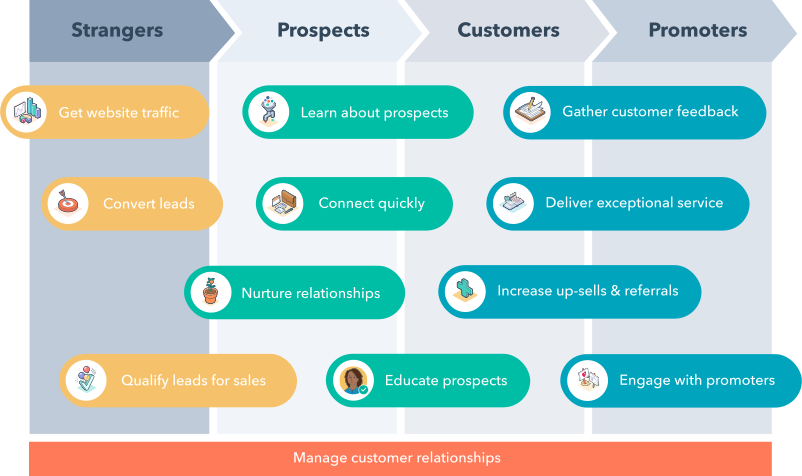
Hubspot-Buyers-Journey-Diagram

Let’s look at how your marketing, sales, service, and operations teams can leverage the HubSpot platform to achieve their goals.

Hubspot: Marketing, sales, service and operations teams collaborate to remove friction in the buyer’s journey.

Hubspot Marketing

Generate qualified leads.

Create and manage content, capture leads, and nurture them until they’re qualified and sales-ready.

Hubspot Sales

Turn leads into customers.

Engage potential buyers, demonstrate the value of your offering and close deals.

Hubspot Service

Convert customers into promoters.

Resolve customer issues and deliver an experience that turns customers into promoters.

Hubspot Operations

Make your systems work better together.

Connect apps, automate processes, and align teams around one source of truth for customer data.

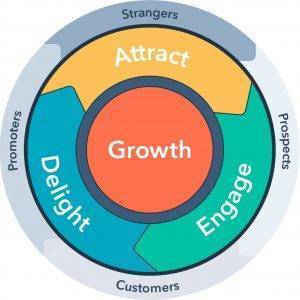
Hubspot-Flywheel-GraphicFunnel to Flywheel: The Buyer’s Journey Is Now a Circle

The flywheel is a model adapted by HubSpot to explain the momentum you gain when you align your entire organization around delivering a remarkable customer experience. With the flywheel, you use the momentum of your happy customers to drive referrals and repeat sales. Basically, your business keeps spinning, you align your entire organization around delivering a remarkable customer experience and continuously produce happy customers. When you use the inbound methodology as a foundation, the three phases of your flywheel are; attract, engage, and delight. By applying force to these three phases, you can provide an amazing customer experience.

Hubspot has changed our business

As a HubSpot Solution Partner here at back9 we may admittedly be a little bit biased, but we truly love Hubspot. We trialed around 6-8 different CRM systems or what claimed to be – back before we tried Hubspot. They were all clunky and had one or two good points but never quite gelled. After using Hubspot Freemium for around 2 years we jumped onboard a paid subscription and became a solutions partner – the only one in Southland (at the time of writing this article).

The price is offputting to a lot of smaller organisations, but the time and energy using Hubspot effectively can save is far greater than the price of the subscription.

If you’re interested in finding out more and would like some guidance, please fill out the form and contact us first before signing up, so we can help you understand and get you onboard.


Payment Methods for Selling Online

While getting your customer to choose you is a huge step, you can still trip at the finish line if your checkout experience doesn’t work as expected. There are a few steps to this including shipping that can cause a customer to reconsider. Most people ask What is the best eCommerce platform for my business? That is definitely important! However, one that sometimes gets overlooked is payment methods. In this article, we cover some of the most popular payment methods in New Zealand so you can decide which ones would be best to include for your site. Keep in mind that in order to accept these payment methods, they must be compatible with your payment gateway.

Jump to quick compare tables now 

Payment Gateways vs Payment Methods

What’s the difference between a payment gateway and a payment method? Payment gateways are the systems that securely process transaction data. They allow payment details to be sent safely between you, the customer, and the financial institution. For more information on Payment Gateways and a comparison of top options in New Zealand, see our article Best Payment Gateways for Selling Online.

Payment methods are where the funds come from. It’s where the money resides so that you can get paid as a merchant. There are a few main payment methods in use. Debit cards, credit cards, digital wallets, bank transfers, and third-party. When choosing a payment gateway, one of the most important parts is ensuring it takes the payment methods you plan on having.

We’ll break down some of the most popular payment methods so you can decide if they’re important to include on your e-commerce website.

Debit and Credit Cards

Debit cards link directly to a financial institution like a bank or credit union. Direct Debit pulls funds directly from the account linked to a debit card and transfers the payment to the merchant. Since New Zealand banks phased out traditional cheques in 2021, debit checks have taken their place and now support millions of transactions nationwide every day.

Credit cards let users borrow money to make a purchase. Merchants receive payment immediately, while the cardholder repays the amount over time—usually in instalments—with interest. Because nearly everyone uses either a credit or debit card, all major payment gateways support them by default.

In New Zealand, Mastercard and Visa dominate the market and are accepted almost everywhere. American Express (Amex) also sees widespread use. Some banks and providers offer specialty or private-label cards, but most of them still operate on one of these three major networks.


Digital Wallets

Digital wallets let you transfer money to an online account. You can then use the funds in that account to make purchases when the payment method is accepted. Digital wallets are a cash alternative that are gaining in popularity. One of the biggest advantages of digital wallets is their fast pay option, where someone can buy a product directly from the product screen and skip checkout altogether–as long as the option is put in place by your web developer.

Apple Pay

Apple Pay is a replacement for physical cards that works only with Apple devices. Using Apple Pay lets you add a debit or credit card directly to your device and works where Apple Pay is accepted or where touchless payment like Paywave is an option. You can also add limited funds to your wallet if you prefer. Online, Apple Pay speeds up checkouts because it has all of your information stored so you can pay in seconds instead of minutes.

Google pay

Google Pay is Google’s answer to Apple Pay and works on both Android and Apple devices. It works similarly by allowing you to add cards or add a specific amount of money to use. The Google Pay API lets you create and add a Google Pay button easily to your website if you want to include it as a payment option.

PayPal

PayPal works both as a digital wallet and a payment gateway. As a payment method, PayPal can connect to your bank or you can add limited funds to a PayPal wallet.

There are other digital wallets available that aren’t as widespread. Samsung Pay lets you add credit, debit, gift cards, and membership cards with a photo. Masterpass is Master Card’s version for Westpac accounts. Some Fitness Trackers also have payment options without the need of a phone or wallet, like FitBit Pay and Garmin Pay.

Buy Now Pay Later Payment Methods

A buy now pay later payment method works similarly to a credit card. You authorise the purchase at the store and then a company pays the cost immediately. Then, you pay back the company instalments over time. These payments may include interest or may be interest-free depending on the specific payment method you choose.

Afterpay operates as a major provider of this service in New Zealand. When a customer makes a purchase using Afterpay, the merchant receives the full amount upfront. The customer then repays the total in four fortnightly instalments. As long as those payments stay on track, the customer pays no interest or fees.

Retailers, however, do incur a cost. Since Afterpay doesn’t charge the customer interest, it earns revenue by applying a fee to the retailer. This fee usually includes a flat charge of about $0.30 per transaction, plus a percentage—typically between 4% and 6%. To get the exact rate, you’ll need to contact Afterpay directly.

There are several other NZ companies with a similar business model. Genoapay breaks down the cost over 10 weekly payments. Laybuy and Zip both do it in 6 weekly payments. None of these companies charge any interest upfront, meaning the retail pays a small charge when the payment method is used.

Direct Bank Transfer

Direct Bank Transfer is when the payment is taken directly out of a bank account. There are no debit cards, wallets, or anything else needed. Because the funds come directly from the account, transfer speed is quick and only works when there is enough in the account. Refunds can also go directly into the account.

Polipay is a popular option for direct transfer in New Zealand. When customers use PoliPay, they log in to their internet banking account through a secure window. They then select the account they want to pay from, and PoliPay processes the payment instantly by withdrawing the funds to complete the purchase.Merchants have three pricing schemes to choose from, with costs ranging from $0.50 to a maximum of $3 per transaction.

Account2Account offered by Windcave, provides a similar payment option. It works as an alternative to credit or debit cards and is perfect for one-off payments where users need to deposit funds quickly without using a credit card. Supported banks include ANZ, ASB, BNZ, Kiwibank, The Co-operative Bank, TSB, and Westpac. Account2Account charges 1.2% per transaction up to a maximum of $3.

Quick Compare Tables

Digital Wallets

NameTransaction FeeCompatible BanksFeatures
Google PaySame as Credit/Debit Card connected toANZ, ASB, BNZ, Gem Finance, WestpacConnects to a wide range of debit and credit cards, Can add money manually, Pay in store or online, one click purchase, card number not shared, advanced encryption security
Apple PaySame as Credit/Debit Card connected toANZ, ASB, BNZ, Gem Finance, WestpacConnects to a wide range of debit and credit cards, Can add money manually, Pay in store or online, one click purchase, card number not shared, private purchases, advanced encryption security
Samsung PaySame as Credit/Debit Card connected toANZWorks with most EFTPOS terminals including some without contactless options, Can add gift and membership cards, Fast app checkout, advanced encryption security
FitBit PaySame as Credit/Debit Card connected toANZ, ASB, Gem FinanceWorks with watch at in-person terminal. In-store only. No phone or wallet needed.
Garmin PaySame as Credit/Debit Card connected toASBWorks with watch at in-person terminal. In-store only. No phone or wallet needed.


Buy now pay later

NameUser FeeMerchant FeeMax purchase amountPayment TermsFeatures
AfterpayNone~$0.30 + 4-6% per transactionStarts at $500, increases with more usage4 payments every 2 weeks1-5 business days for Settlement, no interest for customers, no fees for on-time payment, downloadable app, in-store and online, API Integration
GenoapayNone4-7% per transaction$100010 weekly paymentsSettlement within 2 business days, no interest for customers, no fees for on-time payment, downloadable app, in-store and online, API integration
LaybuyNone4-10% per transaction$30006 weekly automatic paymentsInstant Payment, no interest for customer, API Integration, No credit or fraud risk for merchant, Merchant dashboard, downloadable app
Zip$6/month if not paid by end of monthNot Stated$10004 payments over 6 weeksNo interest for customers, Daily settlement, Downloadable app, API Integration

Direct Bank Transfer

NameTransaction FeeCompatible BanksFeatures
Account2Account1.20%ANZ, ASB, BNZ, Kiwibank, The Co-operative Bank, TSB, WestpacConnects directly with bank accounts, Settlement based on bank times, No customer fees
Polipay1% ($3 max), $10 minimum monthly feeANZ, ASB, BNZ, Kiwibank, The Co-operative Bank, TSB, WestpacConnects directly with bank accounts, Settlement based on bank times, No customer fees, Pay now button, API Integration, Checkout from shopping cart,

Which payment methods should I accept on my site?

Depending on your business, you may want to prioritise some methods of payment over another. You should accept credit and debit cards at a minimum. Nearly everyone has access to one and expects it as an option when shopping online.

We also think it’s a good idea to choose one of the buy now pay later options. These are popular options among kiwis and having at least one as an option can help you increase your average order value.

If you have more payment methods available, you’re more likely to have a customer’s preferred payment method which can simplify check out. A good checkout experience can help you retain customers and get repeat business. If you’re thinking of having a specific payment method on your site, make sure it’s compatible with your payment gateway.

How to Grow Your Building Business

Are you a builder looking to grow your building business?

Whether you’re a seasoned builder or just starting out, the key to success lies in smart marketing. Gone are the days of “getting your name out there.” Instead, it’s all about understanding who your ideal clients are and speaking directly to their needs. This approach is called inbound marketing, and it’s highly measurable and successful. Read on for tips on how to use sales and marketing techniques to boost your business!

Understand Who Your Ideal Client is

Before you can grow your building business or create helpful quality content, you need to know who it is that you’re trying to target. Who are the people most likely interested in the services that you offer? What questions do they have when it comes to building projects? By getting into the head of your potential customers and solving their problems before they even become problems, you can build trust with prospects before they ever consider taking action.

Create Content Based On Their Needs

First, you need to understand who your ideal customers are. Then it’s time to start creating content based on what they may be searching for. And the services that you provide. If your website answers their questions better than your competitors, there’s a far greater chance they will choose to do business with you. You can also create helpful blog posts or videos. These may be things to look for when choosing a building company. Or other helpful tips to help them understand how you’ll solve their problems. This kind of content is highly valuable for DIYers considering tackling a project themselves but not sure where to begin!

Engage With Your Audience

Finally, don’t forget about engaging with your audience once they find you! Social media is an excellent way of maintaining contact with prospects and former customers alike. Ask them questions about their experiences or post polls asking for feedback on products or services – this kind of engagement helps build relationships and creates brand loyalty. Plus, if someone has had a particularly positive experience working with you, there’s nothing stopping them from leaving glowing reviews online – good word-of-mouth advertising goes a long way!

As someone looking to grow your building business, understanding the needs of potential customers is key; solutions-based marketing is essential in creating strong relationships between builders and clients alike. Once armed with an understanding of who these clients are and what problems they face when looking for builders, savvy marketers can craft content tailored specifically towards these issues that will help build trust between parties before any contracts are signed. So don’t wait; start crafting solutions today!

WordPress vs. Silverstripe – Who Wins?

Sometimes at Back9, we get the question posed: WordPress or Silverstripe? Which of these two open-source options is the best content management system (CMS) for your business website? At Back9, Choosing the right CMS platform can be tricky. Both WordPress and Silverstripe have advantages and disadvantages associated with them. Which can make it difficult to decide which one will fit your needs best. In this post, we’ll help you evaluate each platform by breaking down their features and giving an overview of what each offers. You can then make an educated decision on which one will have the most value for your business’s online presence. Let’s take a look at how WordPress vs. Silverstripe stack up against each other so that you can choose wisely!

Benefits of Using WordPress

In today’s digital age, having a strong online presence is crucial for success. That’s where WordPress comes into play. With its easy-to-use platform, anyone can create a professional-looking website in no time. Not only that, but WordPress offers a plethora of customizable themes and plugins. This allows users to tailor their sites to their specific needs. Compared to Silverstripe, WordPress has a larger support community. It also offers a more user-friendly interface, making it the go-to choice for many website designers. Regardless of your business or industry, WordPress has the tools and features to help you get started and succeed. So why wait? Start building your website with WordPress today!

Benefits of Using SilverStripe

Silverstripe is a content management system that offers a wide range of benefits to its users. One of the biggest advantages of using Silverstripe is its flexibility. With its powerful framework, users can create custom layouts, widgets, and modules that enable them to build unique websites with ease. Silverstripe also provides robust security features, making it a reliable option for managing sensitive data and protecting against cyber attacks. Another benefit is its user-friendly interface. Silverstripe enables users to manage their website’s content, design, and functionality without the need for advanced technical skills. Overall, Silverstripe is a versatile platform that can be tailored to fit a variety of web development needs.

Understanding the Differences Between WordPress and Silverstripe

As website creation becomes easier, it’s not always easy to find a platform that fits your unique needs. This is where understanding the differences between WordPress and Silverstripe comes in handy. While WordPress is immensely popular, Silverstripe is not far behind as a content management system. Both offer similar features such as ease of use, customization options, and SEO friendliness. However, they differ in terms of coding language, community support, and security features. Ultimately, the choice between WordPress and Silverstripe comes down to your website’s specific needs. Understanding the pros and cons of each platform can help you make a more informed decision.

Choosing the Right Platform for Your Project

Choosing the right platform for your project can be an overwhelming task, especially if you’re not sure where to start. One of the most important factors to consider is which content management system (CMS) to use. We also recommend thinking about whether the Platform is Opensource vs. Proprietary.

Proprietary systems often seem easier to use as a DIY option, but they can limit you in the mid-lond terms.

A CMS is a software application that allows you to create, manage and publish digital content, without needing to have extensive technical knowledge. With so many options out there, from WordPress to Drupal to Joomla, it’s crucial you choose the right one for your project. Don’t panic though – with a little research, you’ll be able to find a CMS that perfectly suits your needs and helps your project succeed.

Features of WordPress and SilverStripe – Pros and Cons

If you’ve ever considered creating a website, you’ve likely come across WordPress and Silverstripe as popular content management systems. Both have their own unique features, pros and cons. WordPress is known for its user-friendly interface and plethora of customizable plugins, making it a popular choice for beginners and experienced users alike. On the other hand, Silverstripe’s focus on coding and custom development makes it an ideal platform for more advanced users. However, this can also mean that it may intimidate those without coding experience. In terms of pricing, WordPress has a lower cost of entry due to its vast array of free plugins, while Silverstripe’s pricing can vary depending on the level of customization needed. Ultimately, the decision on which platform to use comes down to personal preference and the specific needs of your website.

Tips for Choosing the Best CMS Platform for Your Needs

Choosing the right Content Management System can be tricky, but it’s crucial to get it right. Your CMS platform is the backbone of your website, so it’s important to choose one that suits your specific needs. There are plenty of options out there, so how do you know which one is best for you? Some things to consider when making your decision are ease of use, customization options, and scalability. It’s important to choose a platform that not only fits your current needs but also has the potential to grow and change with your business. By taking the time to research and choose the right CMS, you can ensure that your website is easy to use, visually appealing, and functional for years to come.

Final Thoughts on WordPress vs Silverstripe – Who Wins Out in the End

When it comes to WordPress versus Silverstripe, the choice can be a tough one. Both platforms offer a plethora of customization options, and are trusted by millions of websites worldwide. However, at the end of the day, it’s hard to argue against the overwhelming popularity of WordPress. With its vast community of users and developers, not to mention an endless variety of plugins and themes, WordPress has cemented itself as a reliable, versatile, and user-friendly content management system. While Silverstripe may have its own set of strengths, ultimately WordPress is the clear winner for those looking for a robust platform for their website.

Taking into consideration all of the above-mentioned information, it is clear to see that both WordPress and Silverstripe offer a variety of features that make it difficult to choose just one CMS for any project.

It is important to thoroughly research both platforms and consider their pros and cons before making a decision. Additionally, understanding the key differences between WordPress and Silverstripe will help you determine if one platform would be better suited for your project than the other. Understanding the features available on each platform and their strengths and weaknesses is a crucial part of helping determine which option is finest for your specific needs. After deliberating the positives and negatives of these two platforms, you’ll be able to make an informed decision about which CMS you should utilize for your website. Ultimately, when choosing between WordPress vs Silverstripe, take your time in exploring all options available that can best meet your needs. Now go out there and choose the best CMS technology for your project.

Best Inventory Management for Selling Products Online

One of the biggest hurdles to selling online is how to handle inventory management.

This is especially true when there’s also a brick-and-mortar store. How do you coordinate in-store vs online sales? The last thing you want is to have someone buy something online, then find out that one of the items is out of stock and have to issue a partial refund. Or worse–they request to refund the entire order. Not only is that a potential sale lost, but it costs you time to apologise and process the refund too. How can you handle inventory management when things get complicated?

There are many inventory management systems to choose from, but we’re going to compare some of the most popular options in NZ: Unleashed, Sortly, Vend, Cin7, Accredo, Ostendo, Infusion, and SAM Orion.

Want a quick comparison of each of these? Click here to jump to the quick compare table!

What is inventory management software?

While you might be able to try to keep track of your inventory with a notebook and a pen, it’s a lot of trouble that can be automated away with an online inventory management system. Depending on your business size, a simple database manager may do the trick, or you might need a comprehensive digital suite to make sure everything is handled properly. Either way, you’ll need some kind of inventory management software to help you sell products online.

On the surface, it might seem like inventory management software just keeps track of stock. And the basic ones do just that. But more complex ones can do so much more. Some have a built-in payment gateway so you can accept payments without paying for another subscription. Others manage invoicing too. And some handle everything–sales, customer database, shipping and tax, etc.

Using an online inventory management system keeps track of how many of each product you have left in stock, and allows you to quickly change prices for sales. Many will also automatically track sales numbers and create reports comparing month-to-month performance. A solid offering will also integrate with your in-store stock so you don’t have to try to coordinate stock manually. The right choice for you will depend on the size of your business, the number of products you have, and whether you have or plan to have a physical store.

The big players in inventory management have customers from all around the world. Because of this, they offer solutions for international issues.

Some on the list are dedicated to delivering solutions for New Zealand and focus on specific issues that the country faces for inventory management. These ones have the advantage of local service and understanding some of the unique challenges kiwis face.

1. Unleashed

Unleashed is a cloud-based platform and one of the most popular options today. It’s a real-time inventory management system with dedicated options such as B2B e-commerce (for an added cost).

Features of Unleashed

There are many features available in Unleashed including a dedicated mobile app and business intelligence insights. The software allows for unlimited products, currencies, transactions, and more. It can handle barcode scanning, stock levels, product grouping, and markups. You can also see your stock in real-time, with an integrated physical and digital stock. If you already have something to manage your in-store stock, Unleashed has an API–meaning it is able to communicate and share data with other software and apps–and it easily integrates software and in-store management systems.

Unleashed has a dedicated learning section and also hold regular seminars in many localities including New Zealand. Managed Onboarding is also a required cost (additional $389) where you work via remote chat with an authorised agent.

Unleashed Pricing

Unleashed markets itself for mid-size businesses and above. The Mid-sized tier is $259+GST per month and goes up to Enterprise at $899+GST per month. Each of the plans has the same features, but higher tiers give more access to some features. For instance, Medium has 3 included users and Enterprise has 20.

Unleashed comes with a 14-day free trial with no credit card required. The free trial is in a sandbox environment. A sandbox is basically a test version that isn’t live. This means that you can test any feature you want–like buying a million of a product–and see how the software would handle the situation.

Who is Unleashed right for?

If you’re a business owner of a medium to large business, Unleashed is a good option for you. With a higher price point and dedicated representatives, it’s ideal for businesses with large inventories and many employees as it manages everything across multiple channels and locations all in one place.

2. Sortly

Claiming to be a smarter way to inventory, Sortly allows for multichannel management of your inventory.

Sortly Features

Sortly pares down its features to essential options to keep the price down. Managing inventory is its primary function and it can set automatic alerts when product stock falls under a certain level or send reminders to reorder. Items can be grouped by category, physical location, and more. It can read barcodes and connect your physical stock to digital items. Product data can be imported and exported through CSV and data can be accessed on any device. The software can also create custom reports so you can quickly see top-selling items, inventory, and more.

One helpful thing Sortly offers is a free option with limited features. The free option only allows 1 user, 1 custom field, and 100 entries, but is an excellent starter for new businesses with limited products.

Sortly pricing

Sortly prides itself on affordability, and aims to keep costs low by focusing on essential features. Above the free plan, Advanced is at $39/month (USD) and increases entries to 200, custom fields to 10 and users to 3. Ultra is $119/month and has unlimited entries and custom fields, handheld scanner capability, and API access. For larger stores where integrating digital and physical stock is essential, Ultra is probably the way to go.

You can get a full 14-day free trial of Sortly on any plan. Keep in mind that the free trial requires a credit card so you’ll be charged after the trial period if you don’t cancel within 14 days.

Who is Sortly right for?

Sortly is a good choice if you have a smaller business or are looking to test the viability of selling some of your products online. It’s also ideal for selling products online only or if you have a smaller inventory and don’t need a plethora of extra features.

3. Vend

Focusing on the integration of a retail store with an online environment, Vend aims to seamlessly blend both types of sales.

Vend Features

Primarily a Point of Sale system, Vend strives to do more than be a POS. It’s designed to be simple to use and understand with an intuitive user interface. It allows for fast checkout and catalogue checks in real-time. For inventory management, it offers options to automatically reorder product if it falls below a certain point. Inventory across multiple locations and channels are managed on the cloud; even if you have a separate catalogue for online and social media, you can manage it in one place.

Since having a physical store is a focus for Vend, they offer many in-store benefits. A “register” is included with every plan, an in-store selling point where the Vend software can be loaded to a Mac or PC. They also have a Scanner app that reads barcodes and a customer-facing display for checkout.

Vend Pricing

Vend starts at $129/month for one location with one register on the Lite plan. For over $30k monthly turnover, Pro is $159/month. None of the plans have transaction fees. API access, gift vouchers, and app integration are available for Pro.

Vend has a free 14-day trial you can start after filling out some basic information.

Who is Vend right for?

If you already have a physical store and are looking for a better way to manage inventory, Vend may be right for you.

4. Cin7

For a comprehensive system that does inventory management and much more, Cin7 includes accounting, product management, a CRM, and more.

Cin7 Features

Cin7 is a robust piece of software that is used by major retailers worldwide. It does order management, Amazon integration, reports and analytics, forecasting, and warehouse management. It also has a cloud-based built-in inventory management system that updates in real-time.

For inventory management, it automatically updates stock and can create product groups, add promotional pricing, and dropshipping. Cin7 includes different stock levels for components, finished goods, and incoming stock as well so you can see inventory at different management levels.

Cin7 Pricing

Our most expensive system on the list, Cin7 starts at $375 for their Small Business plan. It includes 2 users, 3 connections, automation, and 24/7 support. Business increases users to 5, has 4 connections, a dedicated B2B online store, and automation at $695/month. Advanced comes in at $1245/month. It includes a dedicated customer success manager, web developer API connections, and 24/7 Screen reader support.

Cin7 doesn’t have a free trial, but you can book a free demo with a business email address.

Who is Cin7 right for?

While they have a plan called Small Business, Cin7 has features that startups and small operations likely won’t need. Consider it if you have a larger business, deal with multiple suppliers and/or warehouses, or prefer more functionality like accounting and a CRM in a single system.


5. Accredo

Accredo combines accounting and inventory management into a single system. They have a network of partners and qualified support people around New Zealand, such as Online Computers in Invercargill.

Accredo Features

A windows-based software, Accredo combines software for business needs such as sales, financials, and inventory in one place. With automation features, it can integrate with other systems and mobile apps. Accredo can also be tailored and customised to your needs by the development team so you can get the features you need.

For inventory management, Accredo keeps track of stock, along with item sales. Inventory can be managed on the computer or via the Accredo mobile inventory application. Job quotes and costs are also visible within the system.

Accredo Pricing

Since Accredo is sold through a partner network, the price will vary depending on who you buy it from. It is not available to buy directly from the website.

Accredo has a demo version available for trial for free.

Who is Accredo right for?

Accredo could be a good option if you have a Windows machine and want accounting and inventory managed in one system.

However, as Accredo isn’t a cloud-based system and the API isn’t documented, it’s important to work with someone who is familiar with it and have worked with it before. This is especially important if you need it to connect to an e-commerce platform properly, which you’ll need to sell products online effectively.

What is a cloud-based system?

A cloud-based system isn’t stored on a single computer. Instead, it’s on “the cloud”, meaning you are able to access it online from anywhere. If your system is on the cloud, you can access it at work, at home, on holiday, anywhere with an internet connection. Cloud-based systems also store your data online instead of confining it to a single system.


If the system is not cloud-based, you can only access the data on the computer it’s downloaded on. This can make it very difficult to manage elsewhere without some creative solutions like remote desktop–a program that lets a computer somewhere else see and control the computer–which can make them a challenge to use. If your system isn’t cloud-based and you don’t have a backup on another device, you can lose all of your data if the device breaks.


When possible, we recommend using a cloud-based system.

6. Ostendo

A small New Zealand business, Ostendo is developed by Development-X and has clients in New Zealand, Malaysia, UK, Australia, and more.

Ostendo is starting to show its age a bit at this point–it’s not cloud-based, it’s hosted on an unsecured HTTP website, it’s difficult to connect it to other software, and it isn’t updated as regularly as others on this list. But it is still used widely around NZ so we’ve included it here.

Ostendo Features

Ostendo has several different features in its software including a CRM and Point of Sale system. It aims to solve a mix of business needs such as labour and timesheet tracking, invoicing, quality control, and inventory management.

On the inventory management side, it can track stock in multiple warehouse locations. Ostendo allows for unlimited products, supplier catalogues, and price lists. It supports several currencies and units of measurement and does inventory forecasting to suggest when you should reorder.

Ostendo Pricing

Ostendo costs $1500 for a single user for the first month, and $300 to renew each year afterwards for updates and upgrades. 3 users are $3800 and additional users are $1250 each. Each user gains access to all products and features of Ostendo.

They also have a free demo trial available for download.

Who is Ostendo right for?

Ostendo claims to have many features that would be helpful for small to medium NZ businesses.


7. Infusion

A small NZ team based in Canterbury developed and maintains Infusion software. Their software does inventory tracking and financials.

Infusion Features

Infusion has a couple of different packages depending on what you’re looking for. The Financials Package is designed for financial reporting. It manages staff records, produces financial reports, and has a cashbook with unlimited accounts. Accounting includes Financials along with a database of customers, suppliers, and products through inventory management. Infusion is about to change to a cloud-based service with full API support which will make it much more versatile.

Inventory management allows for unlimited products. You can assign special pricing per customer so they can receive special rates on one or many products. Each product can be assigned its own serial number and expiry dates if needed. It can manage multiple locations, pricing structures, and pricing levels.

Infusion Pricing

Financials and Accounting packages are online only and cost $25/month and $55/month respectively. Fundamentals includes Financials, a CRM, and product database at $35/month. Professional costs $50/month and adds fixed asset management, marketing tools, and point of sale. The top tier is Elite at $85/month. With Elite, you get a document library and templates, performance reporting, and invoicing modules.

Infusion has a free 30 day trial of any plan you can download and try with no credit card.

Who is Infusion right for?

Infusion may be the right option if you’re an NZ business that needs the essentials of financial and inventory management. It doesn’t have the bells and whistles of some of the bigger names, but has essential features good for small to medium NZ businesses.

8. SAM Orion

Headquartered in Auckland, Orion is part of the SAM suite of Auxo products with an emphasis on the vehicle industry. They claim to help get more sales through faster payments and less admin.

Orion Features

SAM software is all about automation. The Orion program has speciality sections for rentals, vehicle fleets, workshops, and dealerships as well as inventory management.

The inventory management of Orion is designed to combine online and in-store sales in a single place. It can handle multiple currencies as well as project future stock requirements with the option to raise or lower stock based on anticipated need. Orion has discounting and pricing structures built-in as well.

Orion Pricing

Pricing isn’t available on the website, but you can book a free 30-minute product demo by filling out a contact form.

Who is Orion right for?

If you’re an NZ business in the vehicle industry or have a workshop-based business, Orion has features tailored just for you.

Quick comparison of inventory management software

For a quick comparison of pricing and top features of the inventory management software, take a look at the table below.


Name Price (Month) Number of Products Tracked Trial Period Features
Unleashed $259-$899 Unlimited 14 Days Cloud-based, Multiple Currencies; Optional B2B eCommerce; API Access; Document Designer
Sortly $FREE-$119 100-unlimited 14 Days Cloud-based, Desktop/Mobile Access; API Access; Cloud Storage; 30-90 Day storage; Auto sync data
Vend $129+ Unlimited 14 Days Cloud-based, Custom receipts, in-store register, barcode scanner, cash management, auto reordering
Cin7 $375-$1245 Unlimited Guided Demo Cloud, based 24/7 support, automation, CRM, POS integrations, Warehouse Management, Payment Portal
Accredo Not Specified Not Specified Demo Version Invoicing, reporting, automation, sales tracking
Ostendo $1500 (Year);

$300 renewal

Unlimited 30 Days Stock takes, allows negative stock, unlimited supplier catalogues, multi-currency and tax rates
Infusion $35-$85 Unlimited 30 Days Kitset pricing, print barcodes, product catalogues, integrated cashbook
SAM | Orion Not Specified Not Specified Guided Demo Multiple currencies, full sales and costing analysis, vehicle industry special features

How do I choose the best inventory management system?

If you aren’t sure which inventory management system to use, your best bet is to decide on the most important features you need. Cloud-based should be a priority in most situations since you can manage it from anywhere at any time. It also means your system is less likely to become outdated/incompatible as well as the extra safeguard for protecting your data with backups.

Once you decide on the features you need, doing a trial and working with the software is probably the easiest way to tell if it’s a good fit for your company. That way you can work with it first-hand and see if it’s easy to use and does what you need it to.

If you still aren’t sure, we may be able to help. We recommend talking with an unbiased source about your goals and inventory management needs. There’s no one-size-fits-all solution and many representatives from the companies aim to sell you their systems even if it’s not ideal for your situation. It’s also important to understand what the best eCommerce platform for your business will be for the inventory management system you choose. (Yes these are two different things – complicated right!?)

We can work with any cloud-based inventory management system as well as Accredo and Infusion. Get in touch if you’d like to talk about the best way to handle e-commerce for your business.

 

How to write a blog article for your website

One thing that practically every website needs is content. Written content. But writing for the modern internet isn’t as straightforward as putting some thoughts to keyboard and letting them run wild. There are a lot of things to consider when writing web pages including SEO, target audience, and much more. Then there are ongoing articles to inform, educate, entertain, or persuade users. But how can you begin to delve into the intricacies of good content when you aren’t sure how to write a blog?

Since writing is something all of us do–daily for a lot of us–you might think it will come easy for you. And kudos if it does. But many people find they’re stuck with a blinking cursor on a blank page when it’s time to sit down and get it done. If you’re in the latter category, this article might be good for you. We’ll go over everything you need to start your own blog, from choosing a voice to a basic blog structure ideal for SEO and engagement.

A lot of examples for this blog are related to our recent article Are Google and Facebook Spying on You–have a read of it if you haven’t yet!

Choose a voice and style

One thing that users expect is for you to keep a consistent voice and style. The first step in learning how to write a blog is to choose the right type for you. A lot of business owners get stuck thinking they need to be “formal and professional” in their writing. Being professional is good, but that doesn’t mean you need to be formal. You can if you want and if it represents you, but don’t go out of your way to grab a thesaurus and chuck in a profusion of synonyms.

Styles in Action

To show what we mean here are two versions of a phrase asking for the same thing. Which one would you rather get?

Fancy Formal

Outstanding payments are required to be reconciled by the Duodenary hour commensurating on the twentieth, approximately bi-fortnightly.

Straightforward

Invoices are due by noon on the 20th of each month.

What style is right for you?

The most important part of choosing a voice and tone is finding the right one that represents you and your business. We go over a number of different styles in our article 9 Reasons Why you should use a professional copywriter if you’d like some style ideas and examples. You might have to play around with a few before you find the one that sounds right for you and your business.

Article Structure

Web pages should be written in Hierarchal Structure–a structure that clearly designates related topics. Websites do this with the use of Headers. The smaller the header number, the more weight it holds with Google. H1 is the highest, then H2, and so on. In WordPress, you can change to a Header by finding where it says “Paragraph” in your text editing section. Simply change it to the appropriate Heading and press enter. Most sites will default back to Paragraph after pushing enter.

Using headers and Hierarchal Structure is good practice in general too. It helps clearly define what you’re writing about. In Google Docs, you can do this by clicking the “Normal text” between the font and Zoom on the toolbar. Then click and change the Headings.

The longer your content, the more important this structure is.

One structure we’re all familiar with is books. Books have a Title, Table of Contents, and Chapters. If there aren’t any chapters it’s hard to find what you need later on. It’s also harder to read without any breakpoints. This same idea applies to websites.

Basic article structure

Here’s what a basic article structure should look like:

Title (Title Bar at Top or H1 if no Title Bar)

Introduction: Situation or anecdote that ties into your main topic or a brief overview of your main topic.

Section Heading (H2)

Brief overview of section, 1-2 sentences can work or a full paragraph or two if you’d like.

Subtopic of section (H3)

The subtopic should be related to the section in some way. Paragraphs would typically be 3-5 sentences, but you can have as many of them as you’d like.

Additional subtopic (H3)

If you have another subtopic related to your section, break it down here. Here’s a good rule of thumb if you can’t decide if you need another subtopic; If your subtopic gets over 300 words, it should be split into a new one.

You can write use as many subtopics as you’d like.

Further Subtopics (H4 – H6)

If you need to subdivide a section up further, WordPress has headings pre-built all the way down to H6. If you feel the need to go beyond that, you may need to break up your article into multiple separate ones.

Next Section (H2)

Once the topic seems different enough to deserve its own section, break it up with a new H2. This new section can have its own subtopics as well. Add as many sections as you need to cover your main points.

Conclusion and Final Thought (H2)

Your final thought with a call-to-action.


Want to download this structure for easy use later? Download it by clicking the button below.

Download Editable Blog Structure Template Now


How to write your blog article

Once you have your style and know the structure, it’s time to write the actual article. When you’re writing the article, there are a few things you can do to help your SEO at the same time that we’ll cover here.

The title

For SEO purposes so you can be found on Google, your title should be something people are searching for. One of the best methods is to use is to have your title be a question–a question people are asking. Since this is a straightforward how-to, we decided not to go with a question here. But you may have noticed that many of our articles are questions. A good example of this is: Are Google and Facebook Spying on You?

The Intro

If you jump straight into informing your readers, you risk losing them. Instead, consider starting out with an opening paragraph using a situation or problem the reader is likely to encounter. This is called a hook. Just like with fishing, the hook grabs on to a passerby. Then you have to reel them in with the rest of your article.

You’ll want your hook to tie in with your article in some way. With enough practice, you can tie virtually any event into your article if you want to! If you can’t think of a good anecdote or problem that ties in, the next best thing is to write a brief overview of the topic.

Sample Intro with anecdote

Facebook has 3 billion active users. And one of their favourite pastimes is spying on those users. Have you ever talked about something you’ve NEVER searched for online and then saw an ad about it shortly after? Yeah, it’s not just you–the tech giant has been accused of doing more than just recording what you search for on their app and website.

Sample overview Intro

Facebook has 3 billion active users. And Google has at least that many searches every day. Both have been accused of spying on customers to target personalised ads to you. Read on to find out more and what you can do to protect your privacy from tech giants.

The Body

The body is the main section of your article. Basically, everything besides the intro, conclusion, and call-to-action. Here is where you focus on the main purpose of your article (inform, persuade, entertain, etc.) Follow the basic article structure above for help with structuring your article for SEO.

Sample Body Section

Some people don’t mind that Facebook and Google use their information to send them targeted ads. After all, they’re going to send you the same number of ads anyway, so why not have them be about something they might want instead of a completely random product or service?

Other people hate the idea of companies using their data and watching their every move. If you fall in this category, what can you do? By law, companies have to let you limit some of the information they gather on you. But it’s not always straightforward how you do this. In Facebook, you have to update your privacy settings by clicking the down arrow > Settings & privacy > Privacy Checkup (It has a little lock by it). There, you can go through each section and update those preferences to your liking.

The Final Thought and Call-to-Action

A good conclusion includes a Final thought, a Short “thing to think about” or thought to take away.

The conclusion is also an excellent place to use a call-to-action. A call-to-action is the next step you want your visitors to take. That can be reading another article, filling out a contact form, calling you, visiting your Facebook page, and so on. We go over Call-to-Actions in more detail in our article, The Path to Conversion – Is Your Website Doing as Much as it Could?

Sample Final Thought and Call-to-Action

There’s no doubt that Google, Facebook and other tech conglomerates are spying on you; but is that really a bad thing? Until the next wave of the internet, ads are the driving force of revenue, and some argue that it’s better they have your information to make those ads relevant. In the end, it’s up to you–and whether you think privacy or relevant targeting is worth more. To find out more about if these ads are effective, check out our article, Does advertising on Google Adwords really work?

Ready to write your own blog articles?

Are you ready to get started writing your own blog articles? The best way to improve is to practice. The more you practice, the easier it gets! Remember, you can download our blog template to help you get started.

Or if you’d rather leave it to the experts, the Back9 Creative team are content creating professionals. We can help you with blog articles and other copywriting, as well as videos, graphic design, and much more. Get in touch with us to find out how our marketing services can help you today.