Your Squarespace Website and SEO – Can it Rank Well in Google? 

When it comes to website building, you have plenty of options. But can a Squarespace website rank well in Google? Is it worth the time, money, and effort to build a website on the Squarespace platform? We’re here to answer those questions once and for all.

Squarespace is an incredibly popular platform for creating websites. It’s easy to use, has a wealth of features, and boasts an impressive suite of templates. But does that mean you should use Squarespace for your business website?

Let’s take a look at what Squarespace offers when it comes to SEO.

The Pros of a Squarespace Website for SEO

First off, Squarespace is equipped with basic SEO tools like meta tags and titles that you can customize for each page on your site. This means you can provide search engines with detailed information about the content of your pages, which helps improve their visibility in search results. In addition, Squarespace also provides an XML sitemap that makes it easier for search engines to index your pages. Finally, the platform also has built-in support for SSL (Secure Socket Layer) encryption and AMP (Accelerated Mobile Pages). Both are important for improving your website’s security as well as it’s ranking in search engine results pages (SERPs).

The Cons of Squarespace for SEO

There is one major downside when it comes to your Squarespace Website and SEO – its codebase isn’t optimized for speed or performance. That means if your website takes too long to load or isn’t responsive enough on mobile devices, it could hurt your SEO rankings in the long run. The codebase for Squarespace is also not accessible, so there’s a disadvantage there too when it comes to technical SEO. There are certainly ways around this issue – such as using caching plugins or leveraging content delivery networks – but they do require extra work and knowledge on your end.

All in all, Squarespace is a great option if you’re looking to quickly set up a basic website without investing too much time or money into the process. Its built-in SEO tools are useful for optimizing your site’s visibility in SERPs, but there may be limitations due to its non-optimized codebase. However, these issues can be addressed by leveraging external services such as caching plugins or content delivery networks. Ultimately, whether or not a Squarespace site ranks well in Google depends on how much effort you put into optimizing it for performance and speed!

What about Squarespace for Ecommerce?

Squarespace offers a comprehensive e-commerce platform, it’s true. But… How does the proprietary system stack up against the opensource Woo Commerce for WordPress? Check out this article: Selling online: Squarespace vs WooCommerce, which is better?

All-About-Seo-Image-Button

Why is my website not ranking on Google?

So you’re wondering how to make your website rank better on google search? Maybe your website not ranking at all. Maybe you just want it to rank better? It all begins with SEO! This article will give you an overview of 10 main reasons your website is not ranking on google.

Whilst I’ll share these reasons with you, to solve the problem, you need to understand it’s going to take you hours of hard work. And it’s not just a one-off. It takes hours of ongoing work. Work on Technical SEO and Content SEO.

You will know that our computers, smartphones, and apps are constantly and regularly updated to help make them better. The same thing happens with Google Search. In fact, Google Search is updated thousands of times a year to improve the experience and the quality of results. 

What factors contribute to your website not ranking?

The possible issues you might be having can be divided into four sections:

  1. Indexing and crawl issues:
    How to check if your site is on Google, plus reasons that add up to your website not ranking on Google
  2. Technical Health issues with your website:
    Is Google disregarding or de-ranking your website because it’s not set up correctly?
  3. Linking issues:
    Is your internal linking structure and lack of quality backlinks limiting your success? Possibly resulting in your website not ranking as well as it could?
  4. Content and keyword issues:
    Is your content high quality and aligned to the right search intent? Are your keywords just too competitive?

Indexing and crawl issues

Search Engines like Goole are complicated and involve a number of factors- Around 200 in fact! The first thing for Google to show your website in their search results is that they know it exists. So the first few points on the list all deal with indexing and crawl issues. Put simply, you can’t rank if your page or site is not on Google in the first place. If you find these topics confusing, you might want to read up on how Google works or check out our All about SEO Ebook.

All-About-Seo-Image-Button

1. Your website/page is not on Google

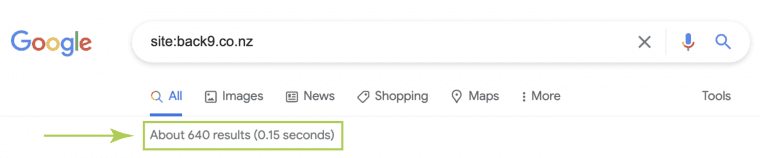
If you’re unsure whether your site is on Google or not, you can check using the site: search operator in Google. Type site:yourwebsite.co.nz and you’ll see a list of pages found on your domain. If you type in the full URL of a specific blog article, you should see only one search result return. If you see your pages, this means that Google does know about your site and has put (at least some of it) in its index.

Once you discover that your page is in the index, but your website is not ranking well, or you think there is an issue with your website performance, you might want to dig deeper.

Google-Index-Search-Result

The site: search operator helps you find your site in Google’s index

2. Your site/page is still too new

If your site or page is new, and you have submitted your site map to Google Search Console, then it might simply be a matter of chilling out and checking back in a little while. There are a lot of moving parts in getting your content crawled, indexed, and ranked. Sometimes, it takes days, weeks, or maybe even months for Google to finish its discovery process.

3. Your content is noindexed

One of the most common reasons for a website not ranking, or Google not indexing your site or a specific page is because it has — inadvertently — been no-indexed. Adding no-index meta robots tags to a page tells Googlebot that it can crawl a page, but that the results can’t be added to the index.

How can you check if your page is no-indexed? That’s easy if you know how, simply open the page and view the source code. (you may need a web developer or SEO expert to help you with this). If you do this yourself, Somewhere in the head of the page, you’ll find the code below. This tells search engine crawlers that the content of the page shouldn’t be added to the index and, thus, keep it from ranking.

<meta name=”robots” content=”noindex”>

4. Your site/page is blocking Google with robots.txt

You might have told Google not to index your content, but it’s also possible you’ve told Google not to crawl your site at all! Blocking crawlers in a so-called robots.txt file is a sure-fire way to never get any traffic. Blocking robots is easier than you might think. For instance, if you have a WordPress site, WordPress has a Search Engine Visibility setting that — once set to Discourage search engines from indexing this site — does its utmost best to keep crawlers out. Uncheck this to make your site available again.

Technical issues affecting ranking

You have checked and found your pages are indexed, but, is your website not ranking? Then technical problems are something you might need to check. You can do a basic website audit here which will help you understand some key benchmarks.

5. You’re not ranking because your site has technical issues

Your website needs to meet certain technical benchmarks if you’re going to rank well on Google! Loading speed, or how quickly your pages load, is an important factor. Security is important too, and that’s not all. You can read about all the essentials in our article: How website health is calculated, or understand what Techincal SEO packages involve.

If your website doesn’t show up in the search engines at all, technical issues could be the issue. This may even be preventing it from appearing in the search results at all. You could have conflicting code, or plugins causing problems. If you’re using WordPress and in particular a pre-built theme, this could be adding to the issue. We’ve also seen some pre-built themes that actually prevent Google from indexing your site. This is one reason why investing in a custom-built website and an ongoing maintenance plan, can take care of many technical issues under the hood. Using a reputable web design company should ensure this will be set correctly to do that properly.

6. You’re being penalised for breaking SEO rules

If Google finds you using dodgy SEO techniques that it doesn’t allow — e.g. sneaky tactics like buying links or stuffing keywords into hidden text — your website can suffer. To be fair, when you’re already putting in the effort to make a good website and quality content, it’s counterproductive to try. Even when everything else on your page is perfect, if you’re doing something that Google doesn’t allow then you’re going to have problems ranking.

Most of these things are common sense, so if you’re not trying to trick Google or spam people, you probably don’t need to stress too much. However, there are a few things that used to be common practice in SEO that can now lead to major penalties. So staying up-to-date with SEO trends and algorithm updates is really important.

Get-Free-Website-Audit-Button

Linking issues that affect ranking

Having a good internal linking structure and quality backlinks are important if you want to rank high. Google crawls the web, following each link it finds, so if your links are lacking it can cause you problems with ranking.

7. Your site doesn’t have a proper internal linking structure

Another reason why your content doesn’t show up in the search results: a crucial part of your SEO strategy is not in order. Don’t underestimate the importance of site structure – the internal linking structure – for your SEO strategy. Having a clear site structure leads to a better understanding of your site by Google. If your internal linking structure is poor, chances to rank high are lower – even when your content is well-optimized and awesome.

8. There are not enough backlinks to your site

If you just started out with your website, your content won’t instantly rank. Not even if you have optimized everything perfectly and every bullet in Yoast SEO is green. To be able to rank, you’ll need some links from other websites. After all, Google has to know your website exists.

Content and keyword issues affecting ranking
If everything else is as it should be SEO-wise, then the reason your page or site is not ranking might be related to your content or keywords. You can also take our Content SEO fitness quiz to see if you might have issues with your site’s content.

9. Your page is great, but there’s too much competition

In most cases, the reason a page doesn’t rank is that there’s simply too much competition. If you optimize your content for competitive keywords and keyphrases, such as [cat behavior], [robot vacuum cleaner], or [real estate agent], chances are high you won’t rank for that term.

To find out if this is the problem, check the results pages for your keyword. Do high authority sites, such as Wikipedia or Amazon, dominate the first page? Do you see many sites that have already firmly established themselves in this niche? Odds are, your site doesn’t have the authority that these other sites have (yet). So you can optimize all you want, but unfortunately, that’s not enough to rank high in the search results if your niche is too competitive.

10. Low-quality content, or wrong type of intent

One final thing that could be the reason your content isn’t ranking: it doesn’t match the intent of people searching for your keyword. Search intent is becoming an increasingly important factor for search engines these days: do people want to buy something, go to a specific website, or are they looking for information? Even if you’re targeting a more long-tail keyphrase if your content doesn’t match the dominant intent of searchers, odds are search engines won’t show it in the results because it won’t be what people are looking for.

Optimized content still not ranking?

There are multiple reasons that could prevent a website or post from ranking. Have you optimized your post correctly? If so, then the most common cause is likely to be that the competition in a niche is just too fierce. Unfortunately, SEO is a long-term strategy. You need to work hard and be patient. In the meantime, there are a lot of other aspects of your SEO (site structure, link building) you can tackle. Try to focus on all aspects of website optimization, and try to be the best result.

SEO is a full-time job!

If you want to see results from your site, you need to understand that websites are like staff. The more you put in – in terms of training and upskilling – the better their performance and their results will be! SEO is not rocket science, but it is still pretty complicated. There are two main components which are on-page SEO and Off-page SEO. So if you get these right how long does SEO take to show results? It takes years to master and hours to implement and stay on top of. Just like your website itself, SEO is an investment and over time it will pay off!

How-Long-Does-Seo-Take-To-See-Results

Can Website Migration Harm my SEO [Checklist]

Website Migration becomes a requirement when a website becomes out of date. Not only will an outdated website not perform well, but the flow-on effect is that it will also not represent your brand well.

Traditionally websites are something that are designed/built, launched and more often than not, not maintained. If this is the case, then a site will become out of date over time. This can mean a redesign is needed to keep up with web standards and design trends. This can often be accomplished with a simple facelift or re-skin. However, in some cases, you may be up against a complete website migration.

What is website migration?

Website migration is when a website gets largely revamped or completely redesigned and rebuilt. Whilst a fresh look is great, this can impact visibility on search engines. Generally, these areas are design, user experience, platform, site location, and structure.

The end result of a website migration may include a cleaner interface, a new or improved user experience, an easier editing experience, and more. However, the choice to migrate your website should not be taken lightly. If executed poorly, you could end up with status code errors, negatively impacted SEO performance, and even irritated website visitors.

Why might you migrate a website?

Here are the circumstances in which you might need a site migration over a simple redesign:

  • The need to move your site’s location from one server or hosting provider to another.
  • Wanting to change the CMS platform your site operates on.
  • You are changing your domain name or URLs.
  • The website needs major changes to your site’s architecture (not just aesthetics)

If you’re considering a website migration, keep in mind that you must leave yourself time to prepare and execute. Migration specialists usually take about three weeks, so plan accordingly. Now, let’s get into the details of migrating a website.

Website Migration Checklist

  • Crawl the existing site.
  • Record your benchmarks.
  • Map your URLs.
  • Make sure you’re retaining titles, meta descriptions, and HTML markup.
  • Try out the new build on a test server (aka sandbox).
  • Choose the right date for the migration.
  • Prepare to update your site’s DNS settings.
  • Launch.
  • Crawl the new site.
  • Identify and resolve missing and duplicate content.
  • Check for redirect chains.
  • Ensure Google Analytics and Google Search Console are implemented.
  • Mark the date in Analytics.
  • Submit sitemaps.
  • Monitor performance.
  • Run site audits.
  • Update your platforms.
  • Have publishers update backlinks.


Pre-Website Migration

1. Crawl the existing site.

A website crawler retrieves the URLs and markup on your site, “seeing” this information similarly to how Google would.

Performing a crawl gives you a starting point for your URL mapping (more on that later) as well as a list to refer to in case something gets lost in translation. You can crawl your website yourself with a third-party tool such as Screaming Frog.

2. Record your benchmarks.

In some cases, analytics data can get erased during a website migration, and these historical benchmarks can be valuable, so it’s best to retain it.

You should also take the time to review your analytics and ensure you know how visitors currently navigate the site and which pages are your most valuable. This context can help inform your redesign and site architecture decisions.

3. Map your URLs.

If you’re making major changes to the URLs on your site, you’ll need redirections in place to guide Google and your website users from your old URLs to your new URLs.

From a usability standpoint, if a page no longer exists, you don’t want your users to get a 404 status code error. Instead, they should be guided to the page that has taken the old page’s place.
Improper redirects can mean a big hit against your SEO. They tell search engines and visitors of your website that a page has changed, whether it’s been removed, or no longer exists. They also tell search engines what new pages have replaced old ones.
From an SEO perspective, you don’t want to lose all of the history, backlinks, and (in essence) “authority” that the old page built up. A redirect tells Google where to attribute those signals instead.
To get redirects implemented, you must first strategize by mapping your URLs. This involves building a spreadsheet with two columns: one for the old URL and one for the corresponding new URL.

Don’t be concerned if there aren’t “perfect” replacements for every piece of content. Just do the best you can to direct your users based on their original intent.

If you have tons of pages, manual mapping probably isn’t in the cards for you, so to save time, look for patterns in your URLs that can be redirected in groups or sections.

Existing redirects should be migrated as well. Try to keep as many existing redirects as possible to lessen the workload, and make sure your URLs are mapped before you test redirects, to make sure you have backups if you lose them.

4. Make sure you’re retaining titles, meta descriptions, and HTML markup.

Recall that website migrations help with website organization. As such, pages should be uniform and contain the same information as they did before. To illustrate, if the HubSpot Marketing Blog underwent a site migration, the content and descriptions for each blog post would be the same, just look different.

You can always update or rewrite titles, meta descriptions, and HTML markup, but you should still ensure that each page includes the proper information.

5. Try out the new build on a test server (aka sandbox).

Seeing mockups or testing in a local environment will not give you a full picture of the new site’s functionality and implementation. For a seamless transition, take it online for a test drive before the official migration.

6. Choose the right date for the website migration.

Hiccups will happen no matter what, but you can minimize them by avoiding peak hours.

Day of Website Migration

7. Prepare to update your site’s DNS settings.

If you’re moving your site to a new server, part of the process will include “pointing” to the site’s new location. Coordinate with your web/IT team and/or your hosting providers (new and old) to accomplish this.

8. Launch.

Set up your forwarding redirects, unpublish, and implement.

If DNS changes were involved, the site may be down momentarily.

If you’re not switching servers or platforms, the migration should be nearly instantaneous.

9. Crawl the new site.

Once the new site is live, you can do a crawl to see if it has been migrated how you expected it to. One thing you want to look for is proper indexability and crawlability.

10. Identify and resolve missing and duplicate content.

Using the crawl report, see if you find any anomalies, including duplicate content or 404 errors and broken links. In addition, you should click around the new site and look for issues.

Now that your site has been migrated, you have a lot of new redirects on your hands. If redirects already existed, links may have been created.

Here’s what this means:

If you were already redirecting A to B, your migration may have added a redirect from B to C.

This creates a chain of redirects: A to B to C.

Redirect chains can slow your site down and impact performance. You can avoid this by breaking the chains, redirecting A to C and B to C.

12. Ensure Google Analytics and Google Search Console are implemented.

To avoid any gaps in data and reporting, these should be up and running the same day.

13. Mark the date in Analytics.

Google Analytics allows you to make “Annotations” of important dates or events. This can help you contextualize the data and measure performance pre-and post-migration (unless you opted for a new Analytics setup).

14. Submit sitemaps.

Once everything is up and running, ensure your XML site map has no errors. Then, you can submit the sitemap in Google Search Console to invite Google to crawl the new implementation.

Post-Website Migration

15. Monitor performance.

While temporary dips in traffic are common after a migration, you should still be keeping a pulse on your analytics to ensure nothing big was missed that could be affecting performance.

16. Run site audits.

Sometimes, third-party tools can find issues you didn’t know about. SEMrush’s site auditor is excellent in situations like this.

17. Update your platforms.

If you have ads running or other platforms that may be using old URLs, be sure to add fresh links.

If your redirects have been implemented correctly, you’ll still get traffic and authority from your backlinks. However, it’s still best practice to use the freshest URLs possible. With that in mind, reach out to the publishers of your highest value links to notify them of the swap.

Website migration can be a lengthy process, but it’s not impossible. With preparation, you can have a migration that’s successful and friendly with your existing SEO efforts.

How to avoid lengthy Website Migration or redesigns in the future

As mentioned above website migration is primarily needed when you go through a redesign process and make major updates. This is generally only required because the website is out of date. And it is out of date because it has not been maintained. A website is like a staff member! it can be trained and upskilled over time. It can and should move and grow with the business.

Maintaining and continuously improving a website over time will cost some time effort and/or money, however, if done with the right goals in place, it will return more to the business than it costs. Much like a staff member. This is a methodology called Growth-Driven Web Design. If you have a continuous growth mindset this could be for you. And it means you will understand your website is a business (growth) tool.

Image-Link-About-Growth-Driven-Web-Design-Back9-Creative

How much does SEO cost?

If you understand how much a website can do for your business, then you should understand the importance of SEO! Search Engine Optimisation is one of the core fundamental practices when it comes to website performance. UX/UI design and performance can then (if measured accurately) be the key to a website working hard for you. It can either earn you exponential ROI or just sit there and essentially cost you money.

Just like the website itself, SEO is an investment. Over time there is no doubt you will see great returns (if you use a trustworthy SEO expert). But how much should SEO cost?

The cost of SEO services will vary depending on a range of things. Like your SEO plan, the types of services included (and if the agency can perform them all in-house), and more. To be fair, most ongoing projects involving SEO cost between $750-$2,500 per month based on the project scope. One-off projects will range between $2,000-$30,000 (which is a huge ball-park) and will typically include SEM services too. Hourly rates for SEO freelances and consultants range between $75-$200 per hour.

Like anything in the realms of marketing, there is no set rule about SEO cost or what it should be. However, there are some key elements that are worth understanding. Then you can decide how much to invest.

SEO service types

When setting expectations for the ROI that a company will receive on an SEO campaign, you must consider the comprehensiveness and quality of the SEO campaign itself. Is it a one-off? Or is it to be ongoing?  What are the parts that will make up the strategy? All of these things and more will contribute to the SEO cost. Below are the three most common SEO services:

1. Technical SEO

This is where an SEO agency, freelancer, or consultant, monitors and fixes technical issues on your website. Typically these fixes relate to site speed, Google core vitals, website security, and mobile optimization. This should involve a monthly audit or health check, where these issues can be detected and fixed. Technical SEO would also involve keyword research to understand Google search volumes and keyword difficulty. From there, this will often lead to rewriting the meta-data on your sites, such as title tags and meta-descriptions, and alt-tags on images. Depending on the level of service and your SEO cost, your provider may also monitor and fix the following:

  1. Backlinks
  2. Structured data
  3. Crawling
  4. Indexing

Technical SEO generally requires the help of someone with expert skills in web development to perform the technical stuff. So find out from the provider if they do this work in-house or outsource it. Find out more about technical SEO in this article: Website performance. Is it important?

2. Standard Content Marketing

Google now more than ever is putting its users at the centre of what they do. That means providing the most relevant information to their search query. The primary function of performing cursory keyword research typically consists of looking up keywords using an online tool. It also involves producing 2-4 blog articles per month of average quality relative to your competition.

3. Educational Content and Thought Leadership

This type of content marketing is a subset of Inbound Marketing. When you start to use it to get found online, it crosses the border into SEM, or search engine marketing. With so many conflicting names and crossovers, it’s no wonder everyone is confused.

Embracing the Inbound way of thinking is where your results will amplify and really level up! Inbound Marketing is really about putting your client or customer at the centre of what you do. By focussing on creating value for them at every stage of their buying journey with you.

This type of SEO campaign is where the best SEO agencies extract from you, the expert in your field, an intimate understanding of your customer’s buyer personas’ pain points. What problems are they facing, and how do you solve these problems? Through thorough keyword research, with an emphasis on target audience persona needs and pain points, transactional behavior, and search intent, you can build out clusters of topics. Over time, coupled with complementary services, these strategies will help you and your business win online.

If you’re serious about winning in the online space, then building out a Marketing Road Map that includes: Growth-Driven Website Design, SEO, SEM, and a solid Content plan will return exponentially on your investment.

What is your SEO Cost?

When figuring out how much you want your SEO cost to be, one option is to reverse engineer the process. How much do you want to make? We know that depending on the industry, SEO results and ROI range from 300% to 1600%. It is also important to understand that with setup and tweaking, and how long it can take to see SEO results. In reality, it depends on how old/good your website is already. A brand new site can take 6-9 months to break even on your SEO cost.

With that said, let’s say your industry’s average return on SEO investment is 700%, or a 7x return. Then, if you want to return $700,000 in revenue each year, you would need to invest around $100k per annum in SEO. This includes online advertising spend or PPC, continuous website improvements (Technical SEO), and content creation (Inbound Marketing).

Of course, there is no guarantee you’ll see this return. However, any half-decent SEO agency should be able to help you if you’re focused on SEO investment and return, rather than SEO cost.

Who is the best SEO Agency in Southland?

Updated: 30th November 2022

As we state in our article Who is the best web design company in Invercargill, narrowing down the best business in an industry can be tricky. This is especially hard when it comes to all things digital. SEO or Search Engine Optimisation in itself is complicated enough!

So how do you find the best SEO agency for your business? How much does SEO cost? Will I even see results from SEO? The questions go on… The most important factor for one person may not matter to another, and vice versa.

Understanding what is SEO all about, is important, but you need to understand, there are so many things to factor in.  Also, you need to understand the difference between organic SEO and paid search! One aspect can stand out among the rest for you and something else for your neighbour. So how do we define who is the best SEO agency for you?

Business is not finite! In fact, if the business were a sporting match, it would be a draw with endless overtime. There is no official way to measure who is better. Or is there? We have business awards, design awards, and a number of other ways to measure who is best, but these are still finite and somewhat subjective things within the infinite.

Who are the best ranking SEO providers in Southland?

Which company will be the best for you depends on your needs and circumstances. What’s your criteria for partnering with an SEO agency or freelancer? What do you want them to do for you? What results do you hope to achieve?

One of the most important parts of teaming up with a company is working with people who believe what you believe! You can usually feel that in your gut. And from my experience, I would say trust your instinct! The reality is if you’re providing SEO services, then you should be able to get your own website ranking pretty well on Google. However, it’s easy in an online world to bend the truth or manipulate Google’s Search Engine Results Pages (or SERP). But the good news is, it’s getting increasingly harder to do. Consumers want trust from their providers, whether that be from their mechanic, their power company, or their website design team.

At the time of writing this (bearing in mind staying at the top of the search results or SERP, is tough at the best of times), here are six of the highest-ranking SEO agencies for the search phrase: best SEO in Southland?

How-Long-Does-Seo-Take-To-See-Results

Back9 Creative

Well, what can we say? I guess the fact that you’re on our website and you more than likely found us in a Google Search, then reiterates it. Not that we like to toot our own horn when the results speak for themselves, but yes, we do believe we are one of the best SEO companies in Southland. Much like the others on the list, we offer the same laundry list of services. So what makes us different?  Well, Nothing specific really. We’re all good at SEO, or our websites wouldn’t be ranking on Google, right? So you’ll choose to talk to us if you think we can deliver value (pssst… We can by the way…) And we’d love to have a chat and see if we can work together…

BWG

BWG is a full-service digital agency based in Takapuna, Auckland. They are Google certified and their mission is to grow New Zealand SME’s and create jobs. They believe the primary difference between them and other agencies is the ratio of production staff to sales staff. Their sales staff are also competent in production. This is why they believe their campaigns deliver higher than average results.

They use Photoshop, HTML, and WordPress CMS for all design and development work. BWG also offer a full digital marketing suite, including Google Ads, Search Engine Optimisation, Social Media, and more.

The search term best SEO Southland, returns a decent ranking for BWG, albeit for a landing page for Napier. If you’re not opposed to dealing with someone outside of Southland, then these guys are possibly at least worth having a discussion with.

Net Branding

Net Branding ranks reasonably well for best SEO Southland search term – around 6 on the first page. They say they “bring a unique approach to digital marketing services – a full-service digital marketing service from strategy to success”.
As a full-service online marketing firm, they can be your SEO company, craft an online marketing strategy, offer website development services, and more.

They bring a team of specialist expertise in multiple disciplines – acting as your SEO company, your Digital Marketing Firm, Email Marketing consultancy, Website design company, and more!

Net Branding state their “SEO services are second to none. And they’re more than just a web developer or SEO Services Company – their offer is a unique, end to end integrated digital marketing solution for your business”.

You’ll see below, that they clearly state they are in Southland Digital Marketing Company in the title – but caveat emptor they are not. In saying that they are showing up on the page for the search term ‘best SEO agency Southland” so maybe they know what they are doing 😉

Best Seo Southland Screen Grab Of Net Brandings Result

Grow NZ Marketing

Much like the crews above, Grow NZ states they are a Southland/Otago Based company. They say they have “Over 100 Years’ Marketing Experience”

“With a mix of some of the world’s best technology and some extraordinary Kiwi marketing talent, we can ensure your marketing dollars are spent in the areas that drive the best return for your business…”

Firebrand

Firebrand has recently snuck onto the first page of google for the search “Best SEO Southland”. Dunedin-based Firebrand is a Digital transformation Agency.

They refer to themselves as: Masters of the Digital Universe

They are a full-service marketing and digital transformation agency, based at our awesome premises in Dunedin, New Zealand.

Our capabilities include business plans and strategies, branding, and complete digital marketing solutions tailored to agreed outcomes. We offer brand positioning, website design, UI/UX design, custom website development, web app development, e-commerce, social media marketing, SEO, copywriting, video, and photography.


So, who is the best SEO agency for you and your business?

So which SEO company based in Southland, is the best for you and your business? Well… That still depends on what you’re looking for. Are the above companies still at the top of the results? SEO is a complicated field – actually it’s a minefield. And to stay at the top of Google you (or the agency you partner with) need to work bloody hard!

All of the above businesses claim to be the Best SEO company in Southland. Best these days is subjective, and is more about what it best for you and your business! What are you trying to achieve and who aligns with your values the best?

If you’re looking to partner with an SEO Agency or Freelancer, or wondering How to choose the right marketing agency for your business you must take the time to research. We’ve had several clients over the years who feel they have not seen results paying for SEO. And the reality is, there are a lot of people out there saying they are the best. SEO is also a long-term investment How Long it takes for SEO to show results will vary. This will depend on a number of factors… These include (but are not limited to) how good your website design is. And then how well developed or built it is too.

Search Google to see who comes up first

When you’re deciding who to contact, do some google searches to see how well their website ranks. Look over their website. If their site seems easy to use, and it answers most of your questions, chances are they could be a good fit. One tip is to check right at the bottom of their website and looks for the “Copyright ©” info. If it says 2014, chances are they may be a bit out of touch. Read up on their services, and testimonials. Ultimately if their style and tone match what you want for your own business, they may be worth talking to. Taking time to find that right fit and work with credible, reliable businesses can save time and trouble later on. So it’s worth the effort!

Ironically, though, if you’re reading this article, you found at the top of the Google Search results. Well… You may have found the best SEO company in Southland already 😉


All-About-Seo-Image-Button

How Long Does SEO Take to Show Results?

One of the most common questions we are asked after What is SEO? is, “How long does SEO take to show results?”

Business owners want to know when they’re going to see the tangible results from their investment (and understandably so). But… SEO isn’t like paid forms of media, where results can be seen almost as soon as ads are turned on. SEO Services are a long-term investment. It takes time to see success. But how long?

Seo-Results-Banner

To understand this question, you must first understand SEO itself. There are a number of factors that impact the length of time it takes to see results from an SEO strategy. These include:

What Does SEO Success Look Like?

If you have an understanding of SEO you still need to put in the hard yards. This means an investment in considerable time, analysis, and maintenance. Or an investment in an SEO agency or expert. If you’re prepared to do that, then you Should Expect to See Results From SEO Within 6 to 12 Months…

The Factors That Determine How Long It Takes to See Success From SEO

  1. Your Website’s History
  2. The Competition
  3. Your Resources

What Factors That Determine How Long It Takes to See Success From SEO

To help you to further understand how long it takes to see SEO success, let’s take a look at the factors that determine this.

1. Your Website’s History

Whether you’re working on a brand new domain or not is one of the key factors that influence the time it takes to see results from SEO.
A new domain will almost always take longer to show success than an established one. This is because it hasn’t yet built up any authority or earned any backlinks. In comparison, an established domain will usually have earned at least some level of authority and have some backlinks pointing to it.
A brand new domain should expect to see results within 9 to 12 months, rather than 6 to 12.

However, an established domain doesn’t automatically mean that you’ll see quicker results. You likely won’t see quick results if the domain has previously been affected by a penalty, a core algorithm update, or has had SEO work that goes against Google’s webmaster guidelines.
When working on a new project, it’s always a good idea to build up a picture of the site’s history. While you can get an idea of site performance by looking at impressions on Google Search Console, or similar tools can help you figure this out very quickly.

Estimates on how long it takes to show results are usually given based on a site with no historical issues that need resolving first. Always consider how a site has performed over the last 2 to 3 years to help put projections together.

2. The Competition

Results can be seen far quicker in low competition niches and low competition search queries than competitive ones.
Trying to rank a website for competitive personal finance keywords (e.g., ‘credit cards’)? It could take 2 years or more to earn prominent page 1 visibility. On the other hand, for local or narrower lower competition keywords, it might be possible to show promising results within 3 to 6 months.

Understanding keywords and how to optimise and rank in google search for these can be a lengthy process to get your head around. Ultimately it is worth understanding – or employing/paying someone who does. If your website’s visibility is much higher than your competitors then you are the company your buyers will find.

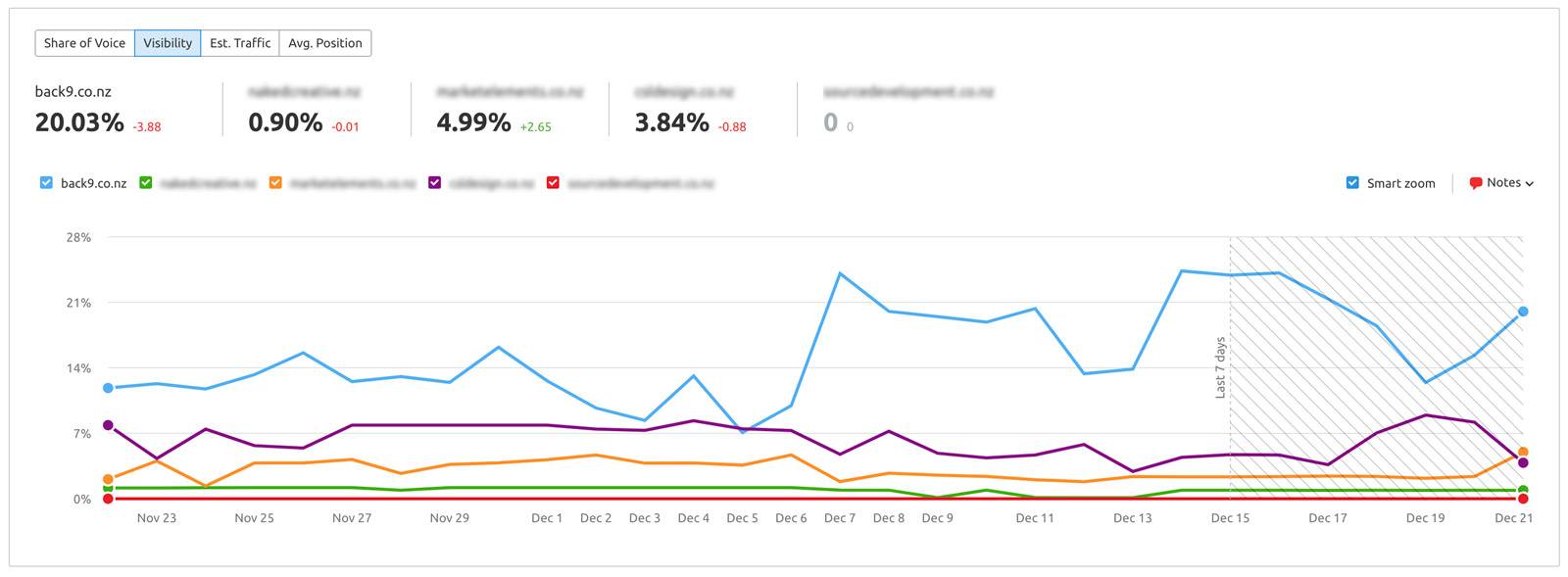
Take a look at an example of the www.back9.co.nz visibility trend vs competitors below.

Back9-Website-Visibilty-Trend-Graph

These results are from an in-depth understanding of identifying Keyword Difficulty. This KD% is a percentage from 0 to 100, and the higher the percentage, the more difficult it would be to rank for.
You should expect it to take longer to show results against high KD % keywords. But there’s more to competition than just Keyword Difficulty.

You need to consider how your competitors got to their current position and what they’re doing to maintain this visibility. Your strategy and projections have to consider what you’re competing against, including the aggressiveness of other people’s strategies.

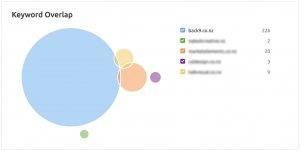
A good starting point to estimate the competitive gap is to use the Keyword Gap Tool to see how you currently perform against up to four other competitors:

You can also use the Backlink Gap Tool to understand the competitive gap from a backlink perspective:

Jeyword-Gap-Analysis-Graphic

3. Your Resources

You can’t control a website’s history nor the competition. But what you can (usually) control is the resources that are allocated toward an SEO project. It’s important to understand exactly how this plays a huge part in the length of time it takes to see results from a campaign. The more resources you’re able to allocate toward SEO, the faster you’ll usually see results.

The most important resource you need is time. Let’s give an example…
Two websites owned by small businesses are competing for the same keyword. They’re both aware that the key drivers of SEO success are technical SEO, content, and backlinks. Both employ the services of an SEO freelancer. For simplicity, we’ll assume that both of these sites start on a level playing field.
Website A engages their chosen specialist for 5 days of time per month, whereas Website B engages theirs for just 2 days.

Of course, website A should expect to see faster results.

Be aware that conversations around the time taken to see an impact must take into account the resources being allocated, understanding that the best way to reduce this (within reason) is to allocate more to the project.
It often makes sense to put together a backlog of action points at the start of a campaign (detailing all of the opportunities and actions) and then prioritize this around the allocated resources. This can help to show the opportunities that are still outstanding that could be brought forward with more investment.

What Do SEO Results Look Like?

To answer the question, we first need to determine what SEO success looks like to ensure that the measures of results are clear.
And when it comes to putting together an SEO strategy, it’s common to put together campaign goals and KPIs.

Let’s break this down.

  • Goals = The end outcome that you want to achieve
  • KPIs = Metrics that demonstrate progress towards your goals
  • These are both important measures of success and, ultimately, results from your efforts. Commonly, the reality is that these goals and KPIs look something like the below:
  • Goals = To achieve an increase in revenue by a set amount over a 12-month period.
  • KPIs = Growth in organic traffic, visibility, impressions, or rankings.

Of course, setting goals is all about putting in place measurable yet realistic targets. To answer this question, we’re going to focus on the length of time it typically takes to see results across core KPIs, understanding that goals are typically far more unique to a business and change significantly based on several factors.

Get Your Free Smart Goal Template

Primarily there are 3 Parts of SEO Success. Let’s take a look at what these are, and how they Impact the Time to See Results…

There are 3 key parts to SEO success, and each of these can impact the time that it takes to see results. Let’s take a look.

Technical SEO

If technical SEO issues exist on a site, they will need to be resolved before you can experience the growth you’re looking to see.
Technical SEO relates to things like:

  • Crawling and indexing
  • Site speed
  • Canonicalization
  • Structured data
  • Duplicate content
  • XML sitemaps
  • Hreflang
  • and more

Resolving issues around some of these areas will have a bigger impact than others, but the fact remains that any technical problems should be fixed.
You can identify technical SEO issues with your site using the Site Audit Tool below and see a list of areas that need your attention:


However, technical SEO on its own isn’t going to be enough. Think of resolving these issues as removing the brakes on your project and allowing your site to compete against others.

Content

You’ve may have heard that content is king, and the fact is that content remains one of Google’s top 3 ranking factors.

Google’s goal is to return the very best results for a given search query, so why would poor content perform well on the Search Engine Results Pages (SERPs)?
It’s important that you place a high priority on creating great content that matches a searcher’s intent. Equally, you should take the time to understand what’s currently ranking. And figure out how to create something better. You can learn a lot from studying the content that already performs.
Poor quality (or even average) content can mean that it takes longer to see results, while great content that’s carefully planned out and adds something new to a topic can help your site to rank faster.

Alongside content, backlinks are also one of Google’s top 3 ranking factors. These are indicators of trust and popularity and have the ability to supercharge a website’s rankings.
After all, links are essentially votes of confidence between two sites. But you need to understand that there’s rarely any shortcut to earning quality backlinks.
It takes time and usually involves creating great content that other people want to link to. And when there’s a sizeable link gap with competitors, this can take time to close.
That said, not all links are created equal, and higher quality links ultimately have the ability to drive rankings faster than lower quality links.
You can work on building up your backlink portfolio but be aware that the need to close a sizeable link gap can mean that it takes longer to see results.
How Long Does Google Say It Takes to See Results From SEO?
So just how long does Google say it takes to see results from SEO?
In most cases, SEOs need four months to a year to help your business first implement improvements and then see potential benefits.

Other Considerations

After you’ve implemented your strategy, it’s imperative to monitor your site to ensure it sees results. SEO is not a one-time tactic; a good strategy requires frequent reporting and maintenance.

SEO should involve ongoing work, and seeing the channel as a long-term, the continued tactic can help to justify the investment. The more resources you can allocate, the faster you’ll typically see results, but every website is a unique scenario. It’s important to pay close attention to the technical issues, quality of the content, and the strength of the link profile before projecting when success could be seen.

You Should Expect to See Results From SEO Within 6 to 12 Months…

SEO should show results within a 6- to 12-month period. By results, we mean a measurable increase in traffic and associated leads or conversions.

This doesn’t necessarily mean you’ll have achieved your goal by this point, but any business that is investing in SEO should expect to be able to see progress within this timeframe.

It’s impossible to give a figure that applies to all websites, and the best guess will be based on analyzing a website’s current performance and the proposed strategy.

There’s no getting away from the fact that SEO takes time. Google (and other search engines) want to show the best result for any given search query, and it takes time for you to deserve to rank well. You’ve got to earn authority and top search visibility.

But with the right strategy in place, we believe 6 to 12 months is a long enough period to be able to see the impact of SEO efforts and to be able to justify ongoing investment into growth.

Free-Ebook-Download-Website-Maintenance-Back9-Creative